First, reduce the light falling on the screen, then choose a projector with brightness, throw distance and screen suited to your room. A bright model can help if you have enough throw distance; short-throw or ultra-short-throw models offer a different placement option, but they won’t prevent the picture from looking washed out if direct light falls on the screen.
Who is this choice relevant to?
Film host with lots of daylight
You can’t fully block out the light from your tall windows and want to stop the picture from looking washed out on the screen. BenQ points out that ambient light and screen size both affect how bright a projection looks.
Film host with limited throw distance
You want a large picture but have little space between the projector and the screen. The available space helps determine whether a standard, short-throw or ultra-short-throw setup is right for you.
Film host weighing up picture and sound
You can manage some of the light and now want to match picture resolution, screen, connections and sound to your complete setup.
What should you consider when choosing?
Standard throw distance
Choose this option: if there’s enough distance between the projector and the screen, and brightness is a priority for your film night.
Bear in mind: direct sunlight or lamplight on the screen will still be a limitation; Optoma excludes this situation from its claim about watching with the lights on.
Short throw
Choose this option: if you want to project the desired screen size from a short distance.
Bear in mind: a short throw won’t solve the problem of light falling on the screen; check the specifications for the exact model and the space available.
Ultra-short throw
Choose this option: if the projector needs to sit close to the projection wall and a fixed setup is possible.
Bear in mind: check that the wall or chosen screen is flat, and consider how light from the windows falls on it.
| What to consider |
What to check before buying |
Who should pay extra attention? |
| Visibility in daylight |
See where and when light falls on the screen; compare brightness only after checking how it was measured, and assess the projector and screen together. |
If I can’t fully block out the light from the tall windows, I want to know whether the picture will remain visible where my screen is. Around 36% of consumers put daylight visibility first. |
| Throw distance and placement |
Measure the distance and desired screen width; check that the model’s projection specifications suit the room. |
If I have little space between the projector and screen, I want to find a suitable placement option without losing sight of the picture size I want. Around 29% of consumers put placement first. |
| Film picture and screen |
Check the actual picture resolution, the desired picture size, and whether the screen is flat and suitable. |
Once I’ve dealt with the lighting, I want to match picture detail and screen size to my film source. Around 21% of consumers give picture quality the highest priority. |
| Sound and connections |
Check the connections and sound of the exact model, and whether you’ll need a separate screen, speakers or film source. |
If I want to put together a complete setup for film night, I’ll consider the film source, clear sound and any extra components. Around 14% of consumers put the overall setup first. |
Common pitfalls
-
Assuming a high lumen rating guarantees contrast in sunlight
Visibility also depends on the light reaching the screen and the screen size. Optoma limits its claim about watching with the lights on to situations where direct sunlight or lamplight doesn’t fall on the screen.
Before comparing models, check how much light reaches the planned screen position at the time you’ll be watching your film.
-
Confusing 4K input support with native 4K projection
The Optoma HZ40HDR lists Full HD and 4K-compatible input as separate features.
Check the actual picture resolution and read separately what the manufacturer means by 4K input support.
-
Considering only the projector when planning your setup
A film night may also call for a suitable film source, a flat projection surface and enough sound. The combination you need will depend on the model you choose and your room.
Before choosing, check which components you already have and which you still need.
Brands to consider
Epson
The EH-TW840 and EH-LS670W offer two different setup options: standard throw distance and ultra-short throw.
- For the Full HD EH-TW840, Epson specifies 4,000 lumens of both white and colour light output. For the EH-LS670W, Epson lists 3,600 lumens, ultra-short throw and integrated 20 W 2.1 sound.
- According to Epson, the EH-TW840 has a lamp light source and a 2 W mono speaker. The stated brightness doesn’t guarantee contrast for either model when direct daylight falls on the screen.
BenQ
The TK705STi is a short-throw option for a room with limited distance to the screen.
- BenQ specifies a throw ratio of 0.8 and 3,000 ANSI lumens for the TK705STi.
- Short throw doesn’t change how much ambient light falls on the screen. Assess the light separately from the throw distance.
Optoma
The HZ40HDR is a Full HD laser projector for a standard-throw setup.
- Optoma specifies Full HD, a laser light source and 4,000 lumens for the HZ40HDR.
- Optoma’s claim about watching with the lights on doesn’t apply when direct sunlight or lamplight falls on the screen. 4K-compatible input isn’t the same as a stated native 4K resolution.
Projectors at Joybuy
This selection includes projectors for standard and short throw distances; check which setup and picture specifications are right for your room.
 No image available
Optoma UZ38X Dual-Laser Projector
Suited to a fixed film setup if native 4K UHD and a built-in speaker meet your needs.
Native 4K UHD; dual-laser light source; rated at 3.800 lumens; 1.3× manual zoom; 15 W speaker.
A projection screen and source device aren’t included. Check how the lumen rating was measured when comparing it with other models.
View at Joybuy
 No image available
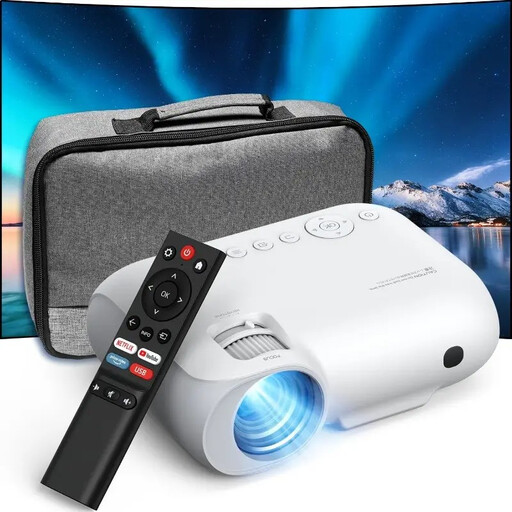
YOTON Y7
Suited to a Full HD film source and a setup where wireless connections are useful.
Native 1080P Full HD; 4K input support; WiFi and Bluetooth.
The stated 9.000 lumens can’t be directly compared with ANSI or ISO ratings unless they use the same measurement standard.
View at Joybuy
 No image available
Optoma H117ST
Suited to a short throw distance if WXGA resolution meets your needs.
Short throw with a 0.52:1 throw ratio; rated at 3.800 ANSI lumens; native WXGA (1280 × 800); built-in 10 W speaker.
The native resolution is WXGA, not Full HD.
View at Joybuy
 No image available
BenQ MW809STH
Suited to limited throw distance if XGA resolution is enough for watching films.
0.49 short-throw ratio; rated at 3.600 ANSI lumens; XGA (1024 × 768).
The stated resolution is XGA, not native Full HD.
View at Joybuy
 No image available
XGODY N7 Cine Smart Projector
Suited to a short-throw setup if the stated picture size and distance work in your room.
Native 1080P; rated at 1.000 ANSI lumens; 60 inches from 1,33 metres; two built-in 8 W speakers; autofocus and automatic keystone correction.
The stated lumen rating alone doesn’t determine how visible the picture will be in a particular room.
View at Joybuy
Frequently asked questions
Can I choose a projector based on its lumen rating alone?
No. Also consider how the brightness was measured, the screen size and the light reaching the projection area. Optoma excludes direct sunlight or lamplight on the screen from its claim about watching with the lights on.
What should I measure before positioning a projector?
Measure the distance to the desired flat screen and check where light from the windows falls. Then compare those measurements with the projection specifications for the exact model; short throw and ultra-short throw are different setups.
Will I need to replace a lamp later?
That depends on the model’s light source: Epson describes the EH-TW840 as a lamp projector, while Optoma specifies a laser light source for the HZ40HDR. Check the maintenance and replacement information for the projector you’re considering.
Does 4K-compatible input mean the projector displays in native 4K?
No, that description alone doesn’t prove native 4K projection. Check the stated picture resolution separately; Optoma lists Full HD and 4K-compatible input as separate features for the HZ40HDR.
What product safety information should I check for a projector?
The Netherlands Food and Consumer Product Safety Authority states that electrical products covered by the applicable rules must carry a CE marking. Check the relevant marking and product information for the specific device; a CE symbol isn’t the result of an independent test.


