First, consider the lighting you’ll have while watching and how much distance you can realistically leave between the projector and the wall. Then decide whether you want to move the projector and how you’ll play the competition. A fixed, brighter set-up and a portable projector involve different considerations, particularly when it comes to ambient light. Epson UK lists 2,800 lumens for both white and colour light for the EH-TW6250; BenQ lists 3,800 lm for the TH575i. These are model specifications, not measurements taken in your living room.
Who is this buying guide for?
Viewers with lights on in the room
You’re watching together, but the curtains can’t be fully closed or the lights can’t all be switched off. Consider the stated light output alongside your preferred image size, not just the resolution. Epson UK and BenQ list light output for specific models.
Housemates with limited space for set-up
You want to keep walkways and seats clear. Measure the distance from the lens to the wall and compare it with the projection details for the exact model. A short-throw model, such as the Epson EH-LS7500, is one possible way to arrange it.
Viewers who want to pack it away afterwards
You share the living room and want to be able to move the projector after the competition. As well as portability, consider the power supply and the connection your video source needs. XGIMI lists a battery for the MoGo 4; Philips lists HDMI for the NeoPix 110.
What should you consider when choosing?
First, decide how many lights will be on during the competition, then measure the available projection distance. Next, consider whether portability, how you’ll play the competition or the overall cost matters most to your household.
| Consideration |
What to look for |
Who this matters to |
| A visible picture in ambient light |
Compare the stated light output and unit of measurement with your preferred image size and how much you can darken the room. |
If some lights need to stay on, I want to be able to see the competition clearly at my preferred image size. Around 25% of consumers put visibility in ambient light first. |
| Set-up space and projection distance |
Measure the distance from the lens to the wall, the usable wall width and the available space; then check the specifications for the exact model. |
I want to set up the projector without blocking walkways or seats. For around 25% of consumers, available set-up space is their main concern. |
| Moving and packing it away |
Check the dimensions, power supply and stated battery life for the specified mode; also check whether there’s a power socket nearby. |
If the living room needs to be clear afterwards, I want to be able to pack the projector away quickly. Around 20% of consumers prioritise moving and storing it. |
| Watching the competition and hearing the commentary |
First, identify the broadcaster and source; then check that the required app or connection is available and that the sound is loud enough where you’ll be watching. |
I want to make sure the chosen source works and everyone can hear the commentary. For around 15% of consumers, playback and clear sound are their main concerns. |
| Total cost and purchase terms |
Compare what’s included in the set-up you have in mind and check the CE marking on the exact item. The UK Government says this is required for electronic devices on the EU market. |
I want to know in advance which accessories I’ll need and stay within my budget. Around 15% of consumers focus on the total cost of buying and using the projector. |
Pitfalls to avoid when buying
-
Assuming the maximum image size means the projector will fit your room
The image size you can achieve depends on the projection distance and set-up. So, a large image size in a product listing doesn’t automatically mean the picture will fit on your wall.
Measure the distance from where you plan to position the lens to the wall, then compare it with the projection details for the exact model.
-
Comparing lumen figures without checking the unit or conditions
Manufacturers use different units, including lumens and ISO lumens. A figure on its own doesn’t tell you what the picture will look like with your lighting and image size.
Check the unit and model, and consider whether you can darken the room. Epson UK, BenQ and XGIMI list light output for specific models.
-
Assuming built-in streaming means the competition will be available
A projector’s list of apps doesn’t confirm that the competition’s broadcaster is available on it.
First, identify a legitimate source for the competition, then check whether the app or connection you need is available for the broadcast.
-
Confusing the manufacturer’s warranty with your statutory rights
A manufacturer’s or retailer’s warranty is in addition to your statutory rights. There is no fixed statutory warranty period that applies to every projector.
Keep your proof of purchase and contact the retailer if there’s a problem. ACM ConsuWijzer distinguishes between statutory rights and additional warranties.
Brands and models to consider
Epson
Epson offers a choice of set-ups here: the EH-TW6250 as a conventional home projector, and the EH-LS7500 as a short-throw model.
- Epson UK lists 2,800 lumens for both white and colour light and 1.6× zoom for the EH-TW6250.
- Light output or a short-throw design alone won’t tell you what image you can achieve in your room; check the distance and preferred image size for the exact model.
BenQ
BenQ lists 1080p, 3,800 lm and an included Google TV dongle for the TH575i. These features apply to this model, not automatically to every projector from the brand.
- The stated resolution and included dongle may be useful if you’re looking for a suitable way to play content.
- The apps listed don’t prove that the dance competition’s broadcaster is available; check the specific broadcast and connection.
XGIMI
The MoGo 4 is a portable option if you want to move your projector between rooms.
- XGIMI lists a battery, 450 ISO lumens and up to 2.5 hours of video playback in eco mode for the MoGo 4.
- The battery life is the manufacturer’s figure for that mode; it doesn’t confirm actual running time or suitability in ambient light.
Philips
The compact NeoPix range includes models for different set-ups. For the NeoPix 110, Philips lists 720p, HDMI and an image size of up to 65 inches.
- The listed connection and image size may suit a simpler set-up in a room that can be darkened.
- The stated resolution and maximum image size alone don’t tell you how clear small details will look during a competition.
Samsung
Samsung describes the Freestyle+ (model SP-LFF3HLAXXXE) as a portable projector with features for different projection locations.
- Samsung lists automatic set-up and picture correction features for this model.
- Automatic correction doesn’t guarantee a suitable viewing picture on every wall or in every lighting condition.
Joybuy products
These Joybuy products are suited to watching a competition on a projector in a shared living room. For each model, check that its performance in your lighting conditions, available set-up space and playback source suit your needs.
 No image available
XGIMI Vibe One Full HD 1080p with projection screen and stand
The built-in battery and included stand suit a set-up that can be moved after the competition.
The product title lists Full HD 1080p, Google TV, 250 ISO lumens, JBL audio and a built-in battery. The projection screen and stand are included.
Joybuy
 No image available
Yaber L2 1080p projector with Google TV
This model may suit you if you’re looking for 1080p and integrated streaming; check that the app or connection works with your chosen source for the competition.
The product title lists 520 ISO lumens, Google TV, native 1080p and two 5 W speakers. The product information gives a throw ratio of 1.17:1.
Joybuy
 No image available
XGODY N7 Cine 1080p smart projector, white
The listed HDMI connection may be useful if you want to play the competition through an external device; check which source you’ll need.
The product title lists 1,000 ANSI lumens and native 1080p. The product information states that it projects a 60-inch image from 1.33 m.
Joybuy
 No image available
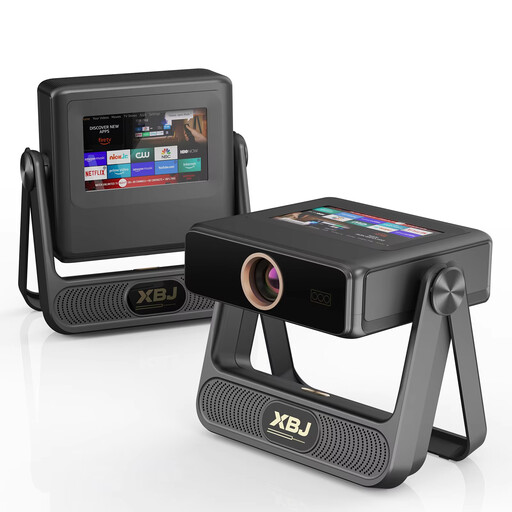
XBJ A5Pro 1080p smart projector, grey
Automatic focus and picture correction can be useful when moving the projector between locations; check the manual and available space at each spot.
The product title lists native 1080p, 900 ANSI lumens, Wi-Fi 6, Android OS, automatic focus and automatic keystone correction.
Joybuy
 No image available
HP CC360 FHD smart projector
Wireless projection may be an option if you want to watch the competition from a compatible source; check in advance that your device and broadcast will work with it.
The product title lists Full HD, Wi-Fi, Bluetooth, wireless projection and automatic focus.
Joybuy
Frequently asked questions
How can I check before buying whether the picture will fit in my living room?
Measure the distance from where you plan to position the lens to the wall, as well as the usable image width. Compare these measurements with the projection details for the exact model; the term ‘short throw’ doesn’t give you the dimensions on its own.
Can I stream the dance competition directly through the projector?
That depends on the competition and broadcaster. A manufacturer’s listing of apps or HDMI doesn’t confirm that the specific broadcast is available, so check the app, account terms or connection you’ll need in advance.
What should I check when setting up and moving the projector temporarily?
Follow the instructions for stable positioning and the clearance the model needs for ventilation. Check the instructions for the exact model, especially if you’ll be moving the projector after every viewing session.
What are my rights when I buy a projector online?
According to ACM ConsuWijzer, online purchases generally come with a statutory cooling-off period of up to 14 days after delivery. Your statutory rights are separate from any manufacturer’s or retailer’s warranty; there isn’t a fixed number of years that applies to every projector.
Which safety and copyright rules apply in the Netherlands?
The Dutch Government states that electronic devices on the EU market must carry a CE marking; check this on the exact item. Use a legitimate source to watch the competition. According to the Dutch Government, you may not distribute or make a private copy available to the public; whether a particular screening is covered by a licence depends on the broadcaster and how you watch.


