What should you look for when buying?
First, measure the available distance and decide how wide you want the picture to be. Then consider which motion processing and picture source suit the way you watch cycling.
The table sets out the choices for shoppers looking for a projector to watch cycling in a dark room, with one main buying priority for each shopper.
| What to consider |
What should you check? |
Who should pay extra attention? |
| Motion and race graphics |
Check the picture modes and motion processing on the exact model; don’t use a gaming figure as a measure of sports footage. |
If I want to keep up with fast camera movements and small details in the race graphics, I’ll focus on how the picture looks in motion. Around 33% of shoppers give motion handling their highest priority. |
| Picture in a dark room |
Decide on your preferred picture size and compare the brightness measurement and the conditions under which it was quoted. |
I want a picture that suits my darkened room and screen size, without relying solely on the highest lumen figure. For around 27% of shoppers, a picture that works well in the dark comes first. |
| Screen size and placement |
Measure the distance from the lens to the screen and check the throw ratio for the full model number. |
If the projector needs to fit in a fixed position, I want to know in advance whether the lens distance will work for my preferred picture width. Around 20% of shoppers make suitable placement their main requirement. |
| Access to the race |
Check your app, account requirements and whether you can connect any external receiver to the projector. |
I want to watch the race through my chosen app or receiver; having a built-in platform doesn’t prove that the broadcast is available. Around 13% of shoppers give access to the broadcast their highest priority. |
| Running costs and maintenance |
Check the light source type, the operating mode used for the quoted lamp hours and whether you’ll need any extra equipment. |
If I plan to use the projector for long periods, I want to know in advance what maintenance or extra equipment may be needed. Around 7% of shoppers put running costs and maintenance first. |
Joybuy projector options
The Joybuy products below list Full HD and offer a range of streaming and connection options. For each model, check that the brightness figure, placement and race source suit your room and viewing set-up.
 No image available
XGIMI Vibe One Full HD 1080p with projection screen and stand
This portable model comes with a screen and stand, making it a possible fit for a flexible viewing set-up.
The product name lists Full HD 1080p, Google TV, 250 ISO lumens and a built-in battery.
View at Joybuy
 No image available
Yaber L2 native 1080p with Google TV
The listed adjustable stand and automatic keystone correction may be useful if you won’t keep the projector permanently in one place.
The product information lists native 1080p, 520 ISO lumens, Google TV, autofocus and a swivel stand.
View at Joybuy
 No image available
XGODY Gimbal A8 native 1080p projector
The swivel gimbal and automatic image correction may be useful if you want to adjust the projection direction easily.
The product information lists native 1080p, 1200 ANSI, Android 14.0, HDMI, autofocus and automatic keystone correction.
View at Joybuy
 No image available
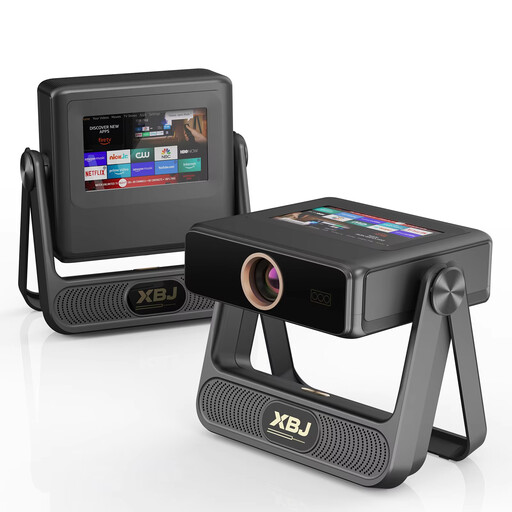
XBJ A5Pro native 1080p projector
Autofocus and automatic keystone correction are features to consider if you want to position the projector flexibly.
The product information lists native 1080p, 900 ANSI lumens, Wi-Fi 6 and HDMI.
View at Joybuy
 No image available
HP CC360 FHD smart projector
The listed built-in streaming apps may suit a set-up without a separate streaming stick; check whether the race you want to watch is available.
The product information lists native 1080p, 500 LED lumens, HDMI, autofocus and pre-installed streaming apps.
View at Joybuy
Frequently asked questions
Do I automatically need the projector with the most lumens for a dark room?
No, not based on the lumen figure alone. First decide on your preferred screen size and how much ambient light will fall on it; both affect the brightness you need. Don’t compare figures without considering their measurement standard and picture settings either.
How can I tell whether the projector will fit in my chosen position?
Measure the distance from the lens to the screen and decide how wide you want the picture to be. Compare this with the throw ratio for the exact model. With a ratio of 1.2:1, XGIMI says the lens distance is around 1.2 times the picture width. Also check the available zoom and lens shift before permanently mounting the projector.
Is low input lag essential for watching cycling?
No, that figure alone isn’t enough to judge the motion sharpness of a cycling race. BenQ quotes 16.7 ms at 1080p/60 Hz for gaming on the TH575i; this doesn’t tell you how your live broadcast will look.
What costs and maintenance should I check after buying?
Check whether you’ll need an additional picture source, what type of light source the model uses and which mode the quoted lamp hours apply to. Read the seller’s terms for servicing and returns. According to the Dutch government, when you buy at a distance you’re often entitled to a 14-day cooling-off period; the applicable terms depend on the contract and circumstances.


