What should you look for when choosing?
First, assess how the furthest seats to the side relate to the screen, then choose a screen type and projector position to suit the room.
| What to consider |
What should you check? |
Who is this most relevant to? |
| Viewing from seats away from the centre |
Compare the screen’s stated viewing angle with the position of the seats furthest to the side. |
If guests are seated around the sides rather than in the centre, I want them to be able to follow the action clearly. Around 33% of consumers say side viewing is their top purchase priority. |
| Picture in daylight or room lighting |
Assess the lighting during the match and compare brightness only on the same measurement basis. If you’re using an ALR or CLR screen, factor in the viewing angle too. |
If I can’t make the room dark enough, I pay extra attention to brightness and contrast without losing sight of how well guests to the side can see. Around 27% of consumers give ambient light top priority. |
| Suitable placement and image size |
Measure the distance from the lens to the screen, the desired image width and how far off-centre the projector will be. Check whether the specifications mention lens shift or keystone correction. |
If the projector can’t be placed at the preferred distance or on the centre line, I want to know which adjustments the set-up allows. Around 20% of consumers say placement is their main consideration. |
| Live picture and connections |
Check the connections on the projector and playback device, and assess motion handling separately from gaming input lag. |
For a live match, I want my playback source to connect to the projector and the motion display to suit my preferences. Around 20% of consumers prioritise live viewing and connections. |
Projectors at Joybuy
These projectors suit a range of home set-ups, including short-throw placement, portable use and projection from a ceiling-facing position. Check that each model’s placement options and connections suit your match source.
 No image available
Optoma H117ST short-throw projector
The short-throw description makes this model worth considering if there’s limited space between the projector and screen.
WXGA resolution, 3.800 ANSI lumens and 3D are listed in the product name.
View at Joybuy
 No image available
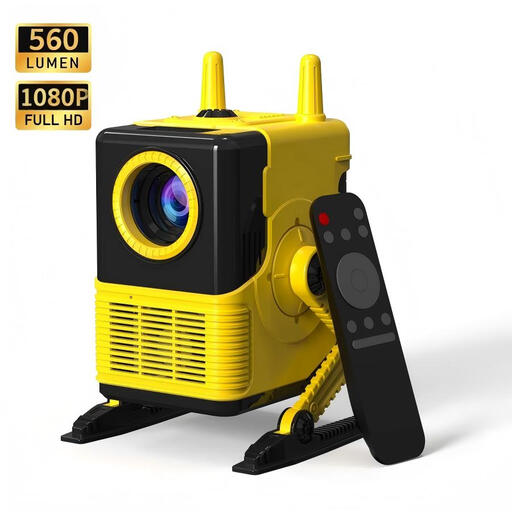
XBJ H8 portable LCD projector
The portable design may suit you if you want to move the projector between different set-ups.
The product name lists 1080P support, 560 lumens, 4-point keystone correction, and HDMI and USB connections.
View at Joybuy
 No image available
Video projector with automatic image correction
The stated 180° rotation may be useful if you’re considering ceiling-facing placement; check how the projector needs to be positioned in your room first.
The product name lists automatic image correction, image sizes from 50–200 inches and HDMI compatibility.
View at Joybuy
 No image available
N3 Max portable smart projector
The portable design may suit you if you want to use the projector outside a fixed set-up. Check the placement and connection for your match source.
The product name lists 1.000 ISO lumens, 4K support, autofocus, keystone correction and HDMI compatibility.
View at Joybuy
Frequently asked questions
Will keystone correction help if only the guests are sitting at an angle to the screen?
No, keystone correction won’t change the viewing angle for guests. It corrects the shape of the image when the projector is pointing at the screen from an angle. For side seating, focus on the screen material and seating arrangement.
How do you prepare your projector set-up?
First, measure your desired image width and the distance from the lens to the screen. If the projector will also sit off-centre, check the horizontal adjustment range of the exact model. With lens shift, the horizontal and vertical ranges can affect each other.
What should you check after buying, for use and maintenance?
Follow the instructions for positioning and maintaining your chosen model. Before a long viewing session, check the playback source, focus and visibility from the seats furthest to the side. For a battery-powered model, running time depends on the stated battery life and the conditions of use.
Which extra components and rights should you check?
Check whether you need a suitable screen and a playback device. ACM ConsuWijzer states that for a typical online consumer purchase, you have a statutory cooling-off period of up to 14 days after delivery, with some exceptions. Your statutory guarantee is separate from any manufacturer’s warranty. If a product is faulty, the seller is responsible for providing a solution.


