What factors determine your choice?
Start with your viewing conditions. Then work out whether you can achieve your preferred picture size from your viewing position, and check your programmes and audio source.
| Factor to consider |
What should you check? |
Which consumers will find this important? |
| Visibility in ambient light |
Compare the stated brightness using the same unit of measurement, and take your preferred picture size and the light in the room into account. Epson Netherlands and BenQ Netherlands both point out how important viewing conditions are. |
If I leave the lights on while watching, I want to be able to make out the ingredients and what is happening on screen. Around 33% of consumers prioritise visibility in ambient light. |
| Screen size and positioning |
Measure the distance from the planned lens position to the screen and compare it with the projection specifications for your preferred screen size. Also check that any zoom or lens shift covers the range you need. |
I want to know in advance whether the projector can achieve my preferred picture size from its fixed position. Around 25% of consumers put positioning first. |
| Programmes and sound |
Check app support for the exact model or choose a suitable external source. Also check HDMI, any HDCP requirements for the service and your preferred audio output. Netflix recommends checking whether the projector model is supported. |
If I want to watch programmes through a particular streaming service, I also want to know how the sound will come across from my seat. Around 25% of consumers put streaming and sound first. |
| Clarity of detail |
Check the resolution of both the projector and your source. Assess text and small details at your intended picture size and from your seat. |
I want to be able to make out small details and text on the screen size I choose. Around 17% of consumers make clear, readable details their main priority. |
Projectors on Joybuy
These product picks include portable smart projectors and models for home cinema use. Before buying, check the CE marking on the specific item. According to the Netherlands Food and Consumer Product Safety Authority, it is required for electrical products placed on the market.
 No image available
Yaber L2 projector
Suited to a portable setup if you want to explore built-in streaming and easy adjustment.
The product information lists 520 ISO lumens, native 1080P, Google TV, two 5 W speakers and a 1.17:1 throw ratio. The rotating gimbal offers flexibility when positioning the projector.
View on Joybuy
 No image available
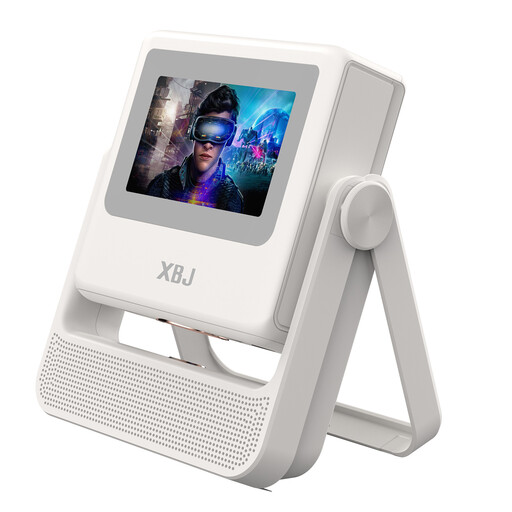
XBJ A5Pro White projector
A portable smart model to consider if you want to compare native 1080P with automatic focusing.
The product information lists native 1080P, 4K decoding, 900 ANSI lumens, autofocus, automatic keystone correction, Android OS and Wi-Fi 6. 4K decoding is not the same as native 4K resolution.
View on Joybuy
 No image available
BenQ TK700
Suited to anyone considering a fixed HDMI setup who wants to compare the stated resolution and brightness with their own room.
The product information lists 4K UHD (3840 × 2160), 3,200 ANSI lumens, 1.3× zoom and automatic vertical keystone correction. Check that the zoom and throw distance work with your screen size.
View on Joybuy
 No image available
Yaber K2s
Could be a good fit if you want to compare built-in streaming and sound with the connection options in your own setup.
The product information lists native 1080P, Google TV with Netflix, autofocus and automatic keystone correction. The two JBL speakers are rated at 10 W each; 4K is listed as supported, not as the native resolution.
View on Joybuy
 No image available
Magcubic HY350Max
A portable model to consider if you want to combine native 1080P with built-in apps.
The product information lists 900 ANSI lumens, a 1:1 throw ratio, Android 14 and a 15 W speaker. Check the throw distance you need for your screen size.
View on Joybuy
Frequently asked questions
How can you check in advance whether the projector will give you the right picture from its planned position?
Measure the distance from the planned lens position to the screen and decide on your preferred screen width. Compare both with the projection specifications for the exact model, then check that any zoom or lens shift covers the range you need.
Can you assume that Netflix will work on a smart projector?
No. Check whether Netflix supports the exact projector model. Netflix suggests using a suitable supported device connected via an appropriate video connection as an alternative. HDCP may also be required when connecting a device.
What should you consider for sound and maintenance when watching for long periods?
Check whether the built-in speakers or your external audio system suit your seating position. Also bear in mind fan noise: BenQ Netherlands notes that it can increase at higher ambient temperatures. For a lamp model, check the stated lifespan and the operating mode it applies to.
Are you always entitled to exactly two years' statutory guarantee in the Netherlands?
No. According to the Dutch government, the Netherlands has no fixed statutory guarantee period. What you can expect from a product depends, among other things, on the product and the sales information. If a product is faulty, contact the seller. A manufacturer's guarantee is separate from this.
What safety rule applies to an electrical projector, and can you reconsider an online purchase?
According to the Netherlands Food and Consumer Product Safety Authority, CE marking is required for electrical products placed on the market. Check the marking on the specific item. The Dutch government says that, in many cases, you have 14 days to change your mind when buying from a business at a distance as a consumer. Check the applicable terms and exceptions.


