What should you look for when buying?
Start by assessing the light where the screen will go and the image size you want. Then check whether the projector will fit at the available distance and can connect to your audio equipment.
| What to consider |
What to look for when buying |
Who should prioritise this? |
| Visibility in daylight |
Check where the daylight falls. Compare brightness only when it’s stated using the same measurement unit, and make sure the image size suits the room. |
If I watch during the day, I want to know whether light from the windows falls on the screen before choosing a projector. Around 36% of consumers prioritise daylight visibility above all else. |
| Audio setup |
Check the projector’s audio outputs and whether your speakers, soundbar or receiver support the connection. |
I want to listen to the recital through my own sound system rather than assume the built-in speaker will be enough. Around 29% of consumers prioritise connecting to audio equipment for good recital sound. |
| Image size and positioning |
Measure the distance from the lens to the screen and the available screen width. Compare these with the throw ratio and zoom of the exact model. |
If I can only position the projector in a limited space, I want to know in advance whether I can achieve my preferred image width from there. Around 21% of consumers make room positioning their main consideration. |
| Recording detail |
Check the resolution of the recording, and distinguish between the projector’s native resolution and its ability to accept a 4K signal. |
If image detail is my main concern, I want to know whether the resolution of my recording is suitable. Around 14% of consumers prioritise playback detail above all else. |
Projectors on Joybuy
This Joybuy selection includes projectors with different resolutions, stated brightness levels, audio features and positioning options. Compare these features with the light reaching your screen and check your setup before choosing a model.
 No image available
Optoma UZ38X 4K UHD Dual-Laser Projector
Could suit you if you’re looking for native 4K UHD playback and a connection to external audio equipment. The stated features don’t establish how clearly the image will show in a room with light from windows.
Native 4K UHD (3840 × 2160); 3,800 lumens; DLP; 1.3× manual zoom; 3.5 mm audio output; 15 W built-in speaker. Projection screen and source device not included.
View on Joybuy
 No image available
Optoma H117ST Short Throw DLP Projector
The short throw ratio could be useful if the projector needs to sit close to the screen. Check whether the WXGA resolution suits your recording.
WXGA 1280 × 800; 3,800 ANSI lumens; throw ratio 0.52:1; integrated 10 W speaker. Full HD content isn’t displayed at native Full HD resolution.
View on Joybuy
 No image available
JMGO N1S Ultra 4K Triple Laser UHD Projector
Could suit you if you prefer 4K UHD playback. Check the stated brightness and positioning options against the conditions in your room.
4K UHD; 3,000 ANSI lumens; triple-colour laser; adjustable gimbal.
View on Joybuy
 No image available
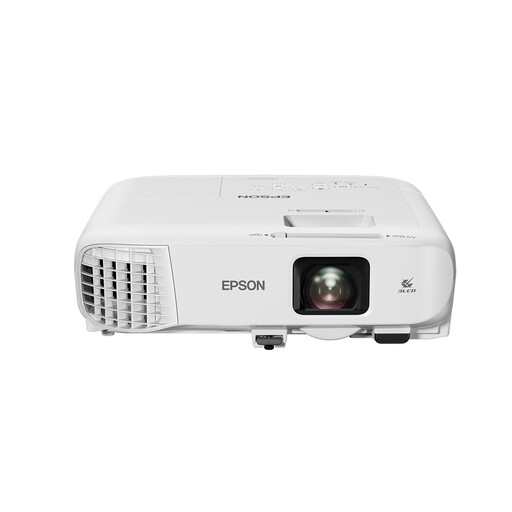
Epson EB-982W Standard Throw Projector
The description mentions use in bright environments. Still, measure the light at the screen position and check whether WXGA suits your recording.
WXGA (1280 × 800); 4,200 ANSI lumens; 3LCD; 1.6× optical zoom; 16 W built-in speaker.
View on Joybuy
 No image available
Dangbei DBOX02 Laser Projector 4K GTV
Could suit you if you’re considering a 4K laser projector with built-in speakers. Check that its resolution and brightness suit your recording and viewing space.
4K; 2,450 ISO lumens; two 12 W speakers; HDR10+; keystone correction and focus adjustment.
View on Joybuy
Frequently asked questions
Can an ALR screen help in a room with high windows?
A suitable ALR screen is designed to reflect projector light back towards the viewer and reject light coming from other directions. Epson describes these screens as an option for ambient light. Check that the screen suits your setup, and bear in mind that direct sunlight on the screen can still affect the image.
How can I check that the projector is far enough from the screen?
Measure the distance from the lens to the screen and your preferred image width, then compare these with the throw ratio of the exact model. For example, the BenQ TK710 lists a throw ratio of 1.15–1.5:1 and 1.3× zoom. These figures won’t automatically apply to other projectors.
Can I play the recital through my existing speakers?
That depends on the connections available on your playback device, projector and audio equipment. The BenQ TK710 lists a 3.5 mm audio output and HDMI eARC. Check that your speakers, soundbar or receiver support the connection you’ve chosen.
What should I consider for maintenance and running costs?
Check the type of light source used by the model and the conditions stated by the manufacturer. Epson describes the EH-TW840 as a lamp projector; Optoma states that the HZ40HDR’s laser light source lasts up to 30,000 hours. This isn’t a guaranteed lifespan for the entire projector.
What warranty and cooling-off period apply to an online purchase in the Netherlands?
When you buy as a consumer, the product must meet reasonable expectations, and the retailer is your point of contact if there’s a problem. According to the Dutch government, there’s no single fixed statutory warranty period for all products in the Netherlands. When you buy remotely from a business, a 14-day cooling-off period applies in many cases. Check the relevant terms and exceptions.


