
Viewers with plenty of daylight
If you often watch with daylight from windows or light from lamps in the room, you’ll want to know how visible the picture will be at your chosen screen size.


Start by choosing a projector to suit how much light you can block out while watching, your preferred image size and the distance to the screen. A suitable ALR screen can help in ambient light, but a higher lumen rating or a 4K label won’t guarantee deep blacks or visible shadow detail. Also check that your streaming services work with your chosen setup, and find out which extras, such as a screen or external player, you’ll need.
If you often watch with daylight from windows or light from lamps in the room, you’ll want to know how visible the picture will be at your chosen screen size.
If you watch detective series with lots of shadowy scenes, you can reduce the light in the room and prioritise shadow detail over the largest possible picture.
If you can’t place the projector far back in the room, you’ll need to match the available distance, desired picture width and screen position.
Start by considering the amount of light in your living room and your viewing distance. Then compare the brightness rating, screen options and streaming features as parts of the same setup.
| What to consider | What should you check? | Who should prioritise this? |
|---|---|---|
| Picture visibility in ambient light | Note how much light comes from windows and lamps while you’re watching. Compare brightness ratings, including their units of measurement, and consider a screen suited to the type of projector. | If I watch during the day with the curtains open or the lights on, I want to know whether the picture will remain visible at my chosen screen size. Around 36% of consumers prioritise picture visibility in ambient light above all else. |
| Shadow detail | If possible, reduce the light falling on the screen and assess contrast in the conditions in which you watch series. | When watching detective series with lots of dark scenes, I want to make out shadow detail and may be able to reduce the light in the room. Around 29% of consumers prioritise shadow detail above all else. |
| Positioning the projector and screen | Measure the distance from the lens to the screen and the available wall width. Compare these measurements with the throw ratio of the exact model. | If my living room is short on space, I want to know first whether the projector, desired picture width and screen distance will work together. Around 21% of consumers prioritise available space above all else. |
| Streaming and sound | Check that the apps and accounts you use are available, what’s included and how you’ll connect the sound. | I want to start watching series without a separate player, but first I need to make sure my apps are available and that I can set up the sound. Around 14% of consumers prioritise easy streaming above all else. |
A resolution rating doesn’t counteract the effect of ambient light on perceived contrast. Epson uses the term ‘4K PRO-UHD’ for the EH-TW7000; compare the specific specifications for each model.
First, work out how much light you can block out and what picture size you want. Then assess brightness and resolution separately for the exact projector.
A screen designed for an ultra-short-throw projector won’t necessarily suit a projector with a standard throw distance. Epson describes its SilverFlex Ultra screen as being specifically for ultra-short-throw projectors.
Check which projector types the screen manufacturer lists and whether the screen suits your setup.
If a screen isn’t included, a suitable one may need to be bought separately.
Throw ratios and connections vary between models. For example, the Epson EH-TW7000 is designed for use with external sources via HDMI.
Measure your setup in advance and check the connections, included items and streaming services you want to use.
Your chosen setup may require a different position, a separate streaming device or an adjusted sound system.
Acer Netherlands lists the Vero PL2520i with the product number MR.JWG11.002. A similar model name alone doesn’t confirm that a deal is for exactly the same version.
Compare the full manufacturer product number and check the model and terms before ordering.
Epson offers models for standard and ultra-short throw distances, with a range of light sources and setup options.
According to BenQ, the TH575i is a Full HD model supplied with a Google TV dongle, while the TK710 is a separate 4K laser range.
The C2 Ultra is a portable 4K projector with VIDAA; check that the regional model meets your needs.
According to the Dutch product information, The Premiere LSP9T is an ultra-short-throw projector with triple laser technology and Smart TV features.
The Vero PL2520i is a Full HD laser projector. When comparing models, check the full product number for the version you’re considering.
This selection includes projectors for home use, with built-in streaming options, models that connect to an external source and a short-throw model. Compare their features with the dimensions and light levels in your living room.
 Image unavailable
Worth considering if you’re looking for Full HD and Google TV in a single projector; weigh the stated brightness against the light levels in your room.
The product name lists 1080p Full HD, 800 ANSI lumens, Google TV and a built-in battery with a stated two-hour runtime.
 Image unavailable
A good fit if you’re looking for a portable projector supplied with a screen and stand; bear its brightness rating in mind in a bright living room.
The product name lists Full HD 1080p, 250 ISO lumens, Google TV, JBL audio and a built-in battery. The product name also states that a screen and stand are included.
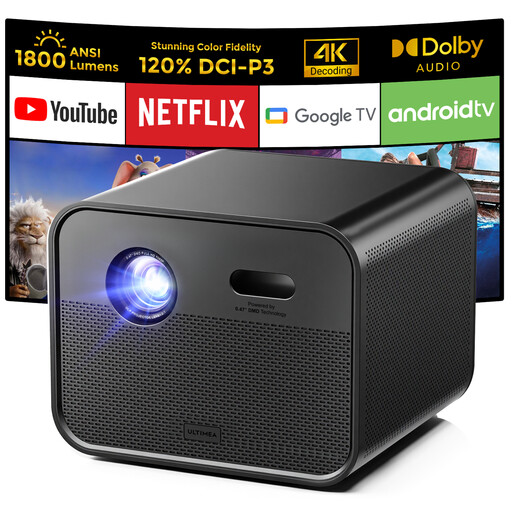 Image unavailable
An option if built-in Google TV and Full HD are important to you; also consider the light levels in your room and your preferred picture size.
The product name lists native Full HD 1080p, 1,800 ANSI lumens, Google TV, autofocus and 6D automatic keystone correction.
 Image unavailable
An option if you want to use a projector with an external streaming source; measure the available distance to the screen in advance.
The product name lists 3,800 lumens, 1.3× zoom and a 15 W speaker.
 Image unavailable
Its short-throw design makes this a model to consider if the projector needs to sit relatively close to the screen; check your preferred picture size and distance.
The product name lists WXGA, 3,800 ANSI lumens and 3D.
No, a high lumen rating on its own is no guarantee. Ambient light can reduce contrast and make blacks look lighter. Compare the brightness rating and measurement method, and also consider the light in the room, picture size and a suitable screen.
Don’t assume so. Epson describes its SilverFlex Ultra screen as being specifically for ultra-short-throw projectors. Before buying, check that the screen is suitable for the projector type and setup you’ve chosen.
No, it depends on the projector. BenQ says the TH575i comes with a Google TV dongle; according to Epson, you can connect a streaming device to the EH-TW7000 via HDMI. Check that your services are available and what’s included with the exact model.
Measure the distance from the planned lens position to the screen and work out your preferred picture width. Compare these measurements with the throw ratio of the exact model. For example, Acer lists a throw ratio of 1.12–1.47:1 for the Vero PL2520i MR.JWG11.002; an ultra-short-throw model requires a different setup.
According to ACM ConsuWijzer, online consumer purchases generally come with a statutory cancellation period that ends 14 days after delivery; legal exceptions may apply. You’re also entitled to a product that meets what you can reasonably expect. If there’s a fault, the seller must offer an appropriate solution under the applicable terms. A manufacturer’s warranty does not replace your statutory rights.