Who is this guide for?

Watching in daylight

You want to watch architectural programmes during the day without completely darkening the living room. Start by considering how much light falls on the screen wall and the image size you want. ProjectorCentral explains how ambient light and the screen affect visibility.

Attention to detail

You notice façades, floor plans, subtitles and material textures, and want to balance sharpness and colour with visibility in daylight. Consider both the source resolution and how clearly fine details appear at your chosen image size.

A neat living room set-up

You want a large image without the projector, mounting or cables dominating your décor. Measure the projection distance and the space available by the screen before choosing a model.

What should you look for in a projector for a bright living room?

Ultra-short throw

Suited to: placing a projector on a unit close to the screen wall when space is limited.

Bear in mind: check that the screen is suitable for ultra-short-throw projection and budget for it separately.

Conventional placement

Suited to: a room where you can position or mount the projector at the required distance. Zoom or lens shift may be useful if the model offers these features.

Bear in mind: measure the distance needed for your chosen image size; a stated light output will not compensate for sunlight on the screen.

Consideration What to look for Who is this important for?
Visibility in daylight Only compare brightness figures when you know which measurement method was used. Also assess the screen and image size in the light conditions of your room. When I watch during the day, I want dark areas to remain visible and the image not to look washed out. Around 36% of consumers prioritise daytime visibility.
Fine detail Check the resolution of both the projector and the viewing source. Look at text and fine lines at your intended image size and in comparable lighting conditions. I want to follow details on façades, floor plans and subtitles, not just see a large image. Around 29% of consumers prioritise visibility of architectural details.
Placement Measure the available distance and screen wall. Check the distance needed for your chosen image size and whether the projector has zoom or lens shift. If I don’t want to make major changes to my living room, the projector needs to work with my furniture and screen wall. Around 21% of consumers prioritise placement.
Costs and connections Budget separately for the screen and mounting, and check that the connections work with your viewing source. Don’t treat manufacturers’ terms as equivalent to your statutory rights. I want to know in advance what extra equipment or connections my viewing source requires, and what the set-up will cost. Around 14% of consumers prioritise costs and connections.

Things to consider when buying

  • Comparing lumen figures measured using different methods directly

    ANSI lumens, LED lumens and light-source lumens do not necessarily measure the same thing. The usable light output in a selected picture mode also won’t automatically match the stated maximum.

    Note the measurement method for each model and assess your desired image size in comparable ambient light.

  • Choosing any ambient-light-rejecting screen for a UST projector

    An ultra-short-throw projector directs light upwards at a steep angle. The screen needs to be designed for that projection direction.

    Check that the screen is suitable for UST projection and confirm its size before ordering the projector and screen together.

  • Focusing only on the largest screen size

    A larger image needs more light, while ambient light reduces visible contrast.

    Compare the image size you want at your intended viewing position and screen wall with the amount of light usually present there.

  • Confusing a manufacturer’s warranty with your statutory rights

    According to ACM ConsuWijzer, the statutory warranty may last longer than the period quoted by a manufacturer or seller.

    Keep your proof of purchase and contact the seller if you think a product may be faulty.

Brands and models to consider

Epson

The EH-LS670B is an ultra-short-throw laser projector designed to stay in a fixed position close to the screen wall. Epson specifies 3,600 lumens, Google TV, Bose sound and an image of up to 120 inches.

  • The stated features could reduce the need for separate equipment.
  • Check the precise imaging technology behind the 4K PRO-UHD designation and budget for a UST-compatible screen. Epson makes claims about performance in bright rooms, but these are not measurements of contrast in your living room.

BenQ

The TK710 is a conventionally positioned 4K UHD laser projector. BenQ specifies 3,200 lumens, 1.3× optical zoom and vertical lens shift.

  • Zoom and lens shift are useful if your measured room distance and preferred placement suit them.
  • BenQ’s claims about use in bright rooms are manufacturer claims. Check the picture in your own conditions and allow for the distance to the screen.

Hisense

The PX3-PRO is an ultra-short-throw Laser Cinema for an image measuring 80 to 150 inches. The L9Q is a separate, larger Laser TV model; Hisense specifies 5,000 lumens and an image of up to 200 inches.

  • The two models offer different screen sizes and set-ups to compare with the space you have available.
  • The L9Q’s brightness and claims about picture quality in different lighting conditions are manufacturer claims. For both models, check the dimensions, what’s included with the screen offer and the light levels at your intended viewing position.

LG

The CineBeam S PU615U is a compact ultra-short-throw projector with a stated 4K UHD resolution and an image of up to 100 inches. LG specifies a projection distance of 39,3 cm for a 100-inch image.

  • Its compact size and short projection distance may be useful when space by the screen wall is limited.
  • LG states that the device does not have a built-in battery. A compact size alone does not prove that the image will remain clearly visible in bright daylight.

Projectors at Joybuy

Joybuy projectors relevant to this topic.

Optoma UZ38X 4K UHD dual-laser projector

Optoma UZ38X 4K UHD dual-laser projector

The stated UHD resolution and optical zoom are useful if you want to view architectural details and the projection distance suits your room.

Specifications listed: 3,800 lumens, DLP, dual-laser light source, 1.3× manual zoom and a 15 W speaker. Screen and source device not included.

View at Joybuy

2026 video projector with built-in apps, black

2026 video projector with built-in apps, black

The stated image size and rotating set-up may be useful if you want to adapt the projection to the space available in your living room.

Specifications listed: 50–200-inch image size, automatic screen correction, digital zoom and 180° rotation. The title also mentions Wi-Fi 6, Bluetooth and HDMI and USB connections.

View at Joybuy

2026 video projector with built-in apps, white

2026 video projector with built-in apps, white

The stated image size and rotating set-up may be useful if you want to adapt the projection to the space available in your living room.

Specifications listed: 50–200-inch image size, automatic picture correction, zoom and 180° rotation. The title mentions HDMI and USB connections and compatibility with iOS, Android and PC.

View at Joybuy

Optoma Photon Beam PK52

Optoma Photon Beam PK52

The stated UHD resolution and manual zoom are useful if you want to view details and the projection distance suits your room.

Specifications listed: 3840 × 2160 UHD resolution and 1.3× manual zoom.

View at Joybuy
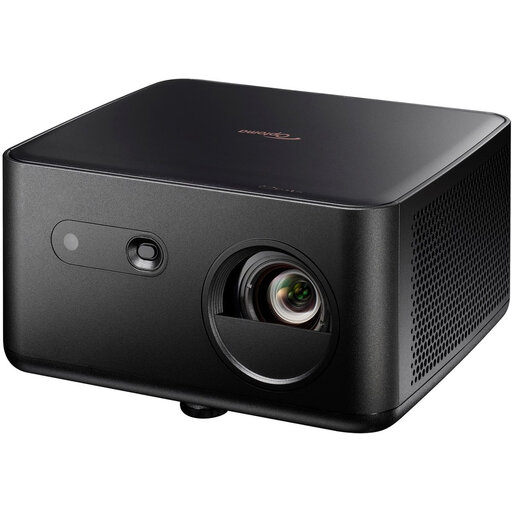
Optoma Photon Life PK32 4K UHD DLP projector

Optoma Photon Life PK32 4K UHD DLP projector

The stated 4K UHD resolution and autofocus may be useful if you want to view fine details and are looking for automatic picture adjustment.

Specifications listed: 1,100 ISO lumens, HDR10, HLG, autofocus, automatic keystone correction, HDMI 2.0 and a 60–150-inch image size.

View at Joybuy

Frequently asked questions

Do I need a special screen for a UST projector on a TV unit?

Choose a screen specifically designed for ultra-short-throw projection from below. A screen generally sold as ambient-light-rejecting is not automatically suitable; check the screen type, placement and image size you want.

Can I project onto a white wall?

You can, but texture, colour variations and uneven reflection can affect the picture. Assess the result on that wall and factor the cost of a suitable screen into your choice, especially if you watch during the day.

How do I know if a projector will fit on my unit or ceiling?

First measure the clear screen wall, the image size you want and the distance available. Compare these measurements with the installation details for the exact model; features such as optical zoom and lens shift are only relevant if the model you choose has them.

What are the rules on warranties and online returns in the Netherlands?

If a product is faulty, the seller is responsible for the statutory warranty; a shorter manufacturer’s warranty does not remove that right. According to the Dutch government, in many cases you have a 14-day cooling-off period when buying online from a business. Check the applicable terms before ordering.

Which product markings should I look out for when buying?

Electrical equipment covered by EU rules must meet the relevant requirements and carry a CE marking where required. Electrical and electronic equipment usually also carries the crossed-out wheeled bin symbol: dispose of the device separately at the end of its life. A CE logo is not an independent assessment of picture quality.
