First, measure the distance from the lens to the projection surface and the image width you want. If a standard projector won’t fit, compare a short-throw model with an ultra-short-throw projector that sits close to the wall. Then consider ambient light, how you’ll connect your recording source and your audio preferences.
Who is this guide for?
Viewer with limited projection space
You want a usable image without placing the projector far into the room. Compare short-throw and ultra-short-throw models, and measure your setup first. BenQ Netherlands and Epson Netherlands both describe projection options for smaller spaces.
Viewer in changing ambient light
You don’t always watch in a darkened room and want to assess the stated brightness alongside the image size and incoming light. BenQ Netherlands and Philips Netherlands publish specifications to help you make that comparison.
Viewer with their own recording source and audio setup
You play ballet recordings from an external device or want to hear the music through other speakers. So, check the connections and playback options of your chosen model. For the NeoPix 750, Philips Netherlands lists, among other things, a 3.5 mm audio connection.
What should you consider when choosing?
Short-throw projector
Suitable if: you have little distance between the projector and the projection surface, but can leave space in front of the wall.
The trade-off: the projector and cables still need a suitable place.
Ultra-short-throw projector
Suitable if: the projector needs to sit on a piece of furniture close to the projection wall.
The trade-off: a flat projection surface and precise positioning are important; also check how much space you have on the furniture.
Compact portable projector
Suitable if: you mainly watch in a darkened room and want to put the projector away after use.
The trade-off: check the brightness, recording source and audio setup for your needs.
Standard-throw projector
Suitable if: despite its small size, your room offers enough distance from the projection surface.
The trade-off: the setup may not work if the distance doesn’t suit the image width you want.
Measure the lens distance and available image width before comparing projector types; room size alone won’t tell you whether a model will fit.
| What matters |
What to look for |
Who should consider this most? |
| Will the image fit the available distance? |
Measure the distance from the lens to the projection surface and the clear image width. Compare these with the throw ratio or installation chart for the exact model. |
If I have limited space, I want to know in advance whether I can achieve the image size I want. Around 36% of consumers prioritise placement and image size. |
| Will movement and the scene remain visible in the available light? |
Consider incoming light and image size; compare stated brightness only when it is measured on the same basis. |
If I can’t always darken the room, I want to weigh visibility against the light in my living room. Around 29% of consumers prioritise these viewing conditions. |
| Can I play my recording and hear the music the way I want? |
Check how your player connects, how your recordings are played and which audio output you need. Don’t rely on the word ‘smart’ alone. |
If I want to use my own recordings and preferred audio setup, I check the connections in advance. Around 21% of consumers prioritise their source and sound. |
| What else does using the projector involve? |
Check the light source requirements and whether you need extra equipment for your recording source or audio. |
If I want to factor in extra equipment, maintenance and servicing, I look beyond the light source alone. Around 14% of consumers prioritise running costs. |
Common pitfalls
-
Focusing only on the maximum screen diagonal
The image size you can achieve also depends on the distance between the lens and the projection surface. So, a stated maximum diagonal doesn’t guarantee that the projector will fit in your living room.
Measure the planned lens position and image width, then compare them with the figures for the exact model.
-
Assuming 4K support means a native 4K image
Product labels and native resolution don’t necessarily mean the same thing. For example, Epson calls the EH-LS800B 4K PRO-UHD; that label alone doesn’t establish that it has native 4K resolution.
Check the native image resolution separately from supported input signals and product labels.
-
Assuming a smart projector will play every recording
App availability can change, and a built-in app doesn’t automatically replace the connections you need for your own recording source or preferred audio setup.
Before buying, check the specific service, recording source and connections you’ll need.
-
Taking conflicting model specifications at face value
Philips lists the NPX230/INT as native 1080p, while a Joybuy product listing for the same model code states 320 × 240. It’s important to check the exact version when choosing.
Ask for confirmation of the model variant and native resolution before relying on that specification.
Relevant brands
BenQ
The TK705STi is a short-throw model worth considering if you have limited depth but space in front of the wall.
- BenQ Netherlands specifies a throw ratio of 0.8 and 3.000 ANSI lumens for the TK705STi.
- These are the manufacturer’s specifications for the model; check the distance, image width and lighting conditions in your living room.
Epson
The EH-LS800B offers an ultra-short-throw setup, with the projector on a piece of furniture by the wall.
- Epson Netherlands states that it can project an 80-inch image from 2,3 cm away from the wall.
- 4K PRO-UHD is Epson’s product label and doesn’t by itself establish native 4K resolution; check the installation details for your image size.
Philips
The NeoPix 750 is a home projector with Full HD playback and smart features. It’s worth considering if you want to put the device away after use.
- Philips Netherlands specifies 700 lumens and a 3,5 mm audio connection for the NeoPix 750.
- Check the lighting conditions, the recording source you’ll use and whether the apps you need are available.
Optoma
The HZ146X-W is listed as a Full HD laser projector for home use. It’s a relevant option if a standard projection distance works in your room.
- A standard projection distance may work if your setup offers enough space.
- Measure the available distance and image width before considering this type for your living room.
Projectors at Joybuy
These Joybuy product picks are suited to choosing a projector for watching ballet recordings at home; check the image size you want, lighting conditions and connections for each model.
 No image available
Blackview PV1000 Max Grey
An option if you’re looking for native 1080P and an adjustable projection angle; check that the stated image size suits your space.
The product name lists 1000 ANSI lumens, native 1080P, 4K decoding and an image size of 40–150 inches.
The product name also lists 360° rotation, autofocus, Wi-Fi, Bluetooth and AirPlay 2.
View at Joybuy
 No image available
Yoton Y6 5.2 Bluetooth 4K LCD
An option if you’re looking for a projector with native 1080P and connections for external audio.
The product name lists native 1080P.
This model is listed with HDMI, USB, AV and Bluetooth audio.
View at Joybuy
 No image available
Dangbei N2 Mini Projector
A portable model to consider if you want to put the projector away after use.
The product name lists 1080P, Wi-Fi and Bluetooth.
Autofocus, automatic keystone correction and obstacle detection are also listed in the product name.
View at Joybuy
 No image available
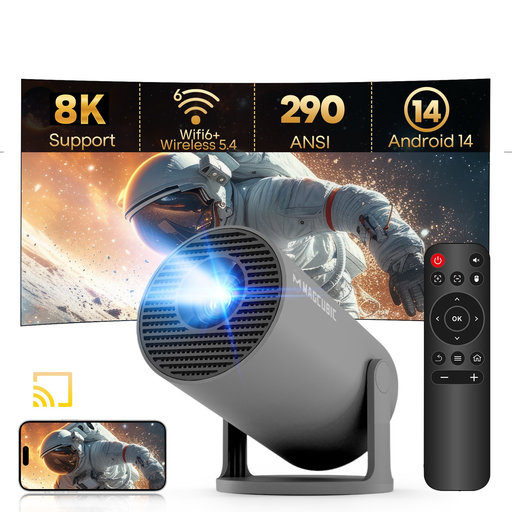
MAGCUBIC HY300Pro Grey
A compact option to compare if the measured distance and image width work with the stated throw ratio.
The product description lists 720P as the native resolution; 1080P refers to support, not native resolution.
The description lists 290 ANSI lumens, a throw ratio of 0,8:1 and a projection distance of 0,6–2,5 m.
View at Joybuy
Frequently asked questions
How can I check before buying whether the projector will fit in my living room?
Measure from the planned lens position to the projection surface, then measure the available image width. Compare both measurements with the throw ratio or installation chart for the exact model; the room size or maximum screen diagonal alone isn’t enough.
Is automatic keystone correction enough if the projector has to sit at an angle?
First check whether you can position it straight, and don’t use keystone correction as a substitute for a suitable setup. BenQ explains that lens shift can move the image without keystone correction, which can reduce image brightness; available features vary by model.
Can I use external speakers for ballet recordings?
That depends on the connections on the exact model and your speakers. Philips, for example, lists a 3.5 mm connection for external speakers on the NeoPix 750; also check how your recording source connects to the projector.
What are my rights when I buy a projector online from a company in the Netherlands?
According to the Dutch government, purchases covered by distance-selling rules usually come with a 14-day cooling-off period. You’re also entitled to a product that works as it should under the legal guarantee, and the seller is your point of contact if there’s a problem. The Netherlands does not have a fixed legal two-year guarantee period that applies to all products.


