For dark astronomy programmes, a projector is a good choice when you can limit the light falling on the projection wall and match the distance from the lens to the wall to your preferred image width. ProjectorCentral warns that ambient light can significantly reduce visible contrast, and that contrast figures alone tell you very little. Consider a compact smart projector for a fixed viewing spot, a portable model if your setup changes, or a brighter model if it’s difficult to darken the room. Compare the stated light output with the measurement method, and check the fan mode and audio connections too: extra brightness won’t make up for the loss of contrast caused by ambient light.
Who is this projector guide for?
Viewers of dark space imagery
You want to watch star fields and shadow detail together, and can darken the shared room at least partially. First, consider the light falling on the projection wall, then the image size and how dark scenes are rendered. ProjectorCentral explains why ambient light and contrast matter.
People with limited viewing space
You share a room with furniture and need to position the projector within a limited distance. Measure the distance from the lens to the wall, then work out the achievable image width. ProjectorCentral explains the relationship between projection distance and image width.
People sharing rooms
You want to be able to move the projector or watch together without unnecessarily disturbing other residents. Compare each model’s placement options, power options, fan modes and audio connections. BenQ explains how ECO mode affects fan noise; also check the setup and connections of the model you’re considering.
What should you consider when choosing?
Start by limiting the light falling on the wall and measuring the distance from the lens to the wall. Then decide whether a fixed setup, quiet shared viewing or the ability to move the projector between rooms matters most to you.
| What to consider |
What to look for |
Best suited to |
| Dark scenes |
Limit the light falling on the projection wall; consider brightness alongside the stated measurement method, and look for a review of dark scenes if available. |
If I want to watch star fields with housemates, my main priorities are limiting light on the wall and being able to assess dark detail. Around 33% of consumers give dark image performance top priority. |
| Suitable image width |
Measure the distance from the lens to the wall and the usable wall width; then check the throw ratio for the exact model. |
With furniture and limited space for positioning, I want to know in advance what image width is achievable. Around 27% of consumers prioritise the available projection distance. |
| Quiet shared viewing |
Compare the stated noise level for each operating mode and check which audio outputs are available. |
If we’re watching a quiet programme together, I want to consider where the projector will sit in relation to our seats. Around 20% of consumers give quiet shared viewing top priority. |
| Moving between rooms |
Check the setup options, power options and access to your preferred video source. |
If I regularly change where I watch, I want to know whether the projector will be practical to use in its new location. Around 20% of consumers prioritise portability. |
What to watch out for when buying a projector for astronomy
-
Assuming a high contrast figure guarantees deep blacks
Ambient light falling on the projection wall can reduce the visible contrast of dark space imagery. ProjectorCentral also notes that contrast figures alone reveal very little about what you’ll see on screen.
Limit incoming light where possible and look for a review of dark scenes if available. Don’t treat contrast claims as directly comparable real-world tests.
-
Choosing the maximum image size before measuring the room
The distance from the lens to the wall, together with the throw ratio, determines the achievable image width. So a stated maximum diagonal doesn’t automatically mean the projector will fit your room.
Measure the distance from the lens to the wall and the usable wall space. Then check the throw ratio or calculator for the exact model before choosing a screen or mount. ProjectorCentral explains the relationship between distance and image width.
Brands worth considering
These brands are relevant for the product ranges mentioned; the specifications below are not an assessment of each brand as a whole.
Epson
In this comparison, Epson offers two options for a shared viewing space: a compact smart projector and a Full HD lamp projector.
- Epson Netherlands lists 700 lumens and Google TV for the EF-61W. For the EB-FH08, Epson Netherlands lists 3.600 lumens of white and colour light output, Full HD, two HDMI inputs and a 2 W mono speaker.
- Light output alone doesn’t predict how dark images will look in a room with ambient light. Assess the viewing space and your audio needs separately.
BenQ
The GV50 is worth considering if an adjustable setup and changing projection angles are important to you.
- BenQ Netherlands lists Full HD, 500 ANSI lumens, an adjustable base, an audio output and noise levels of 28 dBA in Normal mode and 26 dBA in ECO mode for the GV50.
- The recall BenQ describes for the GV31 shouldn’t be generalised to the GV50.
Nebula / soundcore
The Capsule 3 Laser is a compact projector option for anyone who wants to move the device between viewing spots.
- Nebula lists Full HD and 300 ANSI lumens for the Capsule laser range.
- Managing ambient light is an important consideration with the stated light output. Check the exact Capsule 3 Laser variant and battery specifications before deciding.
Joybuy products for shared viewing evenings
These Joybuy picks are projectors to compare for watching programmes in a shared space. Check whether each model’s placement options and connections suit your room and video source.
 No image available
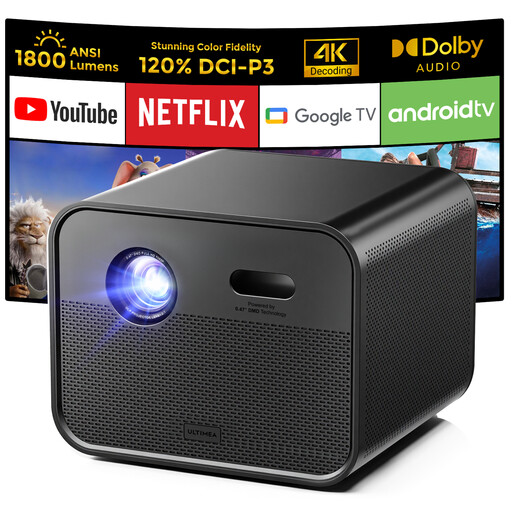
Ultimea Poseidon E100 Native Full HD, 1800 ANSI lumens and Google TV
A compact smart projector to compare for a fixed shared viewing spot.
Native 1080p; 1800 ANSI lumens; Google TV.
Joybuy
 No image available
Yaber L2, native 1080p, 520 ISO lumens and Google TV
A portable projector to compare if you want to switch your viewing spot between rooms.
Native 1080p; 520 ISO lumens; Google TV; dual 5W speakers; compatible with ceiling mounting and a flexible stand.
Joybuy
 No image available
Optoma Photon Beam PK52
An option to compare for a shared viewing evening. Decide in advance on your preferred image width, projection distance and required connections.
Joybuy
 No image available
Optoma Photon Go
An option to compare if you want to use the projector in different viewing spots. Check that the setup and connections suit the location and video source you choose.
Joybuy
 No image available
Magcubic HY350Max, native 1080P, 900 ANSI and Android 14
A portable option to compare if you want to be able to change where you project in the room.
Native 1080P; 900 ANSI; Android 14; 180° rotation; automatic keystone correction.
Joybuy
Frequently asked questions
Is a high contrast ratio enough for images of stars and dark space?
No. Light falling on the projection wall reduces visible contrast, and published contrast figures alone don’t predict what you’ll see on screen. First, work out how much light you can limit in the viewing space. ProjectorCentral explains these limitations.
How can I check in advance whether a projector will fit in my room?
Measure the distance from the lens to the intended wall and the available image width. Compare these with the throw ratio or calculator for the exact model; a stated maximum image diagonal doesn’t prove that it will fit your room. ProjectorCentral explains how distance and image width are related.
What can I do to reduce fan noise?
Compare the noise rating for the mode you intend to use, and consider where the projector will be positioned. BenQ recommends ECO mode to reduce fan noise on supported projectors; also check that the picture mode is suitable for the light in your room.
What cooling-off period and guarantee apply to an online purchase in the Netherlands?
According to ACM ConsuWijzer, the statutory cooling-off period for an eligible online product purchase ends 14 days after delivery. There is no fixed period for the statutory guarantee: ACM ConsuWijzer says a product must meet the reasonable expectations you had for it when used normally.
Can I keep using a BenQ GV31 if I already own one?
No. BenQ is recalling all GV31 projectors because of a battery that may overheat, and is asking owners to stop using them immediately and get in touch to arrange next steps. This model-specific warning applies to the GV31, not the GV50.


