For art documentaries in a darkened home cinema, picture settings, colour information and a suitable projection distance are all important considerations. Don’t choose based on a lumen or contrast figure alone. If you watch with some ambient light, take the stated light output into account too. If space is limited, measure up to see whether an ultra-short-throw model will work with your screen and wall.
Who is this guide for?
Viewers who want to assess the colours in artworks
If you mainly watch in a darkened room, you’ll want to be able to assess colour, detail and adjustability when viewing paintings and museum footage. Manufacturers publish model-specific colour and picture information, but this doesn’t automatically tell you how the picture will look in your room. BenQ, for example, publishes information for the W2720i.
Viewers dealing with changing ambient light
If you can’t always darken the room, consider the stated light output alongside contrast and colour reproduction. Epson and Optoma publish model-specific brightness figures, but these aren’t measurements of the picture in your room.
Viewers with limited space for positioning
The available distance between the projector and screen, along with your preferred screen width, determines which set-up will work. A standard-throw projector and an ultra-short-throw model require different arrangements.
What should you consider when choosing?
Start with your viewing conditions and where the projector will go. Then compare colour information, brightness and the options for playing documentaries.
| What to consider |
What should you check? |
Who should pay extra attention? |
| Colour and detail |
Compare picture modes, colour information, calibration data and the full resolution description for the exact model. BenQ states that the W2720i offers 98% Rec.709 and 90% DCI-P3 coverage, as well as a factory calibration report; these are manufacturer specifications. |
If you mainly watch paintings and museum footage in a darkened room, you’ll want to assess colour and fine detail. Around 33% of consumers rank colour and detail as their top priority. |
| Watching with some ambient light |
Take the room’s light levels and your intended screen size into account. Optoma specifies 4,000 lumens for the UHZ66; that figure alone doesn’t predict colour reproduction or contrast in a lit room. |
If you can’t always darken the room, you’ll want to know how the projector will perform in your room’s ambient light. Around 27% of consumers rank watching with some ambient light as their top priority. |
| Projection distance |
Measure the distance from the lens to the screen and your preferred picture width, then compare these with the model’s throw ratio and positioning information. Epson lists lens shift and optical zoom for the EH-TW7000; the EH-LS670W is designed to be positioned close to the wall. |
If the position of the projector determines your choice, you’ll want to know in advance whether your preferred picture width is achievable. Around 20% of consumers put positioning first. |
| Playback and sound |
Check that your documentary service is available and that the connections and sound options are compatible with your equipment. Dangbei lists Google TV, licensed Netflix access and two built-in 12 W speakers for the DBOX02. |
If you want to connect as few separate devices as possible, pay attention to streaming, connections and sound. Around 20% of consumers give playback and sound top priority. |
Common buying pitfalls
-
Assuming ‘4K’ means every model uses the same picture technology
A term such as 4K PRO-UHD doesn’t, by itself, tell you how a particular model produces its picture.
Read the full resolution and picture technology specifications for the exact model, then compare them with your source material.
-
Treating a lumen or contrast figure as a complete prediction of picture quality
Manufacturers publish model-specific figures, which aren’t necessarily based on the same measurement methods. On their own, they don’t describe how colours and dark scenes will appear in your room.
Consider room-darkening, screen size and picture mode together, and don’t treat manufacturer specifications as an independent real-world test.
-
Choosing a screen size before measuring where the projector will go
The Optoma UHZ66 has a stated throw ratio of 1,4–2,24:1, while Epson describes the EH-LS670W as a model for positioning close to the wall. The required distance therefore varies from model to model.
Measure the distance from the lens to the screen and your preferred screen width before choosing between standard and ultra-short throw.
If the set-up isn’t suitable, you may need to adjust the projector’s position or choose a different model.
-
Confusing lamp life with the warranty
Epson gives the EH-TW7000 lamp a life of 5.000 hours in Eco mode. This is separate from the statutory guarantee and any manufacturer’s terms.
Check the lamp information and service terms for the exact model, and keep the warranty conditions separate from the stated lamp life.
A lamp-based model may need maintenance or a replacement lamp later on.
Brands to compare
BenQ
The W2720i is worth comparing if colour settings and calibration data matter for a dedicated home cinema.
- BenQ states that the W2720i offers 98% Rec.709 and 90% DCI-P3 coverage, as well as a factory calibration report.
- These are manufacturer specifications for this model; they don’t guarantee the same results in every room or picture mode.
Epson
The EH-TW7000 is a standard-throw model, while the EH-LS670W offers an ultra-short-throw option.
- Epson lists lens shift, optical zoom and a lamp life of 5.000 hours in Eco mode for the EH-TW7000. The EH-LS670W is described as suitable for positioning close to the wall.
- These positioning features apply to different models and aren’t interchangeable.
Optoma
The UHZ66 is a standard-throw model to compare if you also watch with some ambient light.
- Optoma specifies 4.000 lumens, a throw ratio of 1,4–2,24:1 and a stated laser life of 30.000 hours for the UHZ66.
- These figures aren’t independent measurements of colour or contrast when watching art documentaries.
Dangbei
The DBOX02 is worth comparing if integrated streaming and built-in speakers matter to you.
- Dangbei lists Google TV, licensed Netflix access, 2.450 ISO lumens and two 12 W speakers for this model.
- Check that your documentary service is available; these features alone say nothing about colour accuracy.
Projectors on Joybuy
This selection includes standard-throw home cinema projectors, an ultra-short-throw model and models with other positioning or viewing features. Before buying, check your preferred screen width, available space and connections.
 Image unavailable
Optoma UZ38X 4K UHD dual-laser projector
An option to compare for a standard-throw home cinema set-up.
The product name specifies 4K UHD, a dual-laser light source and 3.800 lumens. The stated throw ratio is 1,21:1–1,59:1; the description notes that a projection screen and source device aren’t included.
View on Joybuy
 Image unavailable
JMGO N1S Ultra 4K Triple Laser UHD projector
A model to compare if colour information matters to you when watching UHD documentaries.
The product name specifies 4K UHD and a triple-laser light source. The product description warns against looking directly into the laser light source during use and says to keep the ventilation openings clear.
View on Joybuy
 Image unavailable
XGIMI AURA 2 UHD 4K ultra-short-throw projector
An ultra-short-throw model to compare if there’s little room for a projector behind your seating.
The product name specifies 4K UHD, Dolby Vision, 2.300 ISO lumens and a 60 W Harman Kardon speaker.
View on Joybuy
 Image unavailable
Optoma Photon Beam PK52
A model to compare for a standard-throw home cinema set-up.
View on Joybuy
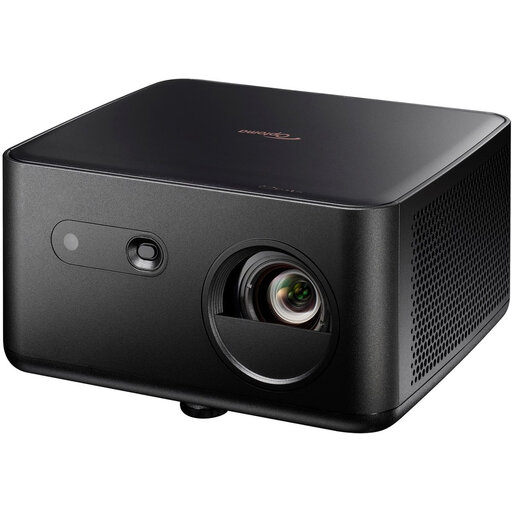 Image unavailable
Optoma Photon Life PK32 4K UHD DLP projector
A model to compare for UHD documentaries and a standard-throw set-up.
The product name specifies 1.100 ISO lumens, HDR10, HLG and a 4LED light source.
View on Joybuy
Frequently asked questions
How can you tell whether a projector will fit your room?
Measure the distance from the lens to the screen and your preferred picture width, then compare these with the throw ratio for the exact model. If that set-up won’t work, consider an ultra-short-throw model and check its positioning information.
Do you need a separate player or sound system for art documentaries?
That depends on your source and the sound you want to use. Epson lists two HDMI ports for external sources on the EH-TW7000; Dangbei lists integrated streaming and speakers on the DBOX02. Check that your service and audio connection will work with your chosen set-up.
What maintenance and service points matter for a lamp-based model?
Check the stated lamp life for the mode you’ll use and the service terms for the exact model. Epson states 5.000 hours in Eco mode for the EH-TW7000. ACM ConsuWijzer explains that the statutory guarantee is separate from any guarantee offered by the seller or manufacturer.
Can you return a projector bought online in the Netherlands?
For a standard online consumer purchase, you generally have a statutory cooling-off period of up to 14 days after delivery. ACM ConsuWijzer also explains the conditions and exceptions; check the seller’s information as well.


