
Viewers who want to see the detail
You want to make out façades, interior details and subtitles clearly, even if not everyone wants the room completely dark.


Start by measuring the distance to the wall and the available image width, and decide how much light will be on while you watch. Then compare the resolution and placement options of the exact model. A portable projector may suit a living room that’s used in different ways, while a fixed home cinema projector may be a better fit for a permanent set-up. With either type, check the fan noise, audio and access to your programmes.
You want to make out façades, interior details and subtitles clearly, even if not everyone wants the room completely dark.
You don’t have a permanent place for the projector, so you need to work out how the image size, furniture and tidying away will fit together.
You want to hear spoken programmes clearly without the fan or speaker noise unnecessarily disturbing other people in the household.
First, measure the projection area and work out how much ambient light will remain. Then compare the picture settings, sound and how you’ll play your programmes.
| What to consider | What to look for | Who is this most important for? |
|---|---|---|
| Picture in room light | Compare the stated light output, native resolution, image size and operating mode of the exact model. | If I want to see façade details and subtitles while the lights are on, I put readability first; around 33% of consumers say an easy-to-read picture is their top buying priority. |
| Distance and set-up | Measure the distance from the lens to the wall and the available image width, then compare these with the throw ratio and optical adjustment range. | When furniture or other people in the household determine where the projector can go, I want to know in advance whether the image will fit in that spot; around 27% of consumers start with placement as their top buying priority. |
| Watching together in peace | Check the stated fan noise for each mode, the audio connections and the projector’s position in relation to the seating. | If we’re watching quiet, dialogue-heavy programmes together, I want to hear the dialogue without unnecessarily disturbing others in the household; around 20% of consumers prioritise watching together in peace. |
| Programmes and running costs | Check that your preferred apps or HDMI source are supported, along with the included accessories, light source and replacement parts. | If I mainly want to know how to play my programmes and what accessories or ongoing costs are involved, I prioritise those points; around 20% of consumers put access to programmes and running costs first. |
The distance from the lens to the wall and the available image width determine whether your preferred set-up will fit in the room.
Measure the space in advance and compare the throw ratio of the exact model with your intended image size.
Stated noise levels can vary between operating modes, and light output may vary too.
Compare picture and sound in the mode you plan to use when watching with others in your household.
Epson lists the EH-TW6150 as a discontinued product.
Check the current status and full model code on the Dutch manufacturer’s website before comparing models or parts.
A changing projection location can be impractical if a required power supply or separate accessory is missing.
Check what’s included with the exact version and where you’ll have access to a power socket.
The TH575i is a Full HD lamp projector worth comparing if you want to keep the living room lights on while watching.
The EH-TW7000 is a lamp model worth comparing if you have a permanent spot and need optical adjustments to position the image.
The Freestyle 2nd Gen is a compact option worth comparing if you want to be able to move your projector around.
The C2 Ultra is a 4K laser projector worth comparing if optical zoom and the available placement range are important to you.
This selection includes projectors for use in a shared living room, from compact models for flexible set-ups to projectors for a permanent or repositioned installation.
 No image available
An option worth comparing if you’re looking for a Full HD picture and a range of connection or streaming options.
The description lists native 1920 × 1080, HDMI, USB, wireless screen sharing and built-in streaming apps. The title also mentions 4K support, which is not the same as native 4K resolution.
 No image available
A model worth comparing if you need a rotating projection direction and a connection to an external source.
The title lists 180° rotation, 50%–100% digital zoom, automatic screen correction and compatibility with HDMI, TV sticks and USB drives.
 No image available
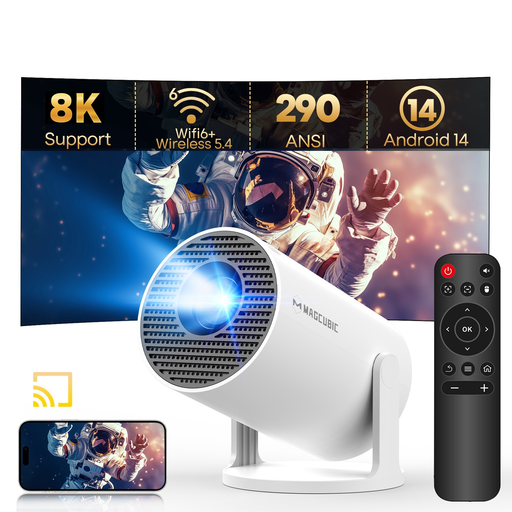
A portable model worth comparing if you want to put the projector away after use and need flexibility over the projection angle.
The title lists native 720P, 290 ANSI lumens, Android 14, Wi-Fi 6, Bluetooth 5.4, 180° rotation and automatic keystone correction. The stated 8K support does not mean native 8K resolution.
 No image available
A model worth comparing if you’re looking for native 1080P and built-in streaming features.
The title lists Google TV, Wi-Fi 6, Bluetooth and 4K support. The description lists native 1080P, automatic focus and keystone correction, built-in JBL speakers and apps.
 No image available
A model worth comparing if native 1080P and adjustment options for a changing set-up are important to you.
The title lists 900 ANSI lumens, Android 14, Wi-Fi 6, Bluetooth 5.4, 180° rotation and automatic keystone correction. The stated 8K support does not mean native 8K resolution.
Measure the available image width and the distance from the intended lens position to the wall. Compare these with the throw ratio and adjustment range of the exact model. The maximum stated screen diagonal alone won’t tell you whether the projector will fit in your chosen spot.
Follow the installation instructions for the exact model and use the mounting points specified in them. Epson warns that incorrect ceiling or wall mounting can lead to the projector falling, causing injury or damage. Also check that the installation complies with any agreements about your home.
No. Check that your preferred app and the required subscription are available, or use a suitable external source. Samsung states that a Samsung account is required for apps on The Freestyle 2nd Gen; BenQ lists a Google TV dongle included with the TH575i.
Yes. Check the lifespan figures for the operating mode of the exact lamp model, and bear in mind that these figures don’t guarantee a fixed replacement date. According to the Dutch government, the Netherlands has no fixed statutory warranty period; if a product is faulty, contact the seller.
For many eligible distance purchases from a business, you have a 14-day cooling-off period. The Dutch government lists exceptions and distinguishes between purchases from a business and purchases from a private individual, so check who the seller is.