What should you look for when choosing?
First, check whether the image width you want is achievable. Then choose based on your playback device, the details you want to show, the ambient light and the space you have to put the projector away.
Short throw distance
Choose this option: if the available distance is too short to achieve your desired image width with a standard throw ratio. BenQ specifies a ratio of 0.8:1 for the TK705STi.
Bear in mind: the ratio won’t solve problems with positioning, the projection surface or the playback source; work out the image size for your room.
Standard projector with higher light output
Choose this option: if you can position the projector far enough from the wall and can’t properly darken the room. Epson specifies 3,000 lumens of white and colour light output for the CO-FH01.
Bear in mind: the required projection distance is still a separate consideration; a higher lumen rating alone says nothing about how your showreel’s colours will look.
Portable projector
Choose this option: if you want to put the projector away after the screening. BenQ describes the GV50 as having a built-in battery and HDMI; Epson describes the EF-61W as portable.
Bear in mind: even with a portable model, check the distance, power supply and stability of the setup for your entire showreel.
BenQ Europe describes the throw ratio as the distance from the lens to the wall divided by the image width. Use the ratio for the exact model and compare brightness ratings carefully, paying attention to the unit used.
| What to consider |
What should you check? |
Who should prioritise this? |
| Image size |
Measure the distance from the lens to the wall and the image width you want; calculate using the throw ratio for the exact model. |
If space is limited, I want to know in advance whether the lens distance will give me enough image width. Around 25% of consumers make projection distance their top buying priority. |
| File playback |
Check your device’s output and the projector’s input; test the final exported file. |
I want to play my own showreel from the device I’ve chosen without having to look for another way to play it during the screening. Reliable file playback comes first for around 20% of consumers. |
| Image detail |
Compare the output resolution with your showreel, and view fine lines and text at the planned image size. |
If small animation details matter, I want to know how they’ll look at the final size. Around 20% of consumers name visible image detail as their top priority. |
| Ambient light |
Assess the image with the lighting you’ll use for the screening; check the unit used for lumen ratings. BenQ uses ANSI lumens for the GV50; XGIMI specifies ISO lumens for the MoGo 4 Laser. |
I can’t properly darken the room, so I want to assess the setup in the actual ambient light. Around 20% of consumers put ambient light at the top of their list. |
| Storage |
Check the dimensions, weight and power supply, and make sure you have a stable place to set it up. |
I don’t want to leave a projector out or mount it permanently; I want to be able to move and store it. A setup that can be put away is the top buying priority for around 15% of consumers. |
Projectors on Joybuy
Below are some Joybuy projectors you could consider for showing an animation showreel. Check the space required and the connection for your playback device for each model.
 Image unavailable
HP CC360 FHD Smart Projector
The FHD designation may be relevant if you want to show a showreel with Full HD detail; test how your file plays in advance.
The product title mentions Wi-Fi, Bluetooth, wireless projection, autofocus and image correction.
View at Joybuy
 Image unavailable
XGIMI MoGo 4 Portable Projector, Full HD 1080p, 450 ISO Lumens, Harman Kardon Audio, 2.5-Hour Battery, EA SPORTS FC 26 Game Code, Match Night EU Edition
The portable design and battery mentioned in the product title suit anyone who wants to put the projector away after the screening; compare the stated battery life with the length of your showreel.
The title lists Full HD 1080p, 450 ISO lumens and a 2.5-hour battery.
View at Joybuy
 Image unavailable
2026 Video Projector, Built-in Apps and Play Store, Wi-Fi 6, HDMI Compatible, 180° Rotation, Black
The title mentions HDMI compatibility, which may be a suitable connection if your playback device supports it; check with your own file.
The product title lists Wi-Fi 6, Bluetooth and a 180° rotating projection direction.
View at Joybuy
 Image unavailable
2026 Video Projector, Built-in Apps and Play Store, Wi-Fi 6, HDMI Compatible, 180° Rotation, White
The HDMI designation makes this an option worth considering if your playback device connects that way; test the setup before the screening.
The product title lists an image size of 50–200 inches, 50–100% digital zoom and 180° rotation.
View at Joybuy
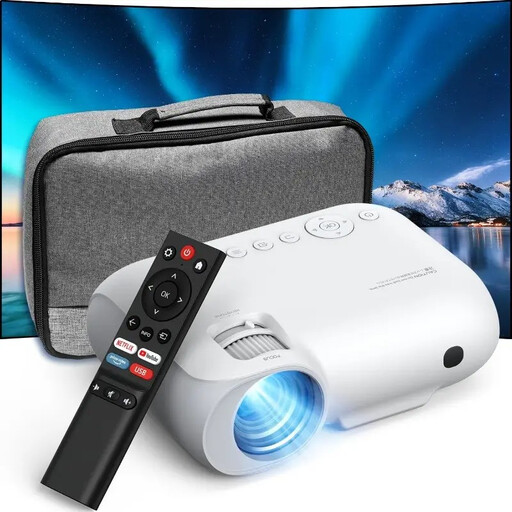 Image unavailable
YOTON Y7 native 1080p Full HD Projector, 4K Compatible
The product title lists native 1080p Full HD; compare this with your showreel’s output and check the playback setup in advance.
The title also lists 4K compatibility, Wi-Fi, Bluetooth and 9,000 lumens. This lumen rating is a product listing, not an independent measurement.
View at Joybuy
Frequently asked questions
How do I work out whether my showreel will fit on the available wall space?
Measure the distance from the lens to the wall and divide it by the throw ratio to work out the corresponding image width. Then check that the width fits within the available projection area; the calculation doesn’t tell you anything about image quality. BenQ Europe describes this ratio as the projection distance divided by the image width.
How can I tell whether my own showreel will play through the projector?
Test the final exported file in advance using the device and connection you plan to use for the screening. Check that your device’s output matches the projector’s input and whether you need a suitable cable or adapter.
Do I need permission to mount a projector in my rented home?
According to the Dutch government, small alterations that can be undone without too much expense, such as drill holes that can be filled, can be made without permission; renovations require permission. If you don’t want to attach anything, you could choose a stable freestanding setup.
What should I do if I already own a BenQ GV31?
BenQ has announced a recall of the GV31 due to a potential risk of the battery overheating, and advises owners to stop using it immediately and follow the service instructions. This applies to the GV31, not the separately mentioned GV50.
Can I show my showreel if it contains music or images created by other people?
According to the Dutch government, you need the creator’s permission to use someone else’s copyrighted work. The Dutch government also says that copyright automatically applies to work you create yourself; whether a particular screening counts as making it public depends on the circumstances.


