Who is this choice relevant to?

Creator who wants to assess picture and colour

You want your audience to be able to see lines, dark scenes and colour choices. Compare the native resolution with the lighting conditions. A manufacturer's claim about colour coverage is not an independent measurement of your animation reel.

Presenter with a cramped seating area

You need to fit in the screen, projector and seats without blocking the picture. Compare the throw ratio of the exact model with the available distance; a short-throw model may give you more placement options.

Presenter at different venues

You take the projector with you and need suitable connections and audible sound. Check the video input, audio output and power supply rather than choosing on compact size alone.

What should you look for when buying?

What to consider What should you check? Who should pay particular attention?
Visible picture and colour Compare the native resolution and stated brightness, including the unit of measurement. Assess your reel at the intended picture size and in the available ambient light. If I want to show fine lines and colour choices, I want to assess the picture in the conditions in which it will be shown. Around 31% of consumers give picture and colour top priority.
Throw distance and sightlines Measure the distance from the lens to the screen and the desired picture width. Compare these with the throw ratio and zoom of the exact model. In a small seating area, I want to fit the projector, screen and seats without anyone blocking the picture. Around 31% of consumers prioritise a suitable set-up.
Connections and sound Check that your source's video output is compatible with the projector's input. Also check for built-in sound or a suitable audio output. When showing my reel to others, I want to play the picture and soundtrack without having to work out the connections at the last minute. Around 23% of consumers prioritise playback and sound.
Moving it and repeated use Check the weight, power requirements, light source type and maintenance needs of the version you have chosen. If I take the projector between venues or use it often, I want to know what’s involved in transporting and using it. Around 15% of consumers prioritise portability and running costs.

Common buying mistakes

  • Confusing supported video resolution with native resolution

    A projector can accept a high-resolution video signal without displaying the picture at that resolution. This matters if you want to show fine details in an animation reel.

    Compare the explicitly stated native resolution with claims about supported input. Treat them as separate specifications.

  • Choosing a small projector based on portability alone

    A compact size doesn’t automatically mean the picture will be visible at your screen size and in your lighting conditions, or that the sound will suit the room.

    Test the same reel at the intended picture size, lighting level and seating positions. Also check the connections on the exact model.

    Depending on the room and your sound requirements, you may need to make extra preparations for blackout or separate audio equipment.

  • Relying entirely on digital correction to fix an angled set-up

    According to BenQ, digital keystone correction can crop the picture and reduce image quality.

    First choose a suitable throw distance and position the projector as squarely as possible to the screen. Use digital correction only when needed.

Brands to compare

BenQ

Compare a standard set-up such as the TK710 with the TK710STi's short-throw projection.

  • BenQ states that the TK710STi offers 3.200 lm and 95% Rec.709 colour coverage.
  • These are manufacturer specifications for a specific model, not an independent assessment of your reel's colour reproduction. The TK710STi's short throw does not automatically apply to the TK710.

Epson

The EF-61W is a compact Full HD option to compare if you use the projector at different venues.

  • Epson states that the EF-61W offers 700 lumens, 3LCD x RGB LED technology and built-in stereo sound.
  • These specifications alone don’t determine whether the desired picture size will be clearly visible in a bright room.

Hisense

The M2 Pro is worth considering if optical zoom and flexible positioning are important to you.

  • Hisense states that this model has optical zoom and a throw ratio of 1,0–1,3.
  • Treat claims about colour accuracy as manufacturer claims, not as an independent comparison with other models.

ViewSonic

The M2e is a compact Full HD LED option to compare if portability and connection options matter.

  • The model specifications list a weight of 1,0 kg, HDMI, USB-C and a 3,5 mm audio output.
  • Check that your chosen source works with the input you want to use. According to its specifications, the M2e does not support native 4K resolution.

XGIMI

The Elfin Flip 4K is a compact laser option from a European product range to compare if optical zoom matters.

  • The European manufacturer page states 1.600 ISO lumens and optical zoom of 0,98–1,3:1.
  • The European product information does not confirm which version is available to buy in the Netherlands. Claims about colour and brightness are not independent real-world tests.

Projectors at Joybuy

These projectors are worth comparing for an animation reel, taking into account native resolution, connections and the available throw distance.

Yoton Y6 projector, native 1080P

Yoton Y6 4K LCD projector, native 1080P

The stated native 1080P resolution is worth considering if you want to show details in your animation reel.

The product information lists Bluetooth 5.2, a built-in speaker, and HDMI, USB and AV. The title also mentions 4K; don’t treat this as the same specification as the native resolution.

Joybuy
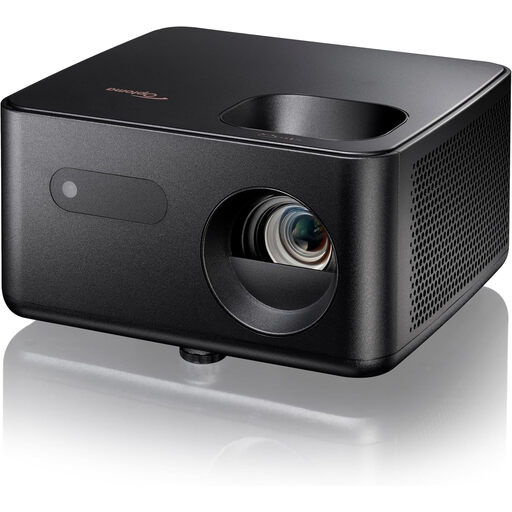
Optoma Photon Life PH31 projector

Optoma Photon Life PH31

This model may suit you if you’re looking for a projector with HDMI and built-in sound. Check first that the stated throw distance works in your seating area.

The product information lists native Full HD 1080p, 1.500 lumens, a built-in speaker and a throw ratio of 1,5:1–1,65:1. The stated throw distance is 1,99–5,47 m.

Joybuy

Optoma Photon Beam PK52 projector

Optoma Photon Beam PK52

The stated throw ratio and zoom can help you work out how to position it in your room.

The product information lists 4K UHD, 3.500 lumens, two HDMI inputs, two 15 W speakers, 1,3x manual zoom and a throw ratio of 1,21:1–1,59:1.

Joybuy

Optoma Photon Go projector

Optoma Photon Go

The stated short throw may be useful when there’s little space between the projector and screen. Check that the specified picture size suits your set-up.

The product information lists native Full HD 1080p, 650 lumens, HDMI, two built-in 10 W speakers and a throw ratio of 0,18:1. For a picture size of 60–100 inches, the stated throw distance is 26–40 cm.

Joybuy

Epson EF-22N 3LCD projector, 1080p, black and blue

Epson EF-22N 3LCD 1080p, black and blue

This standard-throw projector may suit you if the distance in your room matches its stated throw ratio.

The product information lists native 1080p (1920 × 1080), 1.000 ANSI lumens, 3LCD technology, a throw ratio of 1,00–1,82:1 and a stated screen size of 30–150 inches.

Joybuy

Frequently asked questions

How should I set up a projector for a small seated group?

First, measure the distance from the lens to the screen and decide where the seats will go. Compare that distance with the throw ratio of the exact model, and position the lens as squarely as possible to the screen. According to BenQ, digital keystone correction can crop the picture or reduce image quality.

Can I connect my laptop and a separate speaker?

That depends on your laptop's outputs and the projector's connections. According to BenQ, the TK710STi has HDMI inputs and a 3,5 mm audio output. Test the complete playback set-up, including the soundtrack, in advance.

Does the Dutch statutory guarantee end when the manufacturer's warranty expires?

No. According to the Dutch government, the statutory guarantee is separate from any manufacturer's warranty; the Netherlands has no fixed statutory guarantee period. If a product is faulty, the seller is your point of contact.

Can I show an audience other people's music or film footage in my reel?

Don’t assume that a student project automatically gives you permission. The Dutch government says that permission is generally required to use or make copyright-protected films, photographs or music available to the public. Different conditions apply to screenings that are part of education than to a party or entertainment event; check the rights for the specific reel and the nature of the gathering.
