What should you look for when buying?
Start with light output and setup distance, then check how you’ll play the film and what level of image detail you need.
| Buying priority |
What should you check? |
Who is this important for? |
| A picture that’s visible in ambient light |
Compare the stated light output, see whether you can dim the room and take the image size you want into account. |
If the lights will stay on during the get-together, I want the picture to remain visible without relying solely on a small, portable model. Around 33% of consumers give picture visibility in ambient light top priority. |
| A suitable setup location |
Measure the projection distance and screen width, and check the exact model’s throw ratio. |
If there’s only one practical spot in the room, I want to know in advance whether it can accommodate the image size I want. Around 27% of consumers prioritise the available setup location. |
| Film source and sound |
Check which app or HDMI connection you need, what’s included and whether you can connect external audio. |
If I’m organising the film and sound for a group, I want to know what extra equipment the setup requires. Around 20% of consumers give ease of playback and sound top priority. |
| Image detail |
Compare the native image resolution with the resolution of the signals the model can accept. |
If detail at the chosen image size matters to you, the resolution needs to suit the film source and viewing distance. Around 20% of consumers prioritise image detail. |
Projectors at Joybuy
This Joybuy selection includes models for portable film nights, direct streaming, limited setup distances and different image resolutions. Check each model’s light output, placement requirements and any limitations before choosing.
 No image available
XGIMI Vibe One Full HD 1080p, Google TV, JBL audio, battery and screen with stand
A good fit if you’re looking for a portable setup with a built-in battery and direct streaming; the product information lists Google TV and an included screen with stand.
The product information lists Full HD 1080p and 250 ISO lumens. According to the product information, the built-in battery provides up to 1.2 hours of video playback.
View at Joybuy
 No image available
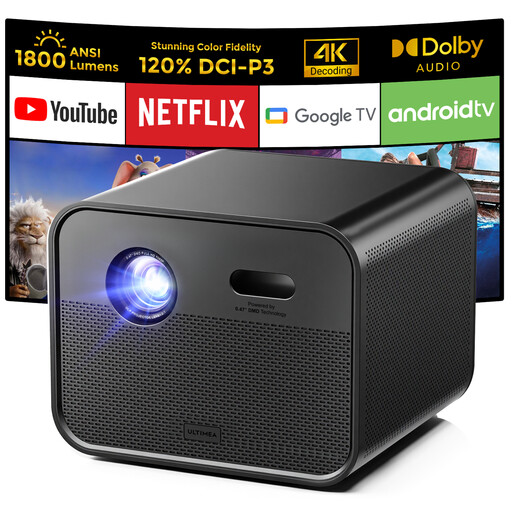
Ultimea Poseidon E100 native Full HD 1080p, Google TV
A good fit if you’re looking for native Full HD and built-in Google TV, so you may not need a separate streaming stick.
The product information lists 1,800 ANSI lumens, a native resolution of 1,920 × 1,080 and two built-in 10 W speakers. The title mentions 4K support; the native image resolution is Full HD.
View at Joybuy
 No image available
Ultimea Apollo P40 Full HD 1080p, 700 ANSI lumens
A good fit if you want a Full HD projector with built-in audio; check that its stated light output suits the room’s lighting and the image size you want.
The product information lists a native resolution of 1,920 × 1,080, automatic focus and two built-in 5 W speakers.
View at Joybuy
 No image available
Optoma H117ST short-throw DLP projector, WXGA
A good fit for a room with limited projection distance; check whether the WXGA resolution offers the level of image detail you want at your chosen image size.
The product information lists a throw ratio of 0.52:1, HDMI, a built-in 10 W speaker and 3,800 ANSI lumens. The native resolution is WXGA 1,280 × 800, not Full HD.
View at Joybuy
 No image available
Yaber L2 native Full HD, Google TV, two 5 W speakers
A good fit for a temporary setup where you want flexibility in aiming the projector; the product information lists a 360° gimbal and built-in Google TV.
The product information lists 520 ISO lumens, native Full HD, two built-in 5 W speakers and a throw ratio of 1.17:1.
View at Joybuy
Frequently asked questions
How can you check in advance whether a projector will fit in your room?
Measure the distance from the planned lens position to the wall or screen, then decide how wide you want the image to be. Compare these measurements with the exact model’s throw ratio. Epson says that the figures calculated by its distance simulator aren’t a performance guarantee and may vary by up to ±5%.
Can you stream an animated film directly on any smart projector?
No. Don’t assume so just because it’s described as ‘smart’. Epson lists Google TV for the EF-61G and an Android TV dongle with the CO-FH02. For your film, check the required app, HDMI connection and any access requirements for the streaming service on the exact model.
What should you get ready before film night?
Check the setup distance, power supply, film source and audio connection in the room as it will be arranged for the get-together. If the model has a battery, its stated playback time matters too: Anker lists up to two hours of playback from the Capsule Air’s built-in battery.
What rights do you have when buying a projector online in the Netherlands?
According to ACM ConsuWijzer, online purchases generally come with a statutory cooling-off period of up to 14 days after delivery, subject to exceptions. The statutory guarantee is separate from any manufacturer’s guarantee; if something is faulty, check which remedy applies in your circumstances.
Do you need permission to show a film at a gathering?
This depends on factors including the venue, audience and film source; you should check separately for a public or business screening. The Dutch government points out that copyright-protected work can’t simply be made available to the public. Videma describes licences for certain business and event screenings of TV programmes; check which rights apply to the specific film and screening.


