What should you look for in a projector for adventure films?
Fixed set-up in a darkened room
A good fit if: you mainly watch in the dark and have room for a standard throw distance.
Consider: BenQ lists a vertical lens shift of ±5% for the W2720i; check that this range works with your planned installation.
Fixed set-up with optical alignment
A good fit if: you can’t position the projector directly opposite the screen; Epson lists optical zoom and lens shift for the EH-TW7100.
Consider: Epson describes the EH-TW7100’s light source as a lamp, so compare the maintenance information for the specific model too.
Ultra-short-throw projection from a TV stand
A good fit if: there’s no suitable spot for a standard projector at the back of the room; Epson offers the EH-LS670W as an ultra-short-throw model.
Consider: Measure your furniture and wall, and decide on your preferred image size. ProjectorCentral points out that watching in ambient light may also call for a suitable screen.
Portable set-up
A good fit if: you want to move the projector between different viewing spots; XGIMI lists an adjustable stand, autofocus and automatic image alignment for the HORIZON S Max.
Consider: Recheck the distance, screen and ambient light at each location; automatic features can’t guarantee the best result in every set-up.
Start with your preferred image size and the light in the room. Then check the throw distance and factor in the screen, light source and connections before making your choice.
| What to consider |
What should you check? |
Who is it for? |
| Picture quality in large and dark scenes |
Check the resolution, supported film formats, light output and intended screen size. Don’t assess the lumen rating without considering how it was measured and your viewing conditions. |
When I watch adventure films on a big screen, I want to assess detail in dark scenes without losing sight of the room and screen size. Around 28% of consumers prioritise the film picture. |
| Throw distance and placement |
Measure the distance from the lens to the screen and decide on your preferred image width. Check the throw ratio, optical zoom and any lens shift for the exact model. |
I want a large picture, but only if the lens distance and preferred image width work in my room. Around 22% of consumers put finding a suitable set-up first. |
| Watching in ambient light |
Work out how much light will be in the room while you watch. Compare the stated light output with its measurement basis, and check whether the screen suits the projection method. |
When I watch while the room is still light, I want to assess in advance how the projector, screen and incoming light will work together. Around 22% of consumers give watching in ambient light top priority. |
| Complete set-up and maintenance |
Compare the cost of any screen you need, and check the light source type, maintenance information and terms for the exact version. |
I want to know what I need for a complete, practical home cinema and whether future maintenance will add to the cost. Around 17% of consumers prioritise the total cost. |
| Streaming and film sound |
Check the HDMI inputs, audio output you need and streaming options for the exact version. |
If I want to play films without a complicated source and audio set-up, I look for built-in features and the connections I need. Around 11% of consumers prioritise easy playback and sound. |
Projectors at Joybuy
This selection includes projectors for a fixed home cinema set-up and portable models for watching films in different locations.
 No image available
Optoma UZ38X 4K UHD Dual-Laser Projector
A fixed home cinema set-up where the throw ratio and zoom suit the available room distance.
Joybuy lists a dual-laser light source, 4K UHD, HDR10/HLG, a throw ratio of 1,21:1–1,59:1, 1,3× optical zoom and a 15 W speaker.
According to the product listing, a projection screen and source device aren’t included.
View at Joybuy
 No image available
XGODY Gimbal A8 projector
A portable viewing set-up for anyone who wants to use a projector with an integrated gimbal stand.
Joybuy lists native 1080p, 1.200 ANSI, a throw ratio of 1,08:1 and Android 14. The product description mentions a stand that rotates from 0° to 90°, automatic focus and automatic image correction.
View at Joybuy
 No image available
XGIMI MoGo 4 Match Night EU Edition with EA SPORTS FC 26 game code
A portable Full HD projector for anyone who wants to watch films in different locations, with built-in streaming and sound.
Joybuy lists 1080p, 450 ISO lumens, Google TV, Harman Kardon audio and a battery.
View at Joybuy
 No image available
Video projector with built-in apps and Play Store
A flexible film-viewing set-up for anyone who wants to use built-in streaming apps.
Joybuy lists an image size of 50–200 inches, digital zoom of 50%–100%, Wi-Fi 6, Bluetooth and 180° rotation. The product description mentions built-in apps and automatic screen correction.
View at Joybuy
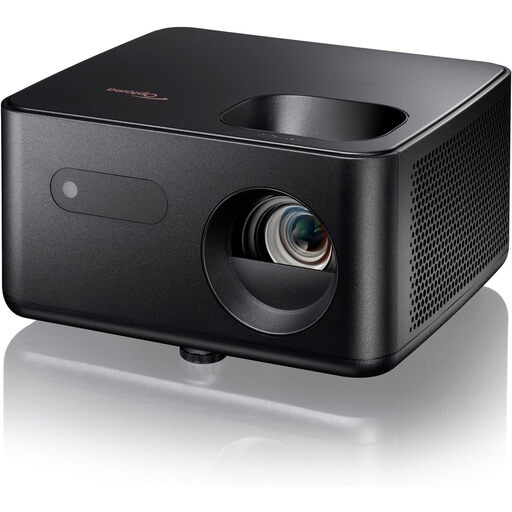 No image available
Optoma Photon Life PK31
A compact, portable Full HD projector for anyone who wants to watch films in different locations.
Joybuy lists 1080p, an image size of up to 120 inches, LED technology, HDMI and USB. The product description also mentions built-in speakers.
View at Joybuy
Frequently asked questions
How can you check whether a projector will fit in your chosen spot?
Measure the distance from the planned lens position to the screen and decide on your preferred image width. Compare the two with the throw ratio and zoom range of the exact model; ProjectorCentral explains how lens distance and image size are linked.
Can a white wall replace a projection screen?
A white wall can be used as a projection surface, but texture and reflectivity can vary from wall to wall. Assess the wall where you plan to watch; in ambient light or with ultra-short-throw projection, the suitability of the screen type also matters, as ProjectorCentral explains.
What should you check before use and when it comes to maintenance?
Follow the instructions for your chosen model for installation, ventilation and maintenance. Check the light source type and model-specific information about lifespan and servicing; Epson, for example, describes the EH-TW7100’s light source as a lamp.
Who should you contact if the projector turns out to be faulty?
According to the Dutch government, the retailer is responsible for providing a product that works as it should. Report the problem to the retailer; they can’t simply send you to the manufacturer to resolve it. The Dutch government notes that free repair or replacement may be available if a product is faulty.
Do you have a cooling-off period when buying online in the Netherlands?
According to the Dutch government, consumers buying remotely from a business usually have a 14-day cooling-off period. Check whether the terms apply to your purchase; under the same guidance, an online purchase from a private individual doesn’t automatically count as a distance sale in this sense.


