Mostly printing text in black and white? A monochrome laser printer is a sensible choice. For handouts where colour really adds value, a colour ink tank printer could be a better fit. Also consider how much you’ll print, whether you need automatic double-sided printing, and whether you’ll need to scan or copy paper originals. If there are long gaps between print jobs, pay particular attention to the maintenance requirements of an inkjet printer.
Who is this choice for?
Text-based workshop organiser
Produces mainly easy-to-read black-and-white worksheets in multiple copies and doesn’t want to keep refilling the paper tray. The Consumentenbond identifies the choice between black-and-white and colour as an important factor when choosing a printer.
Visual handout creator
Needs colour for things such as diagrams or activities, and wants to choose a printer that suits their regular printing needs. The Consumentenbond describes colour and printing technology as factors to consider.
Coordinator handling originals
Regularly needs to scan or copy paper originals, so checks the features of the exact model, such as whether it has an automatic document feeder.
What should you look for when choosing?
Start by considering the content of your handouts and how often the group will print. Then check whether you need double-sided printing, scanning or copying, and the ability to handle originals.
| Consideration |
What to look for |
Who is this important for? |
| Printing sets of text |
Check for A4 support, automatic double-sided printing, a paper tray, and whether the drum needs replacing as well as the toner. The Brother HL-L2445DW is an example of a specific model, not a minimum requirement. |
If I produce lots of text-based handouts, I want double-sided printing and to refill the paper less often. Around 40% of consumers put this text-focused need first. |
| Colour for activities |
Compare models based on your own mix of black-and-white and colour pages, and check which ink bottles or cartridges are compatible with the exact model. |
If colour is needed to make diagrams or illustrations clear, I want to know whether the model I choose will suit our needs. Around 30% of consumers give functional colour the highest priority. |
| Handling originals |
Check whether the model can scan and copy, what type of document feeder it has, and whether you need double-sided scanning. Double-sided printing alone doesn’t tell you whether it can scan both sides. |
If I want to copy or scan paper originals directly, I need more than a printer alone. Around 20% of consumers put handling originals first. |
| Use with long gaps between print jobs |
Consider how much time passes between print jobs. If you don’t print often, an inkjet print head may need cleaning, so also consider a monochrome laser printer if you don’t need colour. |
If the printer sits unused for a long time between sessions, I want to factor in the maintenance that may be needed with an inkjet printer. Around 10% of consumers give suitability for these gaps the highest priority. |
Things to consider before buying
-
Assuming the stated page yield matches your needs
The stated ink yield doesn’t guarantee how many workshop sets your group can print. If you don’t print often, an inkjet printer may also need cleaning.
Compare your expected usage with the information for the exact model, and factor in the gaps between sessions when choosing.
-
Assuming a printer can also make copies
A model with printing only can’t scan or copy a paper original directly. The type of document feeder also varies between models.
Decide in advance whether the group will print digital files or also handle paper originals, and check the scanning and copying features of the model you choose.
Printer brands to consider
Brother
The HL-L2445DW is an example of a monochrome laser printer for A4 handouts containing mainly text.
- According to Brother, this model has automatic double-sided printing, a 250-sheet paper tray, and toner and drum units that can be replaced separately.
- This specific model is for printing only: it doesn’t offer colour printing, scanning or copying.
HP
The Smart Tank 7005 is a colour ink tank model with printing, scanning and copying functions.
- According to HP, this model supports automatic double-sided printing.
- Infrequent use can mean inkjet printers need cleaning. A stated ink yield doesn’t guarantee how much ink your own handouts will use.
Canon
The MAXIFY GX4050 is a colour ink tank model for groups that also handle paper originals.
- Canon specifies that this model has automatic double-sided A4 printing, Ethernet and a 35-sheet automatic document feeder.
- The maintenance cartridge can be replaced separately; these features aren’t automatically available on other Canon models.
Epson
The EcoTank ET-2950 is a multifunction colour ink tank printer for A4.
- Epson lists printing, scanning, copying and automatic double-sided printing among this model’s features.
- Check the specifications for the exact model; don’t assume that features of the ET-2950 are available on another EcoTank model without checking.
Printers available at Joybuy
The models below range from colour printers with scanning and copying functions to monochrome document printers. Choose according to your need for colour, whether you’ll be handling originals, and the connections you need.
 Image unavailable
HP Smart Tank 7305 Wireless All-in-One
Suited to groups that print in colour and also want to scan or copy paper originals.
Automatic double-sided printing; 35-sheet automatic document feeder; 250-sheet paper input capacity.
View at Joybuy
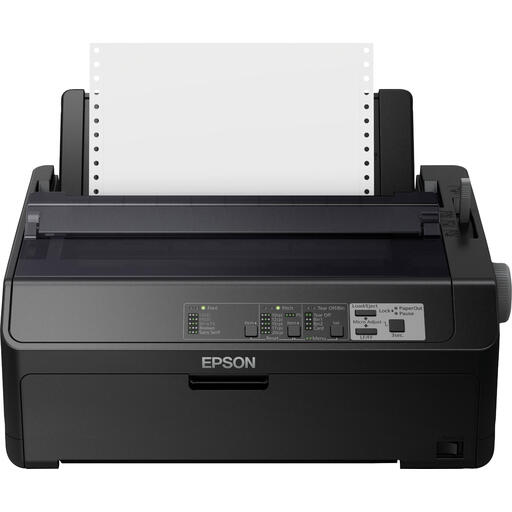 Image unavailable
Epson FX-890IIN dot matrix printer
A monochrome model for printing documents; check whether dot matrix printing is suitable for the type of handout you need.
240 x 144 DPI; 612 cps; Ethernet, parallel and USB connections.
View at Joybuy
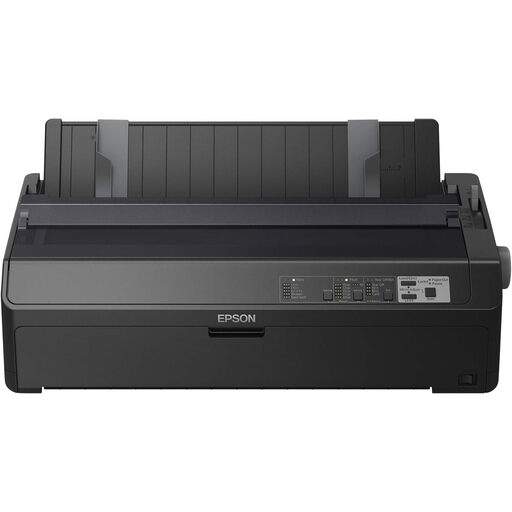 Image unavailable
Epson FX-2190IIN dot matrix printer
A monochrome model for printing documents; consider whether dot matrix printing is suitable for your group’s handouts before buying.
240 x 144 DPI; 738 cps; Ethernet, parallel and USB connections.
View at Joybuy
 Image unavailable
Brother HL-L5210DW
Suitable for black-and-white A4 handouts when the group wants automatic double-sided printing.
Monochrome laser printer; automatic double-sided printing; Wi-Fi, Ethernet and USB.
This model is for printing only and doesn’t offer colour printing, scanning or copying.
View at Joybuy
 Image unavailable
Brother HL-L5210DN A4 laser printer
An option to consider for A4 documents when the group needs a wired network connection.
1200 x 1200 DPI; LAN connection.
View at Joybuy
Frequently asked questions
Is double-sided printing the same as double-sided scanning?
No. Check these features separately for the exact model: automatic double-sided printing doesn’t tell you whether the document feeder can scan both sides too.
How do I compare printers if the number of participants varies?
Estimate the number of printed sides needed for each workshop, and the split between black-and-white and colour. Then compare models based on the same usage scenario and check which consumables and replaceable parts they require.
What should I check if several volunteers will use the printer?
Check which computers or phones need to print, and whether the venue requires Wi-Fi, USB or Ethernet. If the handouts contain personal data, the group must determine appropriate security measures in line with the Autoriteit Persoonsgegevens; don’t leave these printouts unattended.
What warranty applies if the group buys the printer?
The Rijksoverheid explains that there is no fixed statutory warranty period for a consumer purchase, and that the retailer is the point of contact. Whether consumer protection rules apply when the group buys a printer depends on who is legally making the purchase; check this before assuming the group has the same rights.


