
One-off form printer
You mainly want to print legible A4 visitor forms for a one-off project and don’t necessarily need colour or a scanner.


For visitor registers that consist mainly of text, a straightforward black-and-white printer is the obvious choice. Choose colour, scanning or copying only if your school project needs those features too. Also compare duplex printing and the cost of compatible toner or ink based on how much you expect to print. The Consumers’ Association lists these as relevant factors when choosing a printer.
You mainly want to print legible A4 visitor forms for a one-off project and don’t necessarily need colour or a scanner.
You expect to replace registers regularly, so you want to factor in consumables and duplex printing.
You want to create colour pages as well as registers, or scan and copy documents.
A good fit if: you mainly print text-based registers, especially if there are long gaps between print jobs.
Bear in mind: you can’t print in colour; check the price and compatibility of replacement toner. Brother Netherlands lists duplex printing as a feature of the HL-L2400DWE; this is not a comparison of printing costs.
A good fit if: you want to print colour pages as well as registers, or scan and copy documents. Canon lists these features for the PIXMA TS3750i series.
Bear in mind: if you don’t print often, inkjet ink can dry out, and ink may be used during cleaning. The Consumers’ Association highlights this as something to consider with inkjet printers.
A good fit if: you also regularly print colour pages outside the project and want a refillable system. Epson lists A4 printing, duplex printing, scanning and copying among the features of the EcoTank ET-2950.
Bear in mind: compare the purchase price with how much you expect to print. Yield and savings figures on a product page are manufacturer claims, not a guarantee of what you’ll get.
| Consideration | What should you check? | Who is this important for? |
|---|---|---|
| Legible text forms | Check that it supports A4, and decide whether you only need to print or also want to scan and copy. | If I mainly need a clear text-based register and don’t use colour, I don’t want to choose features I don’t need. Around 40% of consumers prioritise text forms. |
| Costs when reprinting | Compare compatible toner, cartridges or ink bottles with how much you expect to print; don’t assume stated page yields will match your results. | If registers need to be reprinted regularly, I want to factor in ongoing consumable costs. Around 30% of consumers give these costs top priority. |
| Colour and extra features | Check each model separately to see whether it prints in colour, scans and copies. | If I also need colour pages or scanning and copying for the project, I want to be able to use those features on the same device. Around 20% of consumers prioritise colour or digitisation. |
| Handling printouts securely | Agree who can view completed sheets, where they’ll be stored and when they’ll be destroyed; check whether the exact model has a secure printing feature. | When using a shared school printer for real visitor details, I want to stop unauthorised people from seeing completed registers. Around 10% of consumers give this privacy-conscious approach top priority. |
The cost of consumables depends on the model you choose and how much you print. If you print infrequently, an inkjet printer may also use ink for cleaning.
For the exact model, compare compatible refills with the number of registers you expect to print.
Colour printing, scanning, copying and automatic duplex printing are separate features; having one doesn’t mean the printer has the others.
Check each feature on the specification page for the exact version before you choose.
If a register contains real personal data, unauthorised people may be able to see it if completed sheets are left where they can access them.
Agree with the school who can view the register, where completed sheets will be stored and when they’ll be destroyed. The Dutch Data Protection Authority stresses that access to personal data must be appropriately restricted.
According to Brother Netherlands, the HL-L2400DWE is an A4 black-and-white laser printer with wireless connectivity and duplex printing.
Canon lists printing, scanning and copying for the PIXMA TS3750i series, along with FINE cartridges and mobile printing features.
Epson lists a refillable colour ink tank, A4 printing, duplex printing, scanning and copying for the EcoTank ET-2950.
HP lists black-and-white printing, duplex printing and Wi-Fi for the LaserJet M209dw.
This selection includes a portable document printer, colour printers and dot-matrix models for document or form-related work. Check each model to make sure its features, print size and workflow suit your visitor register and other project tasks.
 No image available
An option if you want to print documents on the go or at home; check that a mobile workflow suits how the printer will be used at school.
Portable and wireless according to the product name.
 No image available
Suited to project work where you want to print in colour as well as produce registers, and scan or copy documents.
The product name lists wireless use and duplex printing.
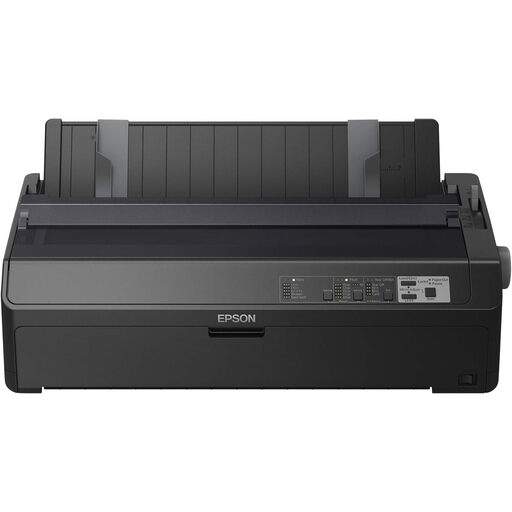 No image available
Worth considering for a project with a business document workflow; check that the type of register you need and your printing process suit this model.
240x144DPI; 738cps according to the product name.
 No image available
An A4 inkjet option if you may need to scan or copy as well as print; check that these features are available on the exact version.
4800 x 600DPI according to the product name.
 No image available
Worth considering for form-focused document work; check that the type of forms you need and the connection suit the school’s workflow.
180 x 360 DPI; 540 Cps according to the product name.
Not if you’re only printing text forms in black and white. If you also want to create colour project pages or scan documents, check which features the exact model offers.
Factor the gaps between print jobs into your choice. The Consumers’ Association points out that ink can dry out if an inkjet printer is used infrequently. If you don’t need colour, it’s also worth comparing a black-and-white laser printer.
Compare compatible refills for the exact model with how often and how much you expect to print. Manufacturers’ page-yield figures don’t guarantee the yield you’ll get with your usage.
To process personal data, the school needs an appropriate lawful basis under the GDPR. The Dutch Data Protection Authority also advises deciding on the purpose, the data needed, appropriate security and the retention period. Buying a printer does not, in itself, give permission to record personal data.