Do you mainly print text forms, even after long periods without using the printer? A black-and-white laser printer is a sensible starting point, as toner doesn’t dry out like inkjet ink. Choose colour if it’s needed for the form layout; a scanner or copier is most useful when your group processes completed return forms.
Which printer is right for you?
Volunteer who prints text forms occasionally
You need legible black-and-white forms and a printer that suits an irregular printing schedule. A scanner or colour function is only necessary if your form process calls for it. The Consumers’ Association explains the trade-offs between laser and inkjet printers.
Coordinator of larger print runs
You need to print lots of forms during a campaign, so consider paper capacity, duplex printing and the consumables required. Brother lists a 250-sheet paper tray for the HL-L2445DW.
Administrator of colour or return forms
You need colour for the form layout, or you need to scan and copy completed paper forms. These tasks require different features from simply printing text; the Consumers’ Association explains the differences.
What should you look for?
| What to consider |
What should you check? |
Who is this important for? |
| Occasional text printing |
Check that the form remains easy to read in black and white, and that the printer works with the computer or phone you use. |
If I sometimes go a long time between campaigns without printing, I want to be able to print text forms without colour. Around 33% of consumers prioritise reliable occasional black-and-white printing. |
| Larger print runs |
Estimate how many forms you’ll need for each campaign and check the paper capacity, duplex printing and suitable toner or ink. |
For a larger campaign, I want to print lots of forms and know which supplies I’ll need. Around 25% of consumers prioritise larger print runs and managing them. |
| Colour on forms |
Print a test copy in black and white; if colour is essential, compare printer options based on your expected usage. |
If colour coding is needed to distinguish orders, black and white won’t be enough for my forms. Around 25% of consumers consider colour their main selection criterion. |
| Processing returned forms |
Decide whether volunteers need to scan or copy completed forms, and whether an automatic document feeder would be useful. |
When paper orders are returned, I want to be able to process the completed forms and check who can access any personal data they contain. Around 17% of consumers prioritise scanning or copying returned forms. |
Pitfalls when choosing
-
Looking only at the printer itself
For repeated printing, you also need to factor in paper and compatible toner or ink. Brother says the HL-L2445DW has a separately replaceable toner cartridge and drum unit.
Compare the consumables and the number of forms you expect to print over the same period of use.
-
Choosing colour when black and white will do
Infrequent use can cause problems with inkjet printers if the ink dries in the print head. The Consumers’ Association notes that this is also something to consider with ink tank printers.
Test the form layout in black and white first, and consider how long the printer might sit unused between print jobs.
-
Assuming any replacement toner will work
HP says the LaserJet M209dw has dynamic security that can block cartridges without a new or reused HP chip.
Before buying, check the consumables requirements for the specific model you’re considering.
-
Thinking of scanning completed orders as just another printer feature
Completed forms may contain personal data. The Dutch Data Protection Authority considers collecting and storing this kind of data to be processing.
Decide who can access completed forms and how long the data needs to be kept for its intended purpose.
Brands to compare
Brother
The HL-L2445DW is a black-and-white laser printer for text forms and larger A4 print runs.
- Brother says the HL-L2445DW offers automatic duplex printing, a 250-sheet paper tray and separately replaceable toner and drum units.
- This model doesn’t print in colour and has no built-in scanning or copying function. Brother lists page yields as manufacturer specifications.
HP
The LaserJet M209dw is a compact black-and-white laser printer with no built-in scanning function.
- HP lists duplex printing and dual-band Wi-Fi for this model.
- HP also says its dynamic security can block cartridges without a new or reused HP chip. So check the requirements for replacement toner for this specific model.
Epson
The EcoTank ET-2860 is an A4 colour ink tank printer with scanning and copying functions.
- Epson lists refillable tanks and a stated yield of up to 4.500 black-and-white and 7.500 colour pages per set of bottles.
- These figures are provided by the manufacturer. As an inkjet printer, this model may be prone to problems caused by drying ink if it’s used infrequently.
Canon
The MAXIFY GX4050 combines colour ink tanks with duplex A4 printing, scanning and an automatic document feeder.
- Canon specifies Ethernet, a document feeder for up to 35 A4 sheets and two paper feeds for plain paper.
- The extra feed features are most useful when your group processes completed paper returns; this model uses inkjet ink.
Printers available at Joybuy
This selection includes black-and-white printers for text forms, as well as colour or multifunction models for groups that need colour, scanning or copying.
 No image available
HP Smart Tank 7305 Wireless All-in-One Color Printer
Could be suitable if your group prints colour forms and wants to scan or copy completed returns.
The product name lists colour, duplex printing, copying and scanning. As an inkjet printer, this model also requires you to consider the possibility of ink drying out if it’s used infrequently; the Consumers’ Association explains this risk with inkjet printers.
Joybuy
 No image available
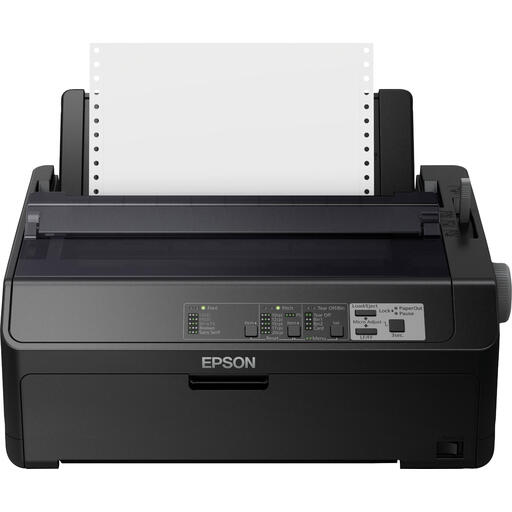
Epson FX-890IIN Dot Matrix Printer
The product description mentions black-and-white documents and high print volumes; check that a dot matrix printer suits your group’s forms and workflow.
The product name lists 240 x 144 DPI and 612 cps.
Joybuy
 No image available
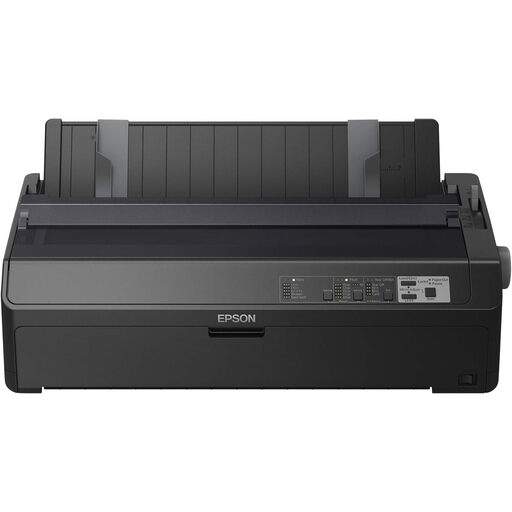
Epson FX-2190IIN Dot Matrix Printer
Could be an option for larger quantities of black-and-white forms if a dot matrix printer suits the workflow you need.
The product name lists 240 x 144 DPI and 738 cps.
Joybuy
 No image available
Canon PIXMA MG2556S
Could be suitable if your group wants to scan or copy completed paper returns as well as print A4 forms.
The product name lists an A4 inkjet printer with 4800 x 600 DPI. Bear in mind that inkjet ink can dry out if the printer is used infrequently; the Consumers’ Association explains this risk with inkjet printers.
Joybuy
 No image available
Epson WorkForce Pro WF-C5390DW
Could be suitable for A4 colour forms; check that the printer fits your group’s connection requirements and usage.
The product name lists an A4 colour inkjet printer with Wi-Fi and 4800 x 1200 DPI. The Consumers’ Association notes that inkjet ink can dry out if used infrequently.
Joybuy
Frequently asked questions
Is a laser printer or an ink tank printer better if we only print forms occasionally?
If black and white is enough and the printer is left unused for long periods, a laser printer avoids the risk of inkjet ink drying out. If you need colour, compare an ink tank printer with your usage pattern. According to the Consumers’ Association, an inkjet print head can still become clogged if an ink tank printer is used infrequently.
Do we need a printer with a scanner and automatic document feeder?
Not if you only need to print blank forms. If your group processes completed paper returns, scanning may be useful. An automatic document feeder, such as the one Canon specifies for the MAXIFY GX4050 for up to 35 A4 sheets, can be handy when you have several loose sheets.
What should we check about toner and other replacement parts?
Check the model numbers and requirements for compatible consumables. Brother lists separate toner and drum units for the HL-L2445DW; HP warns that the M209dw’s dynamic security can block certain cartridges without an HP chip.
What warranty applies if our community group buys the printer?
Check who is legally making the purchase and which terms apply to that buyer. The Government of the Netherlands explains statutory consumer guarantees and says the retailer is the point of contact for faulty consumer products. This doesn’t automatically mean that a purchase made in an organisation’s name is covered by the same consumer rights.
Does the GDPR apply to completed order forms?
If your group collects or stores completed forms containing identifiable personal data, this counts as processing personal data under the Dutch Data Protection Authority’s guidance. Consider who needs access, what security measures are appropriate and how long the data needs to be kept for its intended purpose; the GDPR doesn’t set one general fixed retention period for this.


