Who is this printer choice for?

For making easy-to-read grids

You mainly print black-and-white sheets with numbers and lines, and want participants to be able to distinguish them clearly, even if the printer hasn’t been used for a while. The Consumentenbond describes laser printing as an option for sharp text; do a test print to see how your grid turns out.

For organising regular print runs

You print several copies for meetings and want to factor in paper and consumables. Compare laser and ink-tank printers based on how much your group expects to print, not just the purchase price.

For managing a shared printer

Several group members need to be able to print, or the group wants to scan and copy paper sheets. Check the connections and features of the exact model: wireless printing does not automatically mean a device can also scan or copy.

What should you look for when choosing?

Monochrome laser printer

Choose this option if: you mainly print black-and-white grids, possibly with longer gaps between meetings.

Trade-off: this type of printer does not print in colour; a print-only model cannot scan or copy on its own.

Ink-tank printer

Choose this option if: you regularly print larger batches or also need colour, scanning or copying.

Trade-off: cleaning cycles can use ink if the printer is used infrequently; the stated bottle yield is no guarantee of how many grids you’ll be able to print.

Cartridge colour printer

Choose this option if: you need colour for other group materials and also want to compare the cost of replacement cartridges.

Trade-off: colour is not necessarily needed for a grid that is easy to read in black and white.

What to consider What to look for when buying Who is this important for?
Legible numbers and lines Print your own grid on the paper you intend to use, at full size. Check the numbers, fine lines, margins and contrast. If I want participants to be able to read the grid easily, I first check how my own file prints. Around 36% of consumers put readability and reliable use after breaks first.
Ongoing printing costs Estimate the number of pages per meeting and per month. Compare the printer, compatible toner or ink, any drum and paper over the same period. When printing multiple batches, I want to weigh up the ongoing cost of consumables against the purchase price. Around 29% of consumers put these costs first.
Print runs and shared use Check the paper tray, connections and automatic duplex printing on the exact model. If several volunteers need to be able to print, I look for connections and paper handling that suit our print runs. Around 21% of consumers put shared printing and print runs first.
Colour, scanning and copying Decide whether you need colour and whether you want to scan or copy paper sheets directly using the printer. If our group also needs colour announcements or digital copies, I check these features separately. Around 14% of consumers put these extra features first.

Buying pitfalls

  • Comparing only the purchase price

    For regular group print runs, you also need to factor in toner or ink, paper and any separate consumable parts. For example, Brother lists a separate toner and drum for the HL-L2400DWE.

    Compare models based on the same estimated number of pages and the same period of use. Don’t treat a stated yield as a guaranteed result for number grids.

    If the model has a separate drum, remember to include this replacement part in your costs.

  • Assuming wireless also means scanning and copying

    According to Canon, the i-SENSYS LBP122dw II is a print-only printer, so wireless printing does not make it an all-in-one device.

    Check the printing, scanning and copying features separately for the exact model version.

    If the group wants to digitise paper examples, you may need a separate scanner or another device.

  • Assuming an inexpensive refill will work

    HP warns that the LaserJet M209dw’s dynamic security may block cartridges that do not have a new or reused HP chip.

    Before you buy, check the full cartridge code and the refill requirements for the model you’ve chosen.

Brands to consider

Brother

The HL-L2400DWE is an A4 black-and-white laser printer with print-only functionality, aimed at grids and group print runs.

  • Brother lists automatic duplex printing, Wi-Fi, USB and a 250-sheet paper tray for this model.
  • Brother lists separate TN-2510 toner and a DR-2510 drum. EcoPro is optional; compare the compatible consumables for your needs.

Canon

The i-SENSYS LBP122dw II is a black-and-white laser printer with print-only functionality.

  • Canon specifies automatic A4 duplex printing, Wi-Fi, USB, Ethernet and a 150-sheet cassette.
  • This model does not scan or copy. Canon gives a recommended monthly volume of 150 to 1,500 pages; this is not a minimum for every buyer.

HP

The LaserJet M209dw is a compact black-and-white laser printer for groups that mainly print documents.

  • HP lists duplex printing and dual-band Wi-Fi for this model.
  • HP warns that dynamic security may block cartridges without a new or reused HP chip, including after firmware updates. Check this if your group relies on a particular refill.

Epson

The EcoTank ET-2950 is an ink-tank option for anyone who needs colour, scanning or copying as well as printing.

  • Epson lists A4 printing, duplex printing, scanning and copying for this model.
  • The stated yield per bottle is Epson’s estimate, not a measured yield for number grids. Compare it with your group’s expected use.

Joybuy products

These Joybuy products suit different ways of printing documents for a group. For printing grids, check that the paper size, connection and print settings work with your file, and do a test print first wherever possible.

Phomemo A282U portable wireless printer, black

Phomemo A282U portable wireless printer, black

A portable option if you want to print documents from a mobile device. Check that the app and paper output are suitable for your grid.

Joybuy
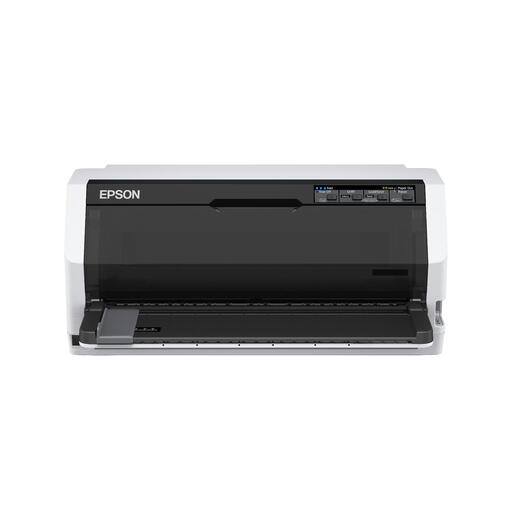
Epson LQ-780 dot matrix printer

Epson LQ-780 dot matrix printer

A monochrome dot matrix option for documents and continuous forms; do a test print to check whether the numbers and lines are easy to read.

Stated resolution: 360 x 180 DPI. Stated speed: 487 cps.

Joybuy

Epson PLQ-35 dot matrix printer

Epson PLQ-35 dot matrix printer

A monochrome dot matrix option for forms and documents; check with a test print that your chosen grid size is easy to read.

Stated resolution: 180 x 360 DPI. Stated speed: 540 cps.

Joybuy

Brother HL-L5210DW wireless A4 monochrome laser printer

Brother HL-L5210DW wireless A4 monochrome laser printer

An A4 monochrome laser option for black-and-white grids and shared printing. Check that the connections are suitable for your group’s devices and network.

Joybuy

Brother HL-L5210DN A4 laser printer, 1200 x 1200 DPI

Brother HL-L5210DN A4 laser printer, 1200 x 1200 DPI

An A4 laser option for documents and printing over a wired network. Check that this connection suits your group’s shared workspace.

Stated resolution: 1200 x 1200 DPI.

Joybuy

Frequently asked questions

How can I stop numbers or lines being cut off at the edge?

Print your own grid on the paper you intend to use, and check the scaling setting and print margins. Canon specifies 5 mm margins on each side for the i-SENSYS LBP122dw II; don’t assume this applies to other models.

Is an inkjet printer a good choice if the group only meets occasionally?

Cleaning cycles can use ink if an inkjet printer is used infrequently. If you don’t need colour, compare it with a black-and-white laser printer too, and do a test print of the grid with both options.

What should the group check about toner and maintenance?

Check the full model code and the consumables it uses. Brother lists both TN-2510 toner and a separate DR-2510 drum for the HL-L2400DWE. For the HP LaserJet M209dw, you should also check HP’s requirements for the cartridge chip.

What warranty applies if a volunteer buys the printer?

If an individual buys as a consumer, ACM ConsuWijzer explains that statutory warranty applies alongside any commercial warranty; if a product is faulty, the retailer is the point of contact. If the printer is bought in the name of an association or business, don’t assume these consumer rules apply and check the relevant terms of purchase.

Where can you take an old printer in the Netherlands?

The Dutch government lists municipal collection points, among other options. When you buy a similar new device, individuals can also use the retailer’s free take-back scheme, including for online purchases. The Dutch government states that this scheme does not apply to equipment owned by businesses.
