For standard text minutes, a printer with a suitable network connection and automatic double-sided printing is a practical starting point. Match the paper capacity and consumables to how much you print and how often. If the minutes contain confidential information or personal data, also consider how print jobs are released and collected: network security is not the same as secure print release. The model specifications mentioned are provided by manufacturers and are not based on independent performance tests.
Who is this relevant to?
Users sharing one printer
You want to print minutes from several workstations and mainly need a suitable network connection and straightforward paper handling. According to Brother, the HL-L2445DW and HL-L5210DW models offer different network and paper options.
Teams handling confidential minutes
You handle minutes containing confidential information or personal data, so you need to consider who can access the digital documents and printed copies. The Dutch Data Protection Authority says organisations should determine appropriate security measures based on the risks.
Teams printing lots of text
You regularly print longer documents or multiple copies and want to take paper capacity, toner yield and replacement requirements into account.
What should you look for when choosing?
| What to consider |
What should you check? |
Who is this important for? |
| Shared printing |
Check that Ethernet or Wi-Fi and your chosen printing method are compatible with the office network. Ask the network administrator if needed. |
If I want to print from different workstations, the connection needs to suit our setup. Around 33% of consumers put shared access first. |
| Confidential printing |
Consider whether print release at the device is needed and how users will collect the printed pages. |
When minutes contain personal data or confidential information, I want to prevent unauthorised people from collecting the printout. Around 25% of consumers prioritise confidentiality. |
| Paper handling |
Compare the standard tray with any optional feeders and check whether automatic double-sided printing is available. |
For longer minutes or multiple copies, I want to refill the paper less often and avoid having to print double-sided manually. Around 25% of consumers prioritise print volume. |
| Consumables |
Check the exact toner or ink model, its stated yield and whether the drum is replaced separately. |
If I print regularly, I want to know in advance which parts need replacing for my model. Around 17% of consumers focus mainly on consumables and replacements. |
What to consider when buying
-
Confusing network security with secure print collection
A secure network connection does not automatically control who can collect a printout from the printer. The Dutch Data Protection Authority requires organisations to assess the risks involved in processing data and determine appropriate measures.
Consider how printouts should be collected and check whether print release is available and necessary for the specific model and configuration.
-
Mistaking maximum paper capacity for standard capacity
For the Canon i-SENSYS LBP243dw II, the stated maximum capacity depends on an optional cassette.
Check which paper feeder comes as standard with the model and whether you need an extra feeder to get the capacity you want.
So, a higher paper capacity may require a separate paper cassette.
-
Overlooking replaceable parts
Toner, ink and drums vary by model. Cartridge conditions can also affect which consumables you can use.
Check compatibility and the stated yield for the exact model. Don’t assume parts are interchangeable between printers.
Brands to consider
Brother
The models reviewed range from the HL-L2445DW and HL-L5210DW to the HL-L6410DN.
- Brother lists network connectivity and automatic double-sided printing for the HL-L2445DW; the paper feed on the HL-L5210DW can be expanded.
- Secure Print+ and NFC authentication are specific features of the HL-L6410DN, not the entire product range.
Canon
The i-SENSYS LBP243dw II is a monochrome laser printer with network connectivity and expandable paper feed.
- Canon specifies a standard 250-sheet cassette and a 100-sheet multipurpose feeder.
- The maximum capacity of 900 sheets depends on an optional cassette; ‘II’ is part of the model name.
Epson
According to Epson, the WorkForce Pro WF-M5399DW is a business monochrome inkjet printer with automatic double-sided printing.
- This model offers an inkjet option for organisations looking to include this technology in their printer management.
- Epson’s claims about total cost and energy use come from the manufacturer. Don’t compare them with other models unless the usage and measurement basis are the same.
Kyocera
The ECOSYS PA3500wx is an A4 printer whose reviewed specifications include Wi-Fi and expandable paper feed.
- Kyocera states speeds of up to 35 A4 pages per minute and a total capacity of 850 sheets with optional feeders.
- The stated capacity depends on add-ons; reliability claims are not independent test results.
HP
According to HP, the LaserJet Pro 4002dw is a monochrome printer with Wi-Fi and automatic double-sided printing.
- These features may be useful if you want to print wirelessly and need double-sided output.
- HP states that its dynamic security can block cartridges with a chip from another manufacturer.
Joybuy products
These Joybuy products suit different printing needs, from wireless inkjet printers to dot-matrix printers. Before buying, check that the printing technology, connections and paper handling meet your needs for minutes and a shared workspace.
 No image available
HP Smart Tank 7305 Wireless All-in-One Color Printer
The product name describes a wireless colour printer with printing, copying, scanning and double-sided printing. Check whether you need these extra features.
Joybuy
 No image available
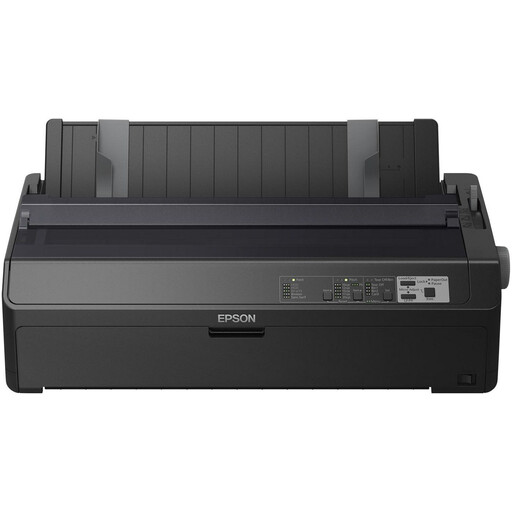
Epson FX-2190II
This is a monochrome dot-matrix printer. Check that this printing technology is suitable for the layout you want for your minutes.
The product name specifies 240 x 144 DPI and 738 Cps.
Joybuy
 No image available
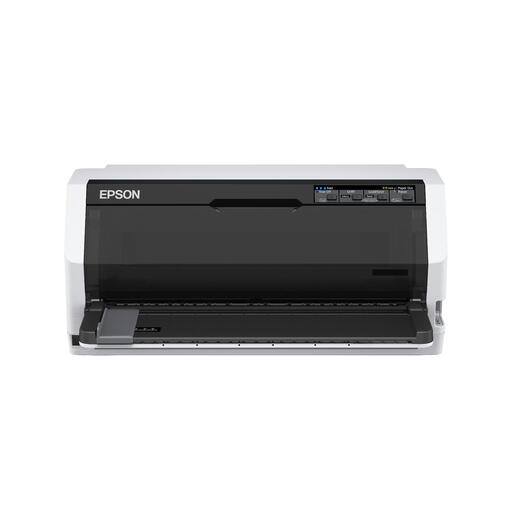
Epson LQ-780
According to the product information, this monochrome dot-matrix printer has USB and parallel connections. Check which connection your shared workspace supports.
The product name specifies 360 x 180 DPI and 487 cps.
Joybuy
 No image available
Epson PLQ-35
This is a dot-matrix printer. The product information states that the model can print up to six copies at once. Check that this feature suits your documents.
The product name specifies 180 x 360 DPI and 540 Cps.
Joybuy
 No image available
Epson WorkForce Pro WF-C5390DW
This A4 colour inkjet printer lists Wi-Fi, Ethernet and automatic double-sided printing. Check which connection suits your network.
The product information states a paper capacity of up to 1,830 sheets. The product name specifies 4800 x 1200 DPI.
Joybuy
Frequently asked questions
Do I also need a scanner or colour printer for minutes?
Not if you only want to print text minutes. According to Brother, the HL-L2445DW is a monochrome printer with printing only. Choose extra features only if you also want to digitise documents or need colour.
What should I consider when setting up a printer on a shared network?
Check with the network administrator which connection and printing method are supported. According to Brother, the HL-L2445DW has Ethernet, 5GHz Wi-Fi and USB, but these connections don’t guarantee that the printer will work on every business network without configuration.
Which replacements should I check before choosing a printer?
Check the exact toner or ink model and its stated yield. Brother lists a separately replaceable drum and toner for the HL-L2445DW; HP notes conditions relating to cartridge chips for the LaserJet Pro 4002dw.
What privacy measures matter if minutes contain personal data?
The Dutch Data Protection Authority says that the organisation processing personal data must determine appropriate security measures based on the risks. This doesn’t mean every printer needs one specific type of print release; also consider who can collect the printed pages.


