What should you look for?
Start by considering how many agendas you print and whether you need colour. Then look at shared access, consumables and how you handle printed documents.
| What to consider |
What should you check? |
Who should pay particular attention? |
| Print volume and double-sided printing |
Check for automatic double-sided A4 printing, the paper tray and how often the studio prints agendas. |
I want to print several text-based agendas for a meeting without having to refill the paper frequently. Around 31% of consumers prioritise print volume and having printouts ready on time. |
| Access from multiple devices |
Check whether ethernet or Wi-Fi is right for your studio network and which devices are supported. |
If different studio users need to print from their own devices, network connectivity and access settings matter. Around 23% of consumers prioritise shared access. |
| Consumables |
For the exact model, compare the compatibility and stated yield of toner or ink. Include a separate drum if applicable. |
When printing agendas regularly, I want to know which parts I’ll need to replace and what yield will suit my printing habits. This is the main concern for around 23% of consumers. |
| Colour and extra features |
Check whether the model prints in colour and whether scanning or copying is part of the studio’s regular tasks. |
If colour coding makes an agenda more useful, or you also need to scan and copy documents, these features could be decisive. Around 15% of consumers prioritise colour or extra features. |
| Documents and network access |
Decide who can access the output tray and how the wireless network and administrator password will be set up. |
I want to avoid leaving an agenda containing sensitive information unattended by the printer. Document security is the main concern for around 8% of consumers. |
Printers at Joybuy
These models suit different studio needs, from colour and extra document handling to network printing and larger text volumes. Before printing your agendas, check that the chosen model’s format and workflow are right for your studio.
 Image unavailable
Brother MFC-J6760DW A3 inkjet printer, 1200 x 4800 DPI, 31 ppm, Wi-Fi
A multifunction model for studios that print colour agendas and also want to scan or copy.
The product description lists automatic double-sided printing, ethernet, Wi-Fi and a 250-sheet paper tray.
The product name specifies A3, 1200 x 4800 DPI and 31 ppm.
View at Joybuy
 Image unavailable
HP Smart Tank 7305 wireless colour printer
A colour option for colour-coded agendas and studios that also want to scan or copy.
The product description lists automatic double-sided printing, dual-band Wi-Fi and a 35-page document feeder.
View at Joybuy
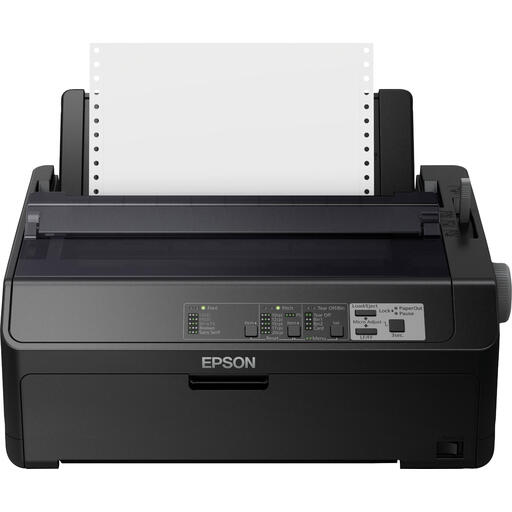 Image unavailable
Epson FX-890IIN dot matrix printer, 240 x 144 DPI, 612 cps
An option for studios looking to print continuous text volumes over ethernet. Check that dot matrix printing is right for your preferred agenda layout.
The product description mentions ethernet and use for larger print volumes.
The product name specifies 240 x 144 DPI and 612 cps.
View at Joybuy
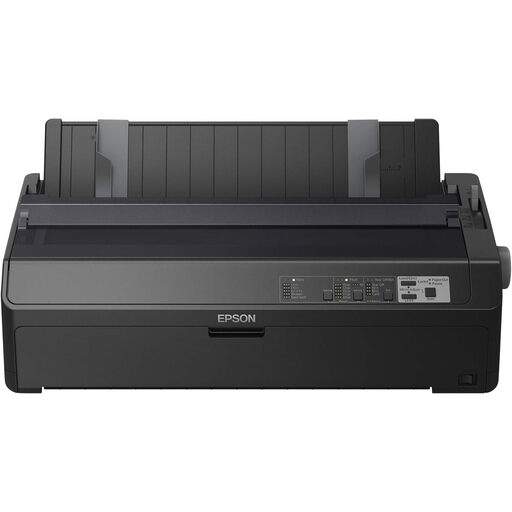 Image unavailable
Epson FX-2190IIN dot matrix printer, 240 x 144 DPI, 738 cps
An option for large text volumes over ethernet. Check that dot matrix printing suits the paper and agenda layout you use.
The product description mentions ethernet and use for high print volumes.
The product name specifies 240 x 144 DPI and 738 cps.
View at Joybuy
 Image unavailable
Brother HL-L5210DW A4 black-and-white laser printer
A text-focused option for studios looking for network access and automatic double-sided printing.
The product description lists A4, automatic double-sided printing, ethernet and Wi-Fi.
View at Joybuy
Frequently asked questions
Do you need colour for meeting agendas?
Only if colour makes the agenda more useful, for example by allowing you to colour-code information. The Brother and Canon models discussed here are black-and-white printers; Epson describes the ET-5150 as a colour printer.
How do you set up a printer on a shared studio network?
First, check that the model’s network options are compatible with the devices and connections in your studio. The National Cyber Security Centre recommends using a strong Wi-Fi password, changing the administrator password and updating wireless equipment, among other measures. Also collect agendas containing sensitive information from the output tray promptly.
Which consumables should you factor into your choice?
Check what the exact model needs and compare stated yields on a like-for-like basis. Brother lists a separate toner and drum for the HL-L2445DW, HP warns about cartridge chip compatibility for the M209dw, and the Epson ET-5150 uses refillable ink tanks.
Do consumer rights apply if the studio buys for business use?
Not automatically. According to Business.gov.nl, statutory consumer guarantees don’t apply to B2B sales, and businesses must set out warranty arrangements in the sales contract. The statutory cooling-off period for online consumer purchases doesn’t apply to business purchases either. So check who you’re buying on behalf of and which terms apply.
How do you choose a paper tray to suit the number of agendas you print?
Choose a tray based on how many agendas you usually print in one go and how often you want to refill the paper. Brother lists a 250-sheet tray for the HL-L2445DW; Canon specifies a 150-sheet standard cassette for the i-SENSYS LBP122dw II. This difference in capacity doesn’t, by itself, say anything about print quality.


