
Someone managing paper records
You mainly print clear text forms and want to know whether a basic mono printer will do the job. The points to consider are based on information from the Consumentenbond and Brother Netherlands.


If you mainly print text records, a mono laser printer without a scanner is a sensible place to start. Choose a mono multifunction laser printer if you also need to scan or copy paper forms. If you print in colour regularly, a multifunction colour printer with an ink tank could be a good fit. Compare each model’s document feeder, running costs and maintenance requirements: if you print infrequently, an inkjet printer may use ink for cleaning. Also check that the connections and consumables are suitable for how your group will use the printer.
You mainly print clear text forms and want to know whether a basic mono printer will do the job. The points to consider are based on information from the Consumentenbond and Brother Netherlands.
You also want to scan or copy completed paper forms. A document feeder can be useful when you have several loose sheets. Brother Netherlands, Canon Netherlands and Epson Netherlands describe the different feeding and scanning options available on each model.
You use colour to distinguish tasks or parts and want to compare colour printers and their running costs. The Consumentenbond and product specifications from Epson Netherlands and HP Netherlands offer useful points to consider.
A good fit when: your group mainly prints text and doesn’t need to scan or copy existing forms using the same device.
Bear in mind: there’s no colour printing, scanning or copying. With the Brother HL-L2445DW, you’ll need to factor in the toner and drum separately when comparing costs.
A good fit when: your group wants to scan or copy paper forms as well as print them.
Bear in mind: these models don’t print in colour. Check whether a flatbed scanner will do, or whether you need an automatic document feeder.
A good fit when: colour printouts are important and your group prints regularly.
Bear in mind: compare the purchase price and compatible ink bottles for the exact model. If you print very infrequently, some ink may be used for cleaning.
| What to consider | What to look for when buying | Who is this important for? |
|---|---|---|
| Occasional text printing | Check the paper size, automatic double-sided printing and the cost of toner and any drum. | If I mainly print clear text from time to time, I don’t want to pay for features my forms don’t need. Around 36% of consumers prioritise occasional text documents. |
| Digitising forms | Check whether a flatbed scanner will do, or whether you need an automatic document feeder. Double-sided scanning is a separate feature. | If I also want to save completed forms as digital files, the way loose sheets are fed into the printer matters. Around 29% of consumers prioritise scanning or copying paper forms. |
| Regular colour printing | Consider whether you need colour on paper and compare your expected usage with the compatible ink bottles for the model. | If I need colour-coded printouts, I want a printer that can print those documents in colour. Around 21% of consumers make regular colour printing a priority. |
| Access for volunteers | Take stock of the devices and network, and check which Wi-Fi, Ethernet or USB connections are available. | If several volunteers use their own devices, I want a connection that suits the way they work, along with clear arrangements for collecting documents. Around 14% of consumers prioritise shared access. |
If you use the printer repeatedly, you’ll also need to consider compatible consumables. For example, the Brother HL-L2445DW uses a separate toner and drum.
Compare the parts required for the exact model with the number of printouts your group expects to make.
Automatic double-sided printing doesn’t mean a printer can automatically scan both sides of a document. A flatbed scanner also requires you to place each original on the glass separately.
Check double-sided printing, scan feeding and any double-sided scanning features separately for the model you choose.
Printouts and files containing personal data could be accessible to people who don’t need them. The Dutch Data Protection Authority says that organisations must protect personal data appropriately.
Decide who can view and collect files and printouts, based on the risks. Don’t assume the printer has a security feature unless you’ve verified it.
According to Brother’s product specifications, the HL-L2445DW prints in mono, while the MFC-L2800DW prints, scans and copies in mono.
Canon describes the i-SENSYS MF272dw as a multifunction mono laser printer with a flatbed scanner.
Epson describes the EcoTank ET-5150 as an A4 ink tank printer for groups looking to combine colour printing, scanning and document feeding.
According to HP, the Smart Tank 5105 offers colour printing, scanning and copying.
This selection includes everything from a portable printer and dot matrix printers to multifunction inkjet models. Compare each model’s printing, scanning and copying features, connections and paper handling with the way your group works.
 No image available
A portable option for printing documents such as contracts and invoices.
Connects via Bluetooth to the Phomemo app on iOS or Android devices.
 No image available
A multifunction colour option for groups that want to print, copy and scan documents.
The product name mentions wireless and double-sided printing; the description lists a 35-page automatic document feeder.
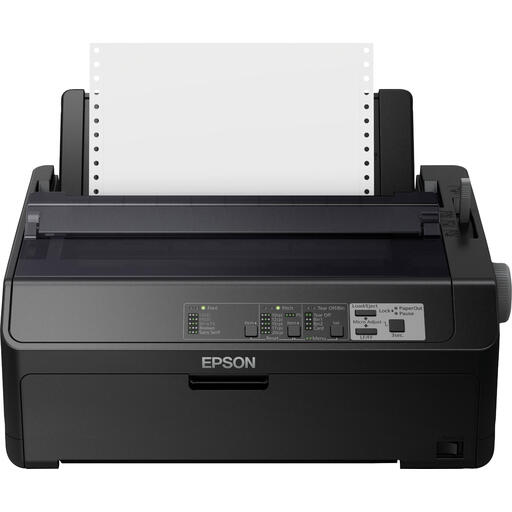 No image available
A dot matrix printer option for printing in black, including stock reports and invoices.
The stated resolution is 240 × 144 DPI and the print speed is 612 Cps. Connections: Ethernet, parallel and USB.
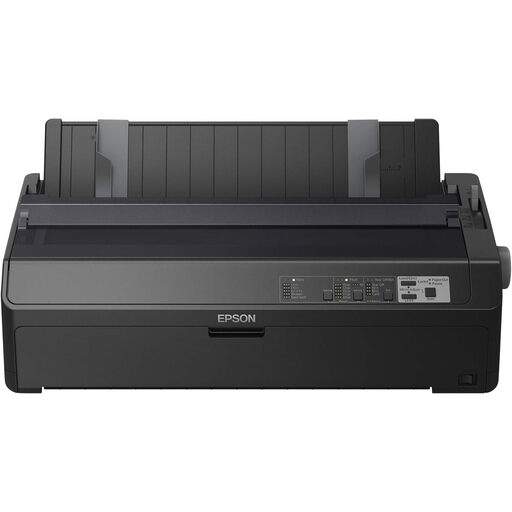 No image available
A dot matrix printer option for printing in black, including reports and invoices.
The stated resolution is 240 × 144 DPI and the print speed is 738 cps. Connections: Ethernet, parallel and USB.
 No image available
An inkjet option for A4 documents, with printing, scanning and copying functions.
The product name lists a resolution of 4800 × 600 DPI; the description mentions colour printing and a 60-sheet paper tray.
Only if you also want to digitise or copy existing paper forms. A flatbed scanner handles one original at a time on the glass; an automatic document feeder can be useful for stacks of loose sheets. Check double-sided scanning separately.
Follow the maintenance and cleaning instructions for the exact model. If you print infrequently, bear in mind that some ink may be used to prevent or clear blockages. Don’t assume that every model needs cleaning at the same set intervals.
Compare the purchase price, compatible ink or toner, any drum and the expected number of printouts. Also check who the legal buyer is: according to the Netherlands Chamber of Commerce, consumer rules don’t automatically apply to business agreements, so check which terms and rights apply to your group’s purchase.
If records contain personal data, the organisation must protect it appropriately in line with the risks, according to the Dutch Data Protection Authority. This doesn’t prohibit printing or mean that a printer automatically complies with the GDPR; decide who can view the files and printouts.
The Dutch government describes a free take-back scheme for a similar old appliance when buying a new one as a private individual, including online purchases. According to the Dutch government, the scheme doesn’t apply to equipment owned by businesses. Check who the buyer is, and ask about another collection option if needed.