For occasional text-only quotes, a black-and-white laser printer without a scanner is a sensible option. If your team needs to digitise paper documents, choose a multifunction model with a scanning function. Colour is mainly useful when a logo, legend or diagram needs to appear in colour on the page. If you print regularly, factor in toner, ink and any other consumables too; inkjet printers that are rarely used may use ink to clean the print head.
Who is this choice for?
Occasional quote printing
You mainly print text from time to time and don’t want colour or scanning features you won’t use. Compare laser and inkjet printers too: according to the Consumentenbond, inkjet printers that are rarely used may use ink for cleaning.
Regular quote printing
You print quotes regularly and want to weigh up the purchase price, consumables and duplex printing together.
Colour and document handling
Your quotes need colour for practical reasons, or you need to scan paper documents. Check the features of each model individually.
What should you look for?
First decide whether your quotes contain text only or need colour and scanning of paper originals. Then compare consumables based on your expected print volume.
| What to consider |
What should you check? |
Who is this important for? |
| Occasional black-and-white printing |
Check whether black-and-white A4 printing is sufficient and whether you want automatic duplex printing. |
If we print text-only quotes from time to time, we don’t want colour or scanning features we won’t use. Around 33% of consumers say occasional black-and-white printing is their main need. |
| Consumables for regular printing |
Compare toner and any separate drum for the same expected number of pages; the stated toner yield is not a guarantee of how much you’ll get from it. |
For recurring black-and-white quotes, we want to factor in the cost of consumables. Around 27% of consumers prioritise these costs when printing regularly. |
| Colour in quotes |
Check a representative quote to see whether colour is needed, and compare ink tank and cartridge printers for the same expected usage. |
If a legend or diagram is less clear without colour, we need colour on the page. Around 20% of consumers say colour for practical reasons is their main need. |
| Scanning and document handling |
Check whether the model can scan and whether you need an automatic document feeder. If you handle personal data, also decide who should have access. |
When we need to digitise paper documents, we want to know whether the printer is suitable and how our team will manage access. Around 20% of consumers prioritise scanning and document handling. |
Common buying mistakes
-
Assuming the cheapest printer means the cheapest quotes
The purchase price and the cost of consumables don’t tell you the same thing about the cost of printing at your expected volume.
Compare models based on the same estimated number of A4 pages, including the relevant toner, ink and any separate drum.
For models with a separately replaceable drum, factor it in as a consumable alongside the toner.
-
Choosing an ink tank based only on the stated bottle yield
Manufacturer yield figures are based on specific conditions and won’t tell you exactly how many quotes you’ll be able to print. Inkjet printers that are rarely used may also use ink for cleaning.
Take your print frequency into account and don’t treat yield claims as a guaranteed cost per quote.
-
Assuming every printer can scan or automatically feed originals
A print-only model can’t digitise paper originals, and a scanning function doesn’t automatically mean the device can feed a stack of originals.
Check printing, scanning and automatic document feeding separately for the exact model.
-
Failing to agree how to handle quotes containing personal data
Printouts and files may be accessible to people who don’t need them if your team doesn’t handle them securely enough.
The Dutch Data Protection Authority advises that measures should be tailored to the risks. Decide who has access and how paper and digital quotes will be handled.
Brands to consider
Brother
The HL-L2445DW is worth considering if you mainly print black-and-white quotes and don’t need a scanning function.
- Brother lists automatic duplex printing and a 250-sheet paper tray for this A4 laser model.
- Toner and drum are separate consumables for this model.
- This model doesn’t print in colour and has no scanning or copying function. Stated speeds and yields are manufacturer figures, not independent test results.
Canon
The i-SENSYS MF275dw is a multifunction black-and-white laser model for anyone who wants to scan or copy as well as print.
- Canon lists duplex printing and scanning via an automatic document feeder for this model.
- It prints in black and white; the ability to scan in colour doesn’t mean the device can print in colour.
Epson
The EcoTank ET-2950 is a multifunction A4 inkjet model with refillable ink tanks, for situations where colour is needed.
- Epson lists duplex printing and refillable ink tanks for this model.
- Epson’s yield and savings figures are based on specific conditions. If the printer is used infrequently, print head cleaning may use ink.
HP
The LaserJet MFP M235sdw is a black-and-white model with printing, scanning and paper-feeding functions for originals.
- According to HP, this model offers duplex printing and a 40-page document feeder.
- HP lists dynamic security that may block cartridges using a non-HP chip. Check in advance which toner options are suitable for you.
Printers at Joybuy
These printer options are intended for printing quotes and documents, with choices for black-and-white, colour and dot matrix printing. Match your choice to the type of printing you need, the features you want and your expected usage.
 No image available
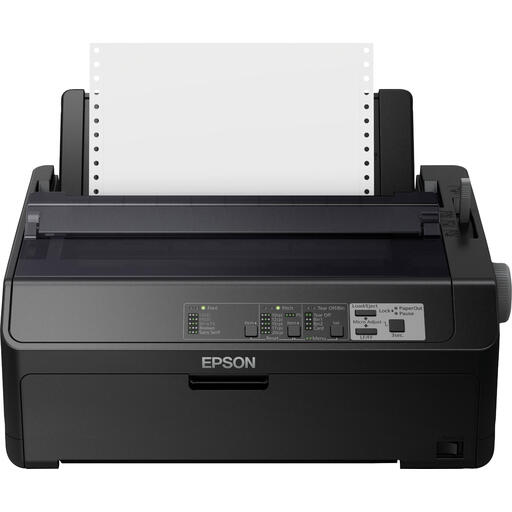
Epson FX-890IIN Dot Matrix Printer 240 x 144 DPI 612 Cps
A dot matrix printer to consider if you print a lot of documents, reports or invoices.
Dot matrix printer; 240 x 144 DPI; 612 Cps.
Joybuy
 No image available
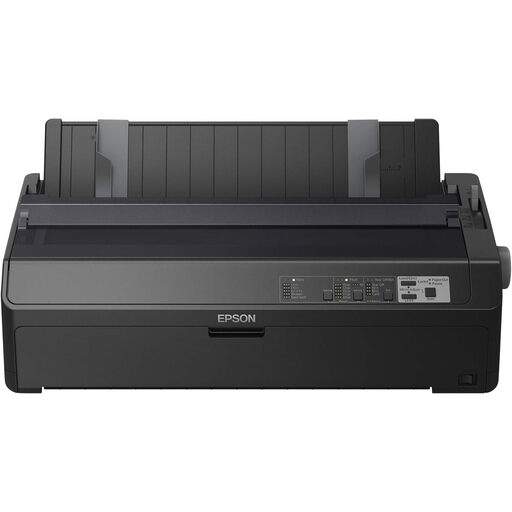
Epson FX-2190IIN Dot Matrix Printer 240x144DPI 738cps
A dot matrix printer to consider if you need to handle large print volumes and business documents.
Dot matrix printer; 240x144DPI; 738cps.
Joybuy
 No image available
Canon PIXMA MG2556S Inkjet A4 4800 x 600DPI
An A4 inkjet option to compare if you’re looking for a printer for documents and may need colour.
Inkjet printer; A4; 4800 x 600DPI.
Joybuy
 No image available
Epson WorkForce Pro WF-C5390DW Inkjet Printer Colour 4800x1200DPI A4 Wi-Fi
A colour inkjet option to compare when your quotes need colour and you want Wi-Fi.
Inkjet printer; colour; 4800x1200DPI; A4; Wi-Fi.
Joybuy
 No image available
Brother HL-L5210DW Wireless A4 Monochrome Laser Printer
A black-and-white laser option to compare for A4 documents if you want wireless connectivity.
A4; monochrome; laser; wireless.
Joybuy
Frequently asked questions
Do our quotes need a colour printer?
Only if colour needs to convey information on the page, for example in a legend or diagram. If the text is clear in black and white, a black-and-white printer may be enough. Check using a representative quote.
What should you consider when using an inkjet printer infrequently?
According to the Consumentenbond, inkjet printers that are rarely used may use ink for automatic print head cleaning. So if you mainly print text occasionally, compare laser printers too, and follow the manufacturer’s instructions for the model you choose.
Does every multifunction printer have an automatic document feeder?
No. Check the features of the exact model. A scanning function doesn’t automatically mean the device can feed multiple originals automatically.
How can you protect quotes containing personal data?
If your team processes personal data, the Dutch Data Protection Authority says it must be secured appropriately, based on the risks of the processing. Decide who can see printouts and digital files, and how documents will be stored. This doesn’t mean you have to choose one specific printer model.
What costs should you factor in besides the purchase price?
Compare the consumables for the exact model, such as toner, ink and any separate drum, based on the same expected number of prints. Stated yields don’t guarantee how many quotes you’ll be able to print.


