
Maker of narrow item labels
You make individual, small captions and want to know whether a roll with a fixed width will suit your display. Brother Netherlands describes label printers designed for this type of print.


A label printer may suit narrow roll labels, while a compact A4 laser printer offers more flexibility for printing black text on larger sheets. Choose a colour inkjet if you need colour or compatible speciality paper. As well as the printer itself, measure the space needed for paper input, output and operation.
You make individual, small captions and want to know whether a roll with a fixed width will suit your display. Brother Netherlands describes label printers designed for this type of print.
You mainly print black text on sheets and cut the captions to size yourself, so paper compatibility and workspace matter. Brother Netherlands describes a compact monochrome laser printer for A4.
You need colour and are comparing compatible paper sizes, running costs and how often you print. Canon Netherlands and Epson Netherlands describe colour inkjet models for different paper options.
Choose this option if: your captions fit on narrow rolls and you want to print individual labels. Brother Netherlands lists the QL-820NWBc as supporting labels up to 62 mm wide.
Bear in mind: the roll width is fixed, as is the label material. This isn’t an A4 printer for printing on card of your choice.
Choose this option if: you mainly print black text on sheets and want to cut several captions from one sheet.
Bear in mind: the Brother HL-L1240W is a print-only model with no colour or scanner. Brother Netherlands specifies 65–105 g/m² for the standard tray.
Choose this option if: you need colour and want to use a size supported by the model specifications.
Bear in mind: the Canon PIXMA TS7650i has a rear feed for smaller sizes. The stated weight of around 265 g/m² applies to specific original Canon photo paper, not automatically to other card.
Choose this option if: you regularly print a lot in colour and want to weigh your expected usage against the purchase price. The Epson EcoTank ET-2950 is an A4 model with refillable tanks.
Bear in mind: a tank doesn’t automatically make the printer better value if you only use it occasionally. Paper compatibility and space for the printer also matter.
| What to consider | What to look for when buying | Who is this important for? |
|---|---|---|
| Workspace and finished size | Measure the caption, desk and space needed for paper input, output and operation. Compare these measurements with the exact model. | If your desk has limited space and you make small captions, you’ll want to know whether the finished size will fit on a roll. Around 36% of consumers say workspace and finished size are their main consideration. |
| Text and material | Check the paper type, size, weight and intended feed for the exact combination. If necessary, print a test page first. | If you want readable text on a particular type of paper or card, check that the printer can handle that specific material. Around 29% of consumers give text and material compatibility top priority. |
| Colour and layout | Decide whether you need black, black and red, or full colour, and check which media the model supports. | If colour is part of your caption, you’ll want to know which print options and materials are available. Around 21% of consumers put colour and layout first. |
| Running costs and maintenance | Compare the cartridges, toner, drum or label rolls that suit your expected print volume; factor in ink used for cleaning on inkjet printers. | If you’re choosing mainly on running costs and maintenance, your own printing habits are key. The Consumers’ Association points out that inkjet printers may use ink for cleaning when you print infrequently. Around 14% of consumers put costs and maintenance first. |
The stated dimensions for the Canon PIXMA TS7650i are with the trays closed. When printing, the input tray, output tray and controls may need extra space.
Also measure the space you’ll need while the printer is in use, as Canon Netherlands advises, using the stated dimensions as a starting point.
Unsuitable material may result in failed prints or paper that doesn’t feed properly.
Consumables vary by technology and model. The Consumers’ Association points out that an inkjet printer may use ink for cleaning if you print infrequently.
Compare the right consumables for the same expected number of black and colour captions over the same period of use.
Factor in cartridges, toner, a drum or label rolls, as well as possible extra ink use if you print infrequently.
HP states that the DeskJet 2920 has dynamic cartridge security and also offers Instant Ink. Check the terms for cartridges and any subscription.
Read the cartridge and subscription terms for the specific offer before making your choice.
A subscription may involve recurring costs; also check whether there are any restrictions on replacement cartridges.
Brother has models for both narrow roll captions and black text on A4 sheets.
The PIXMA TS7650i is a colour A4 inkjet with a rear feed for specified smaller sizes.
The EcoTank ET-2950 is a colour A4 option with refillable ink tanks for those who want to weigh expected print volume against the purchase price.
The DeskJet 2920 is a colour all-in-one for those who want to print captions as well as scan or copy.
These Joybuy products are designed for small labels and stickers. Check that the label width, material and layout you want will suit your caption.
 No image available
An option for narrow self-adhesive captions if a width of 20–50 mm suits your design.
Specified label width: 20–50 mm. Listed as included: 1 label roll.
 No image available
A portable thermal printer for small labels if the included rolls suit the captions you have in mind.
The product name mentions Bluetooth and 10 rolls of thermal paper. The product information warns that thermal paper may turn black through friction.
 No image available
A compact option for small notes or sticker captions if the size you need is compatible with the printer.
The product name lists study notes and stickers as possible uses.
 No image available
An option for narrow labels with text or symbols if the stated width suits your caption.
Specified label width: 20–50 mm. The product name mentions Bluetooth; the product information lists 1 label refill.
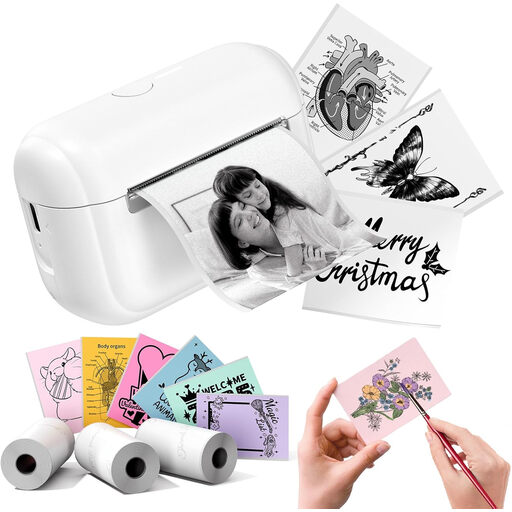 No image available
An option for small sticker or label captions if the size and refills suit your needs.
The product name lists three label refills.
Only if the specific card and chosen feed are within the model specifications. Brother Netherlands specifies 65–105 g/m² for the HL-L1240W’s standard tray; Canon Netherlands links the approximately 265 g/m² figure for the PIXMA TS7650i to specific original photo paper. Don’t automatically apply the latter figure to other card.
Use a template for the exact label sheet and print a test page first. Avery Netherlands provides design templates for its labels. Also check the scale setting and alignment in your own print file.
No, it depends on your expected print volume and ink usage. Calculate the costs for your own use; the Consumers’ Association points out that an inkjet printer may use ink for cleaning if you print infrequently.
Contact the retailer. The Dutch Government states that there is no fixed statutory guarantee period in the Netherlands; a manufacturer’s guarantee or paid service plan is separate from your statutory rights.