For forms made mostly of text and fields to fill in, a monochrome printer is a sensible place to start. Choose a colour printer with a scanner if you need colour or want to digitise completed forms. An ink-tank printer is worth considering if you expect to keep printing regularly after the project. For a one-off project, first check whether you can use a suitable printer you already have access to. The Consumentenbond lists colour, scanning and copying functions, and connectivity options among the factors to consider.
Who are these options relevant to?
If you’re creating text-based forms
You want clearly legible fields to fill in and several black-and-white copies, without needing colour or a scanner as standard. The Consumentenbond lists black-and-white printing, and whether or not you need scanning and copying functions, as points to consider.
If you’re creating colour forms
Colour helps with your form’s layout, or you want to scan completed copies. The Consumentenbond lists colour and scanning functions as factors to consider; Canon describes the PIXMA TS7650i as a model with printing, scanning and copying functions.
If you’ll keep printing after the project
You expect to print again in future and are weighing up consumables and maintenance. The Consumentenbond recommends looking at ink costs as well as the printer; Epson describes the EcoTank ET-2871 as a model with refillable tanks.
What should you look for in a printer for feedback forms?
Monochrome laser printer
Suitable for: forms that are mostly text and don’t need colour or scanning.
Keep in mind: the Brother HL-L2400DWE only prints, so compare the cost of compatible toner too.
Colour inkjet printer with cartridges
Suitable for: forms that benefit from colour, or if you want to scan completed copies.
Keep in mind: compare cartridge costs and check whether the exact model prints double-sided automatically. If you use it infrequently, it may need extra cleaning.
Colour inkjet printer with refillable tank
Suitable for: regular printing, where you can spread the cost of supplies over more pages.
Keep in mind: calculate costs based on your expected usage and refill costs. A manufacturer’s savings claim won’t tell you what your project will cost.
Using a printer you already have
Suitable for: a single project with a limited number of forms, if you already have access to a suitable device.
Keep in mind: print a test page first and check legibility, paper size and how much time you have available for printing.
| What to consider |
What should you check? |
Who is this important for? |
| Text or colour |
Check whether black-and-white printing is enough and whether your chosen model supports the paper size you need. |
I mainly want to print clear text forms without features I don’t need; around 40% of consumers prioritise simple text forms. |
| Scanning and copying |
Check whether the exact model can scan and copy if you want to process completed forms digitally. |
If colour makes information clearer or I need completed forms in digital form, these functions are relevant; around 30% of consumers say colour or digitising is their main purchasing concern. |
| Costs for repeat printing |
Compare the purchase price, compatible ink or toner, and stated yield with the number of pages you expect to print. |
I expect to keep printing after the project and want to factor in ongoing supply costs; around 20% of consumers prioritise future print volume. |
| Connecting to your device |
For each model, check that the USB, Wi-Fi or mobile printing option you want is compatible with your device. |
If I want to print from my own device, the connection needs to suit the way I work; around 10% of consumers say ease of connection is their main purchasing concern. |
Which purchasing mistakes can you avoid?
-
Looking only at the purchase price
A low purchase price doesn’t, on its own, tell you how much printing will cost over time. Compare the compatible ink or toner for the number of pages you expect to print.
Remember to factor in consumables, as well as any paper and maintenance you may need.
-
Choosing a printer without a scanner when you need digital copies of responses
The Brother HL-L2400DWE prints, according to the Consumentenbond, but doesn’t scan or copy. Decide in advance how you’ll collect and process completed forms.
Check whether you have access to a separate scanner or a printer with a scanning function for digitising your forms.
-
Applying a savings claim to a single project
A claim about the maximum savings possible with an ink-tank printer doesn’t tell you how much you’ll save at your print volume. Base your decision on your expected usage after the project and the cost of refills.
Brands and models to consider
Brother
The HL-L2400DWE is an example of a monochrome laser printer for document printing when you don’t need scanning or copying.
- Brother Netherlands lists A4, Wi-Fi, double-sided printing and speeds of up to 30 pages per minute for the HL-L2400DWE. This is the manufacturer’s stated speed, not a speed measured here.
- The Consumentenbond states that this model only prints; it doesn’t scan or copy.
Canon
The PIXMA TS7650i is an example of a colour printer with scanning and copying functions.
- Canon lists Wi-Fi, USB, printing, scanning and copying; the model uses two FINE cartridges.
- The stated speeds of 15 ipm in black and white and 10 ipm in colour are manufacturer figures. Compare cartridge costs and check whether the exact model supports double-sided printing.
Epson
The EcoTank ET-2871 is an example of an A4 colour printer with refillable tanks, for anyone who prints regularly after a project too.
- Epson lists Wi-Fi, printing, scanning and copying functions for this model.
- Calculate the costs based on your own usage. A manufacturer’s claim about potential savings doesn’t guarantee savings on an individual school project.
HP
The Smart Tank 5105 is an example of a colour printer with scanning and copying functions.
- For the Smart Tank 5105, HP lists printing, scanning and copying, with stated A4 speeds of up to 12 ppm in black and 5 ppm in colour.
- These speeds are figures provided by the manufacturer for this specific model. The claim about included ink doesn’t necessarily reflect the cost of printing your own number of pages.
Joybuy printers for printing forms
The Joybuy models below suit different form-printing needs, from monochrome printing to colour, scanning or printing multiple copies.
 No image available
Brother MFC-J6760DW A3 inkjet printer
The scanning function may be useful if you want to digitise completed forms.
A3; 1200 x 4800 DPI; 31 ppm; Wi-Fi; automatic double-sided printing; 50-sheet document feeder.
Joybuy
 No image available
HP Smart Tank 7305
A colour printer with scanning and copying functions for forms you also want to process digitally.
Wireless; double-sided printing; printing, scanning and copying; the product description mentions refillable ink bottles.
Joybuy
 No image available
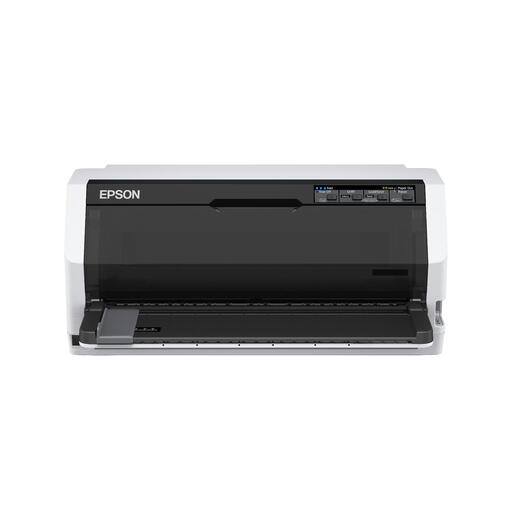
Epson LQ-780 dot-matrix printer
A monochrome model to consider if you don’t need colour. Check that its print quality and form layout suit your needs.
360 x 180 DPI; 487 cps; monochrome printing; USB.
Joybuy
 No image available
Canon PIXMA MG2556S A4 inkjet printer
Printing, scanning and copying may be useful if you want to digitise or duplicate completed forms.
A4; 4800 x 600 DPI; USB 2.0; two cartridges.
Joybuy
 No image available
Epson PLQ-35 dot-matrix printer
The stated number of copies may be useful if you need several copies of each form.
180 x 360 DPI; 540 cps; USB; the product description states that it can print up to six copies at once.
Joybuy
Frequently asked questions
Do I need colour and a scanner for feedback forms?
Not necessarily. Choose colour if it helps convey information on your form. A scanner is useful if you want to store or process completed paper forms digitally. If you’re unsure, print a black-and-white test page first.
What can I do if my inkjet printer produces streaky or blurry prints?
Start by printing a test page and following your model’s manual. For the EcoTank and Expression printers mentioned, Epson recommends checking the nozzles and, if necessary, cleaning the print head if text looks blurry.
What costs and warranty rights apply after buying in the Netherlands?
As well as the printer, compare the cost of compatible ink or toner. Under Dutch consumer law, the Rijksoverheid states that you’re entitled to a product that meets reasonable expectations; report any problem to the seller. Any paid-for extended warranty is separate from this statutory right.
Do privacy rules apply to feedback forms containing pupil data?
If a school uses forms to process pupils’ personal data, the GDPR obligations for schools are relevant. The Autoriteit Persoonsgegevens highlights matters such as security and the duty to provide information; the legal basis or procedure required depends on the specific processing involved.


