
Teacher who prints forms regularly
You regularly print sets for a small class and want the cost of consumables and the paper feed to suit repeated use.


If you mainly print black-and-white text, compare compact monochrome laser printers. For larger colour print runs that you need regularly, an ink-tank printer is also worth considering. First, work out how many pages you print and whether you want to scan or copy completed forms: these factors matter just as much as the purchase price. A cartridge-based colour inkjet may suit occasional colour printing, but bear in mind that infrequent use can lead to extra ink consumption.
You regularly print sets for a small class and want the cost of consumables and the paper feed to suit repeated use.
You mainly need clear black-and-white questionnaires and may go for a while without printing.
You may need colour, copies or scans of completed forms. If forms contain personal data, the school's procedures are also important.
If you mainly print black text, a monochrome laser printer is one option to compare. The Consumentenbond notes that inkjet ink can dry out if a printer is left unused for a long time. If you regularly print larger runs in colour, compare ink-tank models too, and weigh features such as scanning and document feeding against how you use the printer.
| What to consider | What should you look for? | Who is this important for? |
|---|---|---|
| Cost of regular print runs | Estimate how many pages you print each month and compare the relevant ink or toner. Also check that the paper tray can handle your usual print run. | If I print sets often, I want to know how ongoing running costs affect my choice. Around 40% of consumers prioritise the cost of print runs. |
| Black-and-white printing for occasional use | Check whether you need colour and whether the model prints double-sided automatically if your form has content on both sides. | If I mainly print text and sometimes go weeks without printing, straightforward, clear black-and-white printing is important to me. Around 30% of consumers prioritise occasional black-and-white text printing. |
| Colour on forms | Print a sample form and check whether colour is needed to understand the questions or answer fields. | If my form uses colour to distinguish different sections, I want to check whether black-and-white printing will be enough. Around 20% of consumers prioritise colour printing. |
| Processing completed forms | Decide whether you scan individual sheets or process stacks; if you handle stacks, check whether the printer has an automatic document feeder. | If I want to process completed forms using the same device, I look for scanning and copying functions, as well as how the school handles personal data. Around 10% of consumers prioritise scanning or copying. |
A low purchase price doesn't tell you how much ink or toner you'll need for repeated printing. Infrequent use can also mean extra ink consumption with an inkjet printer.
First estimate how many pages you print each month, then compare the relevant consumables.
A printer without scanning or copying can't digitise or copy completed forms for you.
Before buying, check whether you need a scanning function and whether an automatic document feeder would be useful for stacks of forms.
HP states that dynamic security on the LaserJet M209dw blocks certain cartridges with a non-HP chip.
Check the cartridge requirements for the exact model before choosing consumables.
This may limit your choice of replacement toner.
The HL-L2400DWE is a monochrome laser option for text forms. Brother also offers ink-tank printers for larger print runs.
The EcoTank ET-5150 is an ink-tank option for those who regularly print in colour and also need to scan forms or feed in stacks.
The PIXMA TS7650i is a cartridge-based colour inkjet for those who want to print in colour occasionally and also need to scan or copy.
The LaserJet M209dw is a monochrome laser option for text forms when you don't need to print in colour.
This selection includes monochrome laser and dot-matrix printers, as well as colour printers for forms. Check each model for the features you need, such as double-sided printing, scanning or copying.
 Image unavailable
Worth considering if you print colour forms and also want to scan or copy completed forms.
The product name specifies double-sided printing, copying and scanning. Double-sided scanning is not supported.
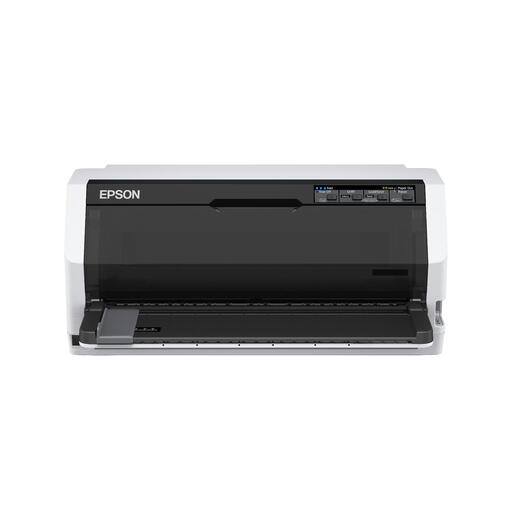 Image unavailable
This monochrome printer is worth comparing if you print black-and-white forms; check whether dot-matrix printing is suitable for your forms.
The product name specifies 360 x 180 DPI and 487 cps.
 Image unavailable
Worth considering if you occasionally print colour forms and also want to scan or copy them.
The product name specifies 4800 x 600 DPI. The paper feed holds 60 sheets, so you may need to top it up during larger print runs.
 Image unavailable
Worth comparing if you print colour forms and want to print double-sided automatically.
The product name specifies A4 and Wi-Fi.
 Image unavailable
Worth comparing if you mainly print black-and-white A4 forms and want to print double-sided automatically.
This is a print-only model; colour printing, scanning and copying are not available.
If a form needs printing on both sides, an automatic duplex function means you don't have to turn the sheets over yourself. Canon specifies this feature for plain A4 and Letter paper on the PIXMA TS7650i.
If you use it infrequently, allow for possible automatic cleaning and extra ink consumption. The Consumentenbond notes that dried ink can cause blockages. If you only need black text, compare a monochrome laser printer too.
Not for every model: Brother says the HL-L2400DWE can also be used without an EcoPro subscription. For your own monthly print volume, compare the purchase price, relevant consumables and any subscription terms.
If forms contain pupils' personal data and a school processes it, the school must comply with the GDPR. The Dutch Data Protection Authority says schools must, among other things, be able to demonstrate the technical and organisational measures they take, and inform pupils or parents about the processing. The guidance does not specify a particular printer model or a general requirement to print anonymously; make sure printing, access and processing follow the school's policy.