What should you look for in a printer for expense reports?
First decide whether monochrome printing will do, whether you really need colour and whether paper documents need to be scanned. Then compare the features of the exact model and the consumables based on your group’s expected print usage.
| What to consider |
What to look for when buying |
Who is this important for? |
| Monochrome printing and intermittent use |
Check for A4, automatic double-sided printing and whether you need scanning; features vary by model. |
If I mainly print text and tables and sometimes leave the printer unused for a long time, I want to know whether I really need colour and a scanner. Around 36% of consumers put reliable monochrome printing first. |
| Scanning receipts and forms |
Check whether you need scanning and whether a flatbed scanner will do or an ADF is better suited to your documents. |
If paper receipts or forms are part of our records, I want to be able to digitise and copy them too. Around 29% of consumers list scanning as their top purchasing priority. |
| Running costs for regular printing |
For the same expected number of prints, compare the printer, ink or toner, any separate drum and paper. |
If we print regularly, I want to factor in consumables rather than looking only at the purchase price. Around 21% of consumers put running costs first. |
| Colour in group materials |
Check that figures and categories remain readable in monochrome; compare colour models on features and running costs if colour is needed. |
If our charts or report highlights need colour, I want to know whether a colour printer suits our needs. Around 14% of consumers say colour is a decisive requirement. |
Brands to compare
The features and limitations described apply to the models and product ranges mentioned; they are not a general judgement on a brand.
Brother
Monochrome laser models for printing only, and multifunction models with scanning and copying features.
- Brother lists automatic double-sided printing for the HL-L2400DWE. The toner and drum for this model can be replaced separately.
- The HL-L2400DWE has no scanner. Brother lists a 50-sheet ADF for the DCP-L2660DW.
Epson
EcoTank colour inkjet models with refillable tanks; the ET-2950 is an A4 multifunction model.
- Epson lists printing, scanning and copying features, as well as automatic double-sided printing, for the ET-2950.
- Any savings quoted by the manufacturer depend on its terms and won’t determine the cost for your group’s print volume.
Canon
PIXMA colour inkjet models with cartridges; the TR4755i combines printing and scanning with an ADF.
- Canon lists a 20-sheet ADF and automatic double-sided printing for the TR4755i.
- This model uses black and colour cartridges. If you print infrequently, factor replacement costs into your decision.
HP
Smart Tank colour inkjet models with refillable tanks; the Smart Tank 5105 can print, scan and copy.
- HP lists wireless printing and scanning to PDF for the Smart Tank 5105.
- Don’t assume it has an ADF or automatic double-sided printing without checking the model specifications. Claims about included ink and usage are subject to HP’s terms.
Kyocera
ECOSYS devices for workgroups; the MA2101cwfx is an A4 colour multifunction printer.
- Kyocera lists double-sided printing and Wi-Fi for this model.
- The stated use for a group doesn’t automatically mean you need a larger workgroup device. Kyocera’s environmental and reliability statements are brand claims.
Joybuy printers for expense reports
This Joybuy selection includes models for office forms and A4 documents, from dot matrix printers to inkjet and monochrome laser printers. Check whether each model’s features and connection options suit the way your group prints.
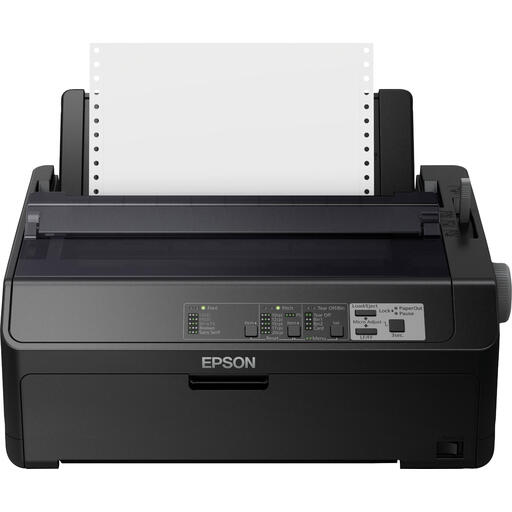 Image unavailable
Epson FX-890IIN dot matrix printer, 240 x 144 DPI, 612 Cps
The product description lists reports and invoices as examples of what it can be used for; check whether a dot matrix printer suits the type of documents your group wants to print.
Listed resolution: 240 x 144 DPI; listed speed: 612 Cps.
Joybuy
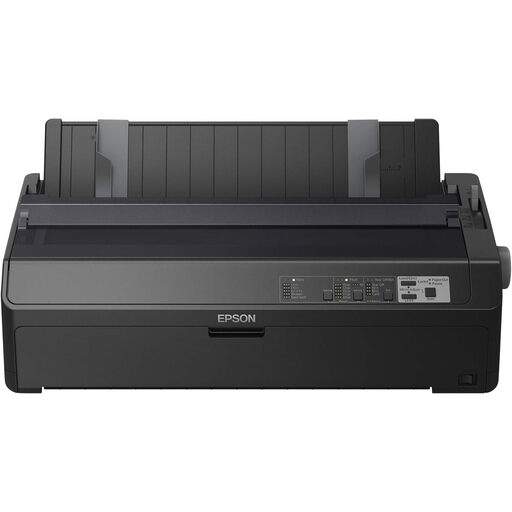 Image unavailable
Epson FX-2190IIN dot matrix printer, 240x144DPI, 738cps
The product description lists reports and invoices as examples of what it can be used for; check whether a dot matrix printer suits the type of documents your group wants to print.
Listed resolution: 240x144DPI; listed speed: 738cps.
Joybuy
 Image unavailable
Canon PIXMA MG2556S inkjet printer, A4, 4800 x 600 DPI
An option for printing A4 documents and scanning or copying paper documents too.
A4 inkjet printer; listed resolution: 4800 x 600 DPI.
Joybuy
 Image unavailable
Epson WorkForce Pro WF-C5390DW colour inkjet printer, A4, Wi-Fi
An option for printing colour A4 reports when your documents need colour.
Listed resolution: 4800x1200DPI; Wi-Fi is listed in the product name.
Joybuy
 Image unavailable
Brother HL-L5210DW wireless A4 monochrome laser printer
An option for printing monochrome A4 reports when you don’t need colour.
Monochrome laser printer for A4; the product name specifies a wireless model.
Joybuy
Frequently asked questions
Do we need a scanner to keep our records?
Not solely because of record-keeping requirements. For a foundation or association, the Belastingdienst explains that supporting administrative documents must be kept, and that records are sometimes kept digitally and sometimes on paper. There are conditions for converting paper records and keeping them digitally only; a printer with a scanner does not, on its own, meet those conditions.
How can we avoid problems if we only print occasionally?
An inkjet printer may use ink for cleaning when it’s used infrequently. So, if you don’t need colour, compare the expected running costs with those of a monochrome laser printer, and follow the chosen model’s instructions for set-up and maintenance.
What should we consider if several volunteers use the printer?
Before buying, check the connection options and available security settings for the exact model. If expense documents contain personal data, the Autoriteit Persoonsgegevens says the organisation must determine appropriate security measures based on the risks; a wireless connection alone does not guarantee privacy.
What warranty applies if the group buys the printer?
For sales to consumers, the seller is responsible under the Autoriteit Consument & Markt for the statutory guarantee that a product meets reasonable expectations. Whether this group purchase legally counts as a consumer purchase depends on who is buying and in what capacity. If buying in an organisation’s name, check the applicable terms of sale and warranty; any manufacturer’s warranty is separate from the consumer protection described here.


