If you mainly print text-based expense reports, start with a black-and-white laser printer and compare the cost of toner, drum and paper for your expected usage. The Dutch Consumers' Association considers laser printers suitable for sharp text. Choose a multifunction black-and-white model if you also regularly need to scan receipts. If you print colour attachments regularly, an ink tank printer could be a good fit, provided its print volume, costs and maintenance suit your needs.
Which printer is right for you?
A studio that mainly prints reports
You want to print clear black-and-white A4 documents while keeping a close eye on the cost of day-to-day use. The Dutch Consumers' Association points out that an inkjet printer can use ink for cleaning when you print infrequently.
A studio with a shared printing area
Several people need to be able to print. If reports contain personal data, consider who might see or take documents from the printer. The Dutch Data Protection Authority emphasises that organisations must take appropriate technical and organisational security measures.
A studio that processes receipts
You want to digitise paper receipts or documents as well as print them. A built-in scanner and an automatic document feeder are separate features, so check for each one when comparing models.
What should you look for?
Start by considering what your studio prints and how often. Then decide whether you need scanning, colour printing or access from multiple workstations.
| What to consider |
What to look for when buying |
Who should prioritise this? |
| Running costs |
Compare the cost of toner, ink and, where applicable, a separate drum against your expected print volume. If you print infrequently, also factor in possible inkjet printer cleaning. |
If I mainly print black-and-white reports, I want to be able to estimate the cost of consumables for our volume. Around 33% of consumers say running costs are their main consideration. |
| Access from workstations |
Check whether Wi-Fi or Ethernet suits your studio network and whether your devices can print. |
If several people need to print from their workstations, I want a connection that suits our network setup. Around 25% of consumers give shared access their highest priority. |
| Confidential printouts |
Think about where the printer will be placed and agree who will collect printouts. Check the security features available on the exact model. |
If reports contain personal data, I want to stop others from seeing or taking them from the printer. Around 17% of consumers put confidentiality first. |
| Scanning receipts |
Check whether a scanner is sufficient or whether you also need an automatic document feeder for stacks of paper or multi-page documents. |
If I want to digitise paper receipts and multi-page documents, I need a scanning solution that suits them. Around 17% of consumers put scanning at the top of their list. |
| Colour attachments |
Decide which documents genuinely need colour and how often you will print them. Then compare running costs and maintenance. |
If I need colour charts or attachments, I want to know whether I’ll use colour often enough to justify the feature. Around 8% of consumers say colour is their top priority. |
Common buying mistakes
-
Comparing only the purchase price
A lower upfront cost doesn’t tell you how much toner, ink, paper and a separate drum, if needed, will cost at your print volume. Inkjet printers can also use ink for cleaning if you print infrequently.
Compare expected running costs for your print habits. Don’t treat quoted yields as guaranteed results for your studio.
Depending on the model, you may also need a separate drum or a replaceable maintenance cartridge.
-
Assuming a shared Wi-Fi printer protects confidential printouts
A network connection doesn’t determine who can see or take a report from the output tray. The Dutch Data Protection Authority advises taking appropriate technical and organisational measures to protect personal data.
Consider where the printer is placed, agree who can access it and collect sensitive printouts straight away. Check the security features available on the specific model.
-
Assuming a scanner includes a document feeder
A built-in scanner can digitise documents, but that doesn’t automatically mean the model can process multi-page documents using an automatic document feeder.
Check the specifications for the exact model if you want to scan stacks of receipts or multi-page documents.
Without a suitable document feeder, scanning documents one at a time can take longer.
-
Assuming any compatible toner will work
HP states that the HP LaserJet Pro MFP 3102fdw uses dynamic cartridge security and has chip requirements. Toner that doesn’t meet those requirements may not work.
Before buying, check which replacement cartridges meet the stated chip requirements for this model.
Brands to consider
Brother
The Dutch models mentioned include black-and-white laser printers for text-based expense reports, with and without scanning features.
- Brother says the HL-L2400DWE offers Wi-Fi and automatic double-sided printing. The DCP-L2660DW adds Ethernet, a scanner and a 50-sheet document feeder, according to Brother.
- The HL-L2400DWE doesn’t have a built-in scanner, so choose it only if you process receipts elsewhere.
HP
The LaserJet Pro MFP 3102fdw is a multifunction black-and-white model for a small team that also needs to scan documents.
- HP lists printing, copying, scanning, faxing and wireless use among this model’s features.
- HP states that it uses dynamic cartridge security and has chip requirements. Before calculating running costs, check that replacement cartridges meet those requirements.
Canon
The MAXIFY GX4050 is an A4 colour ink tank model for studios that need colour printing and a document feeder.
- Canon specifies Ethernet, Wi-Fi, automatic double-sided printing and a 35-sheet document feeder for this model.
- The model has a replaceable maintenance cartridge. A quoted bottle yield doesn’t guarantee how much you’ll get from it in your own use.
Epson
The EcoTank ET-2871 is an A4 colour ink tank model with printing, copying and scanning functions.
- Epson lists wireless connectivity and quoted bottle yields for the ET-2871.
- These features and yields are manufacturer information, not the result of an independent long-term test or a guarantee of how much you’ll print in a particular studio.
Printer options at Joybuy
These Joybuy products suit a range of studio needs: black-and-white reports, printing from multiple workstations, scanning receipts and occasional colour attachments. Check which connections and features suit your needs for each model.
 No image available
Brother MFC-J6760DW A3 multifunction inkjet printer
Suited to a studio that needs to print in colour and scan documents as well as print reports.
A3 multifunction inkjet printer that supports printing, scanning, copying and faxing. The product information lists Wi-Fi, Ethernet, automatic double-sided printing and a 50-sheet document feeder. Inkjet cleaning can use ink if you print infrequently or irregularly.
Joybuy
 No image available
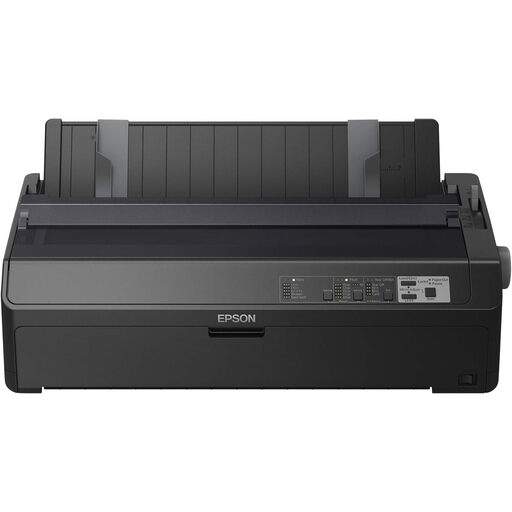
Epson FX-2190IIN dot matrix printer
An option to compare if your studio needs to print reports and invoices in black and requires an Ethernet connection.
The product information lists black dot matrix printing, Ethernet and a speed of 738 characters per second. The model name specifies a resolution of 240 × 144 dpi.
Joybuy
 No image available
Epson WorkForce Pro WF-C5390DW A4 colour inkjet printer
Suited to a team that needs colour printing and wants to print from multiple workstations.
A4 colour inkjet printer with Wi-Fi, Ethernet and automatic double-sided printing. The product name specifies a resolution of 4800 × 1200 dpi. Inkjet cleaning can use ink if you print infrequently or irregularly.
Joybuy
 No image available
Brother HL-L5210DW A4 black-and-white laser printer
Suited to a studio that mainly prints black-and-white A4 reports and needs shared network access.
Monochrome laser printer with Wi-Fi, Ethernet and automatic double-sided printing.
Joybuy
 No image available
Brother HL-L5210DN A4 black-and-white laser printer
An option to compare if A4 black-and-white printing and a wired network connection at the printing area suit your needs.
Laser printer with a wired LAN connection; the product information lists a resolution of 1200 × 1200 dpi.
Joybuy
Frequently asked questions
Do you need a scanner for expense reports?
Not if you only print digital reports. If you also process paper receipts, compare models with a built-in scanner. An automatic document feeder is particularly useful for multi-page documents, but check for it on each model.
How do you set up a printer for a shared studio?
Check that the printer’s connections suit the studio’s computers and network. For documents containing personal data, agree who can access them and how printouts will be collected straight away. A network connection alone won’t protect those documents.
What maintenance should you consider if you print infrequently?
Inkjet printers can use ink for cleaning. Compare the cost of consumables with your expected usage, and check whether a laser printer needs a separate drum replacement.
Will any compatible toner work in any printer?
No, don’t rely on fit alone. HP states that the LaserJet Pro MFP 3102fdw uses dynamic cartridge security and has chip requirements. Check that replacement toner meets these requirements for this model.
Who should you contact if a printer is faulty?
For a consumer purchase, the Dutch government says you should contact the seller if the product doesn’t work properly. If you’re buying on behalf of a studio, don’t assume that consumer rights apply in the same way. Check who the buyer is and which terms and conditions apply.


