
People making folded programme booklets
You want the pages to be in the right order after double-sided printing, folding and, if needed, stapling. Adobe explains the booklet settings; also check that duplex printing supports your chosen paper size.


First decide how you’ll print the programme. For a folded booklet, you’ll need the right PDF booklet settings and, if you don’t want to turn the pages by hand, duplex printing that supports your chosen paper. Then compare colour requirements, changing print runs, network access and consumables. Test the PDF and paper before printing a large batch. Adobe explains the booklet printing settings, while the Consumers’ Association discusses the pros and cons of different printer types and usage.
You want the pages to be in the right order after double-sided printing, folding and, if needed, stapling. Adobe explains the booklet settings; also check that duplex printing supports your chosen paper size.
Sometimes you print lots of programmes, and sometimes you don’t print anything for a while. Compare your expected print run with the cost of refills. The Consumers’ Association notes that infrequent use of an inkjet printer can mean it needs cleaning.
Several people need to be able to print from their own devices. Compare the network options on the models you’re considering, and agree who will manage print jobs and paper.
Choose this when: your programmes are mainly text and you don’t need colour. Brother lists automatic double-sided A4 printing and Wi-Fi for the HL-L2445DW.
Consider: this model doesn’t print in colour. Also check the cost of toner and the drum.
Choose this when: colour matters and you also want to print double-sided documents. Brother lists colour printing, A4 duplex, Ethernet and Wi-Fi for the HL-L8240CDW.
Consider: compare the toners required and their expected yields. Stated print speeds don’t indicate how long it takes to print a folded booklet.
Choose this when: you regularly print larger quantities of colour pages and refillable ink suits your needs. Canon lists Ethernet, Wi-Fi and a 250-sheet cassette for the MAXIFY GX2051.
Consider: Canon specifies automatic duplex printing on the model for A4 and Letter paper, but only on plain paper—not A5.
Choose this when: you want to compare colour and scanning features with the cost of cartridges. Epson lists A4 duplex, scanning, Ethernet and Wi-Fi for the WorkForce Pro WF-C4810DTWF.
Consider: a stated speed is a manufacturer’s specification, not a measured print time for folded programmes.
| Point to consider | What to look for when buying | Who is this most relevant to? |
|---|---|---|
| Booklets and duplex printing | Decide whether you’re making single sheets or a folded booklet. Check that duplex printing supports your chosen paper size, and print a test booklet. | When I make a folded programme, I want the pages to be in the right order after folding, without having to turn them by hand. Around 33% of consumers prioritise booklet layout and double-sided printing. |
| Costs for changing print runs | Estimate the number of black-and-white and colour pages per event, as well as the gaps between events. Compare the printer, refills and paper costs for the same level of use. | With changing print runs, I want to keep track of recurring printing costs, even after quiet periods. Around 27% of consumers prioritise the total cost of printing. |
| Team access | Check the network options for each model and test printing from the devices your team uses. | When several colleagues use the same printer, I want to be able to print from my own workspace. Around 20% of consumers give shared access top priority. |
| Colour and images | Decide whether colour is needed to make something like a map easy to understand. Print a representative page on the paper you plan to use. | When colour makes information in the programme clearer, I want to know what that page will look like on paper. Around 20% of consumers prioritise colour reproduction. |
A paper size appearing on the list doesn’t automatically mean the printer can print double-sided in that size. Canon lists A5 as a supported paper size for the MAXIFY GX2051, but automatic duplex only for A4 and Letter on plain paper.
Check the paper size and duplex capabilities separately for the exact model, and print a test booklet first.
The right choice depends on print run size, how much colour you use and the gaps between printing sessions. The Consumers’ Association notes that infrequent use of an inkjet printer can mean it needs cleaning.
For the same series of events, compare the ink or toner required, any drum components and the paper.
HP warns that the Color LaserJet Pro 3202dw uses dynamic security: cartridges without an HP chip or circuitry may be blocked.
Read the cartridge requirements for the exact model before buying.
Compare the HL-L2445DW for black-and-white programmes with the HL-L8240CDW if you need colour.
The MAXIFY GX2051 is a refillable colour model to consider if you print programmes regularly.
The WorkForce Pro WF-C4810DTWF is a cartridge-based colour inkjet to consider if you also need scanning features.
The Color LaserJet Pro 3202dw is a colour laser model to compare for double-sided team documents.
These Joybuy products cater to a range of needs, including colour, black-and-white and printing in a shared workspace. If you’re making a booklet programme, always check the duplex and paper size specifications for the model you choose.
 Image unavailable
Worth considering if you need colour and double-sided printing for changing print runs.
The product name specifies a Smart Tank, wireless connectivity, colour and double-sided printing.
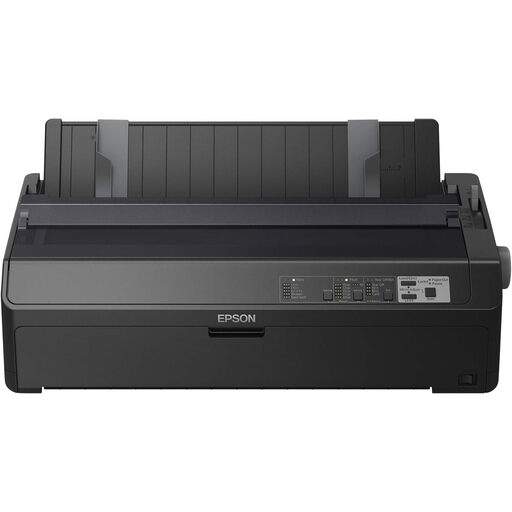 Image unavailable
Worth considering if you need black-and-white printing and an Ethernet connection. Check that a dot matrix printer is suitable for the programme layout you want.
The product name specifies 240 × 144 dpi and 738 cps.
 Image unavailable
Worth considering if you need an A4 colour inkjet printer. Check that its connectivity options suit your shared workspace.
The product name specifies A4 and 4800 × 600 dpi.
 Image unavailable
Worth considering if you need colour, A4 printing and network options for a shared workspace. Check the connections and paper settings for your intended use.
The product name specifies 4800 × 1200 dpi, A4 and Wi-Fi.
According to the product information, this model weighs over 15 kg; two-person lifting is recommended.
 Image unavailable
Worth considering if you print text-only programmes and need a shared network connection.
The product name specifies a wireless A4 monochrome laser printer.
Yes. Acrobat or Reader can arrange pages in booklet order. Choose the booklet setting and use double-sided printing only if your printer supports it for your chosen paper. Adobe also describes a method where you print the front and back sides separately.
No, you need to check these capabilities separately. Canon lists A5 as a paper size for the MAXIFY GX2051, but automatic duplex printing is specified for A4 and Letter on plain paper.
Check which consumables and parts are compatible with the exact model. For example, Brother lists a separate toner and drum for the HL-L2445DW. The Consumers’ Association notes that infrequent use of an inkjet printer can mean it needs cleaning.
According to the Dutch Government, you need the creator’s permission to use copyright-protected photos and text. The exception for a private copy for personal use doesn’t give you permission to distribute copies to visitors.
According to the Dutch Data Protection Authority, an organisation that processes personal data must decide on appropriate security measures based on the risks. Before publishing or distributing documents, also check for personal data that shouldn’t be included in the shared programme.