What should you consider when choosing?
Start by considering how confidential your printouts are and what you actually need to print and scan. Then compare the relevant consumables and connections.
| What to consider |
What should you check? |
Who should pay particular attention? |
| Confidentiality |
Check who can access the printer, print queue and output tray. Don’t assume secure print release is available without confirming it for the exact model. |
If I print donor details in a shared space, I want to know who can access the device and the printed documents. Around 36% of consumers put confidentiality first. |
| Running costs |
Compare toner, ink and any separate drum for a similar expected print volume. |
If I print admin documents regularly, I want to factor in consumables rather than looking only at the purchase price. Around 29% of consumers put running costs first. |
| Digitising forms |
Check whether the exact model scans and has an automatic document feeder. Don’t assume it can scan both sides just because it can print double-sided. |
If I need to process paper forms, I want to know whether the printer can scan and handle stacks of loose sheets. Around 21% of consumers prioritise digitising documents. |
| Colour and connectivity |
Decide whether you need colour and check that the specified Wi-Fi or Ethernet connection is compatible with the studio’s network. |
If I print colour documents and share the printer with others, I want the colour and connection options to suit how we work. Around 14% of consumers prioritise this combination. |
Printers for studio admin
This selection of Joybuy products includes printers for admin, paper documents and shared use. Check that each model’s features suit your printing and scanning needs.
 No image available
Brother MFC-J6760DW A3 inkjet printer
A multifunction option if you want to scan or copy paper forms as well as print.
50-sheet automatic document feeder; automatic double-sided printing; Wi-Fi and Ethernet. The product description also mentions Secure Print; check the feature and settings for your needs.
A3; stated print speed: 31 ppm.
View at Joybuy
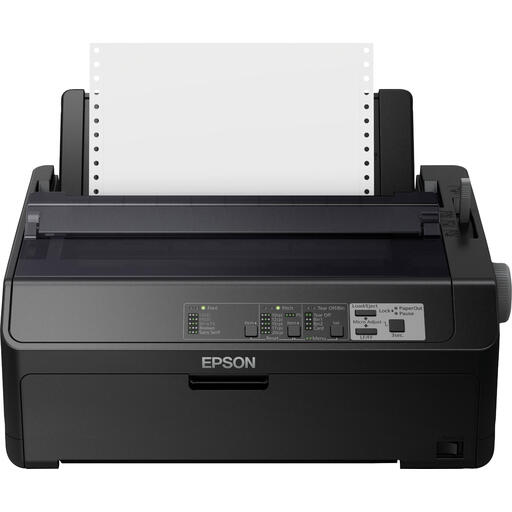 No image available
Epson FX-890IIN dot matrix printer
A monochrome option to consider if you mainly print admin documents and need an Ethernet connection.
The product description specifies monochrome output and Ethernet. Stated resolution: 240 × 144 DPI; stated speed: 612 cps.
View at Joybuy
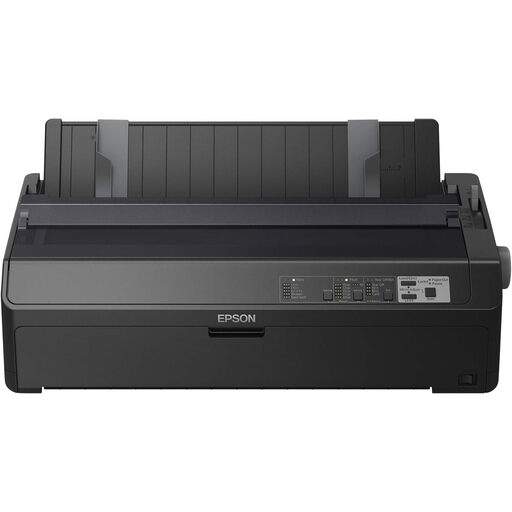 No image available
Epson FX-2190IIN dot matrix printer
A monochrome option for admin documents if you also need an Ethernet network connection.
The product description specifies monochrome output and Ethernet. Stated resolution: 240 × 144 DPI; stated speed: 738 cps.
View at Joybuy
 No image available
Canon PIXMA MG2556S A4 inkjet printer
A multifunction option if you want to print documents and scan or copy paper documents via USB.
A4; USB 2.0; 60-sheet input capacity. Stated resolution: 4800 × 600 DPI. With inkjet printers, ink can dry out or the printhead can become clogged if the printer is used infrequently; the Consumers’ Association of the Netherlands describes this risk for inkjet printers.
View at Joybuy
 No image available
Epson WorkForce Pro WF-C5390DW A4 colour printer
An option for shared use if you print in colour and want automatic double-sided printing.
A4 colour inkjet printer with Wi-Fi, Ethernet and automatic double-sided printing. Stated resolution: 4800 × 1200 DPI. With inkjet printers, ink can dry out or the printhead can become clogged if the printer is used infrequently; the Consumers’ Association of the Netherlands describes this risk for inkjet printers.
View at Joybuy
Frequently asked questions
Do donor details always need to be printed using a PIN?
Not necessarily: the Dutch Data Protection Authority doesn’t require every printer to have a PIN feature. An organisation processing personal data must choose appropriate measures based on the risks. In a shared space, also consider who can access the device and any unattended printouts.
Is automatic double-sided printing the same as double-sided scanning?
No, these are separate features. Check the scanning specifications for the exact model if you want to digitise forms printed on both sides.
What should you do if you print infrequently and sometimes take a long break?
When choosing an inkjet or ink-tank printer, factor in the risk of ink drying out or the need for printhead cleaning. If you don’t need colour, you could also compare monochrome laser printers, taking toner, any drum and your expected print volume into account.
How long should you keep printed donor details?
The Dutch Data Protection Authority states that the GDPR doesn’t set a specific general retention period for personal data; don’t keep data for longer than necessary. Other laws may set retention periods for certain types of records, so decide how long to keep them based on your organisation and documents.
Who should you contact about a faulty printer?
For a consumer purchase, the Dutch government advises contacting the seller if a product doesn’t meet the legal requirements. First establish whether the studio is buying as a consumer or a business: consumer guidance doesn’t automatically determine the terms of a business purchase.


