For forms that are mainly text, a mono printer is often a sensible starting point. Choose a model with scanning and copying functions if you also handle paper attachments, and only opt for colour if your documents require it. Before buying, check that the connectivity and paper handling suit your shared workspace, and whether the form can be printed single- or double-sided. If you’re handling personal data, access to the output tray also needs attention: the Dutch Data Protection Authority warns that paper documents can be lost or stolen.
Who might need this type of printer?
A printer for forms used by several people
You mainly want to print readable text, with connectivity and a paper tray that work well at a shared desk. The Consumers’ Association lists mono or colour printing, wireless connectivity and duplex printing as factors to consider when choosing a printer.
A printer for forms with a scanner
You also receive paper attachments, or want to copy or store completed documents digitally. Check which scanning functions the exact model offers; the Consumers’ Association lists scanning and copying as features to weigh up.
A workspace handling confidential forms
You process forms containing personal data while other people can access the printer. The Dutch Data Protection Authority highlights risks around paper documents, so controlling access to printouts is a separate consideration.
What should you look for in a printer for forms?
Start with the print job: mono is often enough for text, while scanning, copying or colour functions are only necessary if your documents or workspace call for them.
Mono laser printer without a scanner
Choose this if: you mainly print text forms and scan attachments elsewhere.
Bear in mind: you can’t print in colour, and there’s no built-in scanner.
Multifunction mono laser printer
Choose this if: as well as printing, you want to scan or copy paper forms or attachments.
Bear in mind: a scanner adds functions you may not need, and doesn’t automatically make a printer suitable for confidential printouts.
Colour inkjet or ink tank printer
Choose this if: you also print or copy colour documents in the same workspace.
Bear in mind: compare the ink and expected running costs for your needs. Manufacturers’ savings claims won’t necessarily reflect what every user will achieve.
| What to consider |
What to check before buying |
Who should pay particular attention? |
| Text and paper handling |
Check A4 support, the available connectivity, the paper tray and the form’s printing instructions. |
I mainly want to print readable text and handle paper conveniently at a shared desk; around 29% of consumers say text printing is their main need. |
| Scanning and copying |
Check whether the exact model scans and copies, and whether its document feeder suits your paperwork. |
If I need to store paper attachments digitally or copy completed documents, I want those functions in the same device; around 24% of consumers prioritise scanning or copying. |
| Confidentiality |
Check whether the exact model supports secure print release, and agree who will collect printouts straight away. |
If other people can access the output tray, I want to avoid leaving forms containing personal data unattended; around 18% of consumers prioritise print privacy. |
| Consumables |
Compare compatible ink or toner, any maintenance parts and how often you expect to use the printer. |
I want to factor in ongoing costs rather than look only at the purchase price; around 17% of consumers prioritise running costs. |
| Colour |
Check the recipient’s requirements and decide whether colour is needed for this form or other documents. |
If colour information matters on documents I print in the same workspace, colour will be more useful than mono-only printing; around 12% of consumers prioritise colour printing. |
Automatic duplex printing is a printer feature; it doesn’t mean that every application form can be submitted double-sided. Follow the recipient’s instructions. When working out running costs, also consider your printing habits: according to the Consumers’ Association, an inkjet printer that is used infrequently may use ink for cleaning.
Common buying mistakes
-
Assuming a shared printer is a private printer
Forms may contain personal data and be accessible to other people after printing. The Dutch Data Protection Authority notes that paper documents can be lost or stolen.
Decide who will collect the printouts. If you need secure release at the printer, check whether the exact model supports this feature.
-
Assuming the lowest purchase price means the lowest printing costs
Running costs also depend on the consumables and parts required for the exact model. The Consumers’ Association explains that an inkjet printer used infrequently may use ink for cleaning.
Compare the compatible ink or toner and base your calculations on how much you expect to print. Also check whether a separate drum or subscription is involved.
-
Printing double-sided without checking the form
The fact that a printer can print automatically on both sides doesn’t tell you whether a particular form should or can be submitted that way.
Follow the recipient’s instructions, then choose the single- or double-sided setting.
-
Assuming any replacement toner will work
HP lists conditions relating to the cartridge chip for the LaserJet M209dw, and notes that firmware updates may block cartridges.
Before buying, check the conditions and toner compatibility for the exact model.
This may limit your choice of compatible replacement cartridges.
Brands to consider
Brother
Brother offers mono printers as well as multifunction mono models with scanning functions.
- Brother lists Wi-Fi and automatic duplex printing for the compact models mentioned.
- Don’t assume their security features are equivalent to SecurePrint+ on the separately mentioned business model.
Canon
According to Canon, the i-SENSYS LBP122dw II is a mono printer without a built-in scanner.
- Canon lists automatic A4 duplex printing, Wi-Fi, USB and a wired network connection.
- The stated print speeds are manufacturer figures, not independent test results.
HP
According to HP, the LaserJet M209dw is a compact mono printer with wireless connectivity and duplex printing.
- These features may suit anyone printing forms without colour.
- HP lists cartridge chip requirements and possible blocking through firmware updates; check the toner for the exact model.
Epson
The EcoTank ET-2950 is a multifunction colour inkjet printer with refillable ink tanks.
- Epson lists duplex printing, scanning and copying.
- Savings and page-yield figures are manufacturer claims, not guaranteed results for your usage.
Printer options at Joybuy
These models are suited to printing and handling documents in a shared workspace, from mono forms to colour printing and scanning.
 No image available
Brother MFC-J6760DW A3 inkjet printer
A multifunction option if you want to scan or copy paper attachments as well as print.
A3; 1200 × 4800 DPI; 31 ppm; Wi-Fi.
Check that A3 suits the size and submission instructions for your forms.
View at Joybuy
 No image available
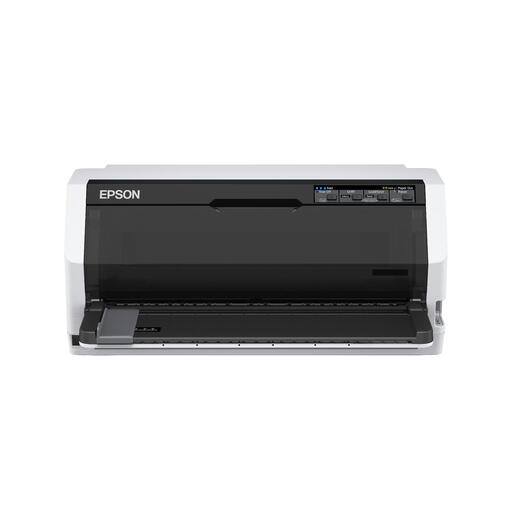
Epson LQ-780 dot matrix printer
An option to consider if you specifically need a dot matrix printer for forms.
Beforehand, check that the printer is compatible with the paper size, documents and software used in your workspace.
View at Joybuy
 No image available
Canon PIXMA MG2556S A4 inkjet printer
An A4 inkjet model with scanning and copying functions for handling forms and paper attachments.
The stated resolution is 4800 × 600 DPI.
Check that the USB connection suits your shared workspace.
View at Joybuy
 No image available
Epson WorkForce Pro WF-C5390DW A4 colour inkjet printer
An A4 colour printer for a workspace where forms or other documents are also printed in colour and double-sided.
The product information lists Wi-Fi, Ethernet and automatic duplex printing.
Check that the available network connection suits your workspace.
View at Joybuy
 No image available
Brother HL-L5210DW mono A4 laser printer
A mono laser printer for A4 text forms in a shared workspace.
The product information lists Wi-Fi, Ethernet, USB and automatic duplex printing.
Check which connection is available and whether duplex printing suits your form.
View at Joybuy
Frequently asked questions
Should I print an application form double-sided?
Not before checking the recipient’s instructions. Automatic duplex printing is a printer feature; it doesn’t determine how a particular form should be submitted.
What should I check if several people print from their own devices?
Check that the connections on the exact model are compatible with those available in your workspace. The Canon i-SENSYS LBP122dw II lists USB, wired networking and wireless networking; Brother lists Wi-Fi and USB for the HL-L2400DWE. An available connection doesn’t automatically mean network access has been set up.
How should I handle forms containing personal data?
Don’t leave printouts unnecessarily in an output tray that other people can access. The Dutch Data Protection Authority warns that paper documents can be lost or stolen. You can also check whether the exact printer model supports secure release using a PIN or card. This is a possible technical measure, not a general legal requirement for every buyer.
Can I work out the running costs from the purchase price?
No. Also compare compatible ink or toner and how much you expect to print. The Consumers’ Association explains that an inkjet printer used infrequently may use ink for cleaning. HP also lists cartridge chip requirements for the HP LaserJet M209dw.
What can I do if a printer I bought as a consumer turns out to be faulty?
According to the Government of the Netherlands, if you have a problem, you should contact the seller to exercise your right to a product that works properly. There is no fixed statutory guarantee period in the Netherlands; a manufacturer’s guarantee comes on top of your legal rights.


