
Vandaag of morgen in huis

Kwaliteit gegarandeerd

Welkomstaanbiedingen ontgrendelen: GRATIS bezorging | Tot 80% korting | Gratis 30 dagen JoyPlus-proefperiode
Download de app
A prebuilt gaming PC is an attractive choice: you take it out of the box, plug it in, and can start gaming immediately. No hassle with picking individual components or the build process itself. But the market for a ready-to-go gaming computer is full of pitfalls. Marketing terms are thrown at you from every direction, and not every PC is worth its price tag. Before you make a decision, it's wise to know what to look for to avoid buyer's remorse.
Many gamers fall into the same traps, lured by a flashy case or a steep discount. Here are the three most common mistakes that can cost you money and ruin your gaming experience.
To avoid these traps, it's important to look beyond the marketing hype. Focus on a few technical specifications that determine the actual performance of a powerful gaming desktop.
The CPU and GPU are the heart of your gaming PC. They must be well-matched. A modern combination, such as an Intel Core Ultra 7 processor with an NVIDIA GeForce RTX 5050 graphics card, ensures a balanced distribution of the workload. The CPU handles game logic and AI, while the GPU (an RTX 5050 PC in this case) is responsible for rendering the visuals. A good balance between these two is crucial for a smooth experience at high settings, especially in games that use technologies like ray tracing.
Always ask about the cooling system. A good prebuilt gaming PC has a well-thought-out airflow design, with sufficient fans and vents. Even in a compact gaming PC, there must be space for cool air to be drawn in and hot air to be exhausted. Pay attention to specifications like the number of fans and the presence of dust filters, which help keep the system internally clean and cool.
For modern games, 16 GB of DDR5 RAM is a solid baseline. This ensures you can multitask smoothly (for example, gaming with Discord running in the background) without lag. A PCIe NVMe SSD of at least 1 TB is also essential. Games will launch significantly faster, and in-game loading times are drastically reduced compared to older hard drives or SATA SSDs.
Below are some products that suit different types of users, based on their specifications and how they address the pitfalls mentioned earlier.
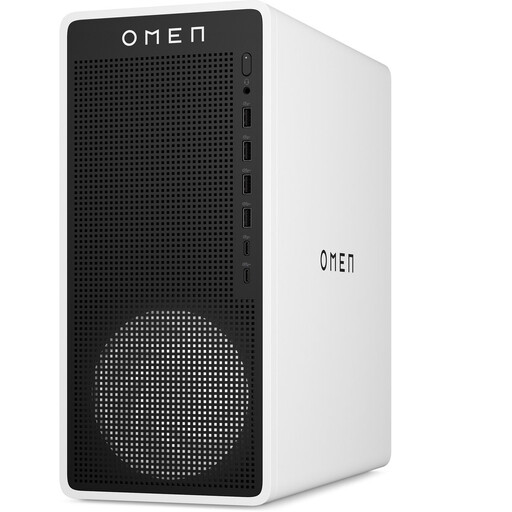
Why This Fits Their Persona: Ideal for the serious gamer who doesn't have time for a custom build but expects top-tier performance right out of the box. This system is ready for the latest games at high settings and, with its sleek, compact design, fits on almost any desk.
The combination of an Intel Core Ultra 7 processor and an RTX 5050 graphics card is well-balanced. The 16L chassis was designed by HP with efficient airflow in mind, avoiding the 'hotbox' trap.
Ready to use immediately with Windows 11. Features modern connectivity like Wi-Fi 6, 2.5 Gb Ethernet, and multiple DisplayPort 2.1 outputs. The 1 TB PCIe SSD and 16 GB DDR5 RAM provide a fast and responsive experience.
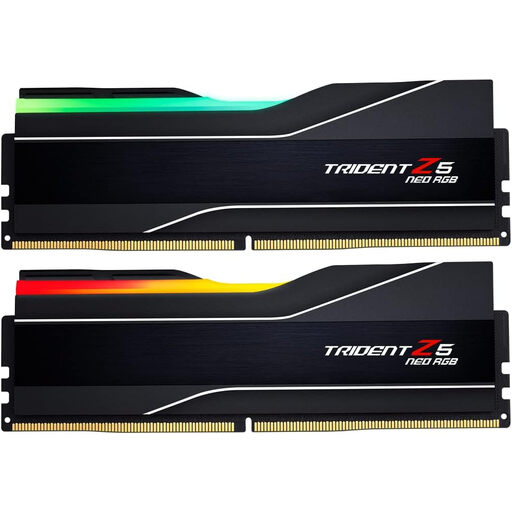
Why This Fits Their Persona: For the user looking to future-proof their existing (or new) system. This RAM kit provides an immediate performance boost for demanding games, content creation, and intensive multitasking.
This tackles the unbalanced system pitfall by directly resolving one of the most common bottlenecks: insufficient or slow RAM. It's an upgrade that noticeably improves overall system performance.
High speed (DDR5-6000) for maximum throughput. The heat spreaders ensure proper heat dissipation, and the RGB lighting adds a visual element to your build. The kit is designed for the latest platforms.
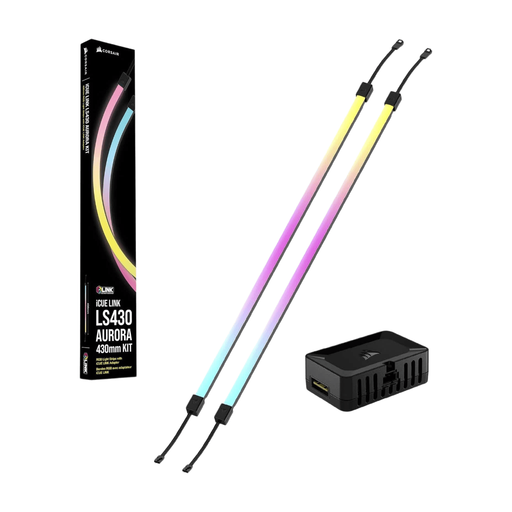
Why This Fits Their Persona: For the gamer who values the look of their setup. These LED strips are an easy way to personalize a PC case with vibrant, customizable lighting without needing deep technical knowledge.
This is a purely aesthetic upgrade that doesn't affect performance, so it can't create an 'unbalanced system'. It's a safe and fun way to customize your PC without any risk of performance loss.
Simple installation and integration with Corsair iCUE software for full control over colors and effects. The slim design fits in most cases. The set comes with two strips for a complete look.
A gaming setup is more than just the PC. For those who want to personalize their system further, we have a selection of products that meet strict criteria for quality and compatibility.
Generally, building it yourself can be slightly cheaper if you have the time and knowledge to find the best deals on individual components. However, with a prebuilt PC, you're paying for convenience, professional assembly, software installation, and a full-system warranty. For many people, this outweighs the small price difference.
A powerful gaming desktop, like the models coming to market now, can typically run the latest games at good settings for 3 to 5 years. After that period, you can often still play perfectly well at lower settings, or you might consider upgrading specific components like the graphics card to extend its lifespan.
With a compact PC, airflow is extra important. Check if the case has ventilation openings on the front, top, and back. After purchase, ensure the PC has enough clearance (at least 4 inches or 10 cm on all sides) and is not placed in an enclosed cabinet. Regularly cleaning the dust from fans and filters also helps keep temperatures low.
