
Vandaag of morgen in huis

Kwaliteit gegarandeerd

Welkomstaanbiedingen ontgrendelen: GRATIS bezorging | Tot 80% korting | Gratis 30 dagen JoyPlus-proefperiode
Download de app
A desk cluttered with chargers, a tangle of cables behind the TV, and the constant feeling that you're wasting energy. Finding a good power strip seems simple—until you buy one that causes more frustration than convenience. Many models promise the world but have design flaws that make them impractical to use.
Before you make a purchase, it's wise to know the most common pitfalls:
A good power strip with USB and switches is an investment in convenience, safety, and energy savings. Below, we discuss the specifications that truly make a difference.
To avoid buyer's remorse, it's important to look beyond the number of outlets. The following features determine whether a power strip is truly functional for your needs.
Not all USB ports are created equal. Pay attention to the following specifications:
A power strip with a combination of USB-A and USB-C ports offers the most flexibility for all your devices.
A power strip with an on/off switch is essential to combat standby power drain. There are two main types:
Safety is paramount. Always check a power strip for the following two features:
Finally, consider where and how you will use the power strip. A power strip with a 5-meter cord offers great freedom if the nearest wall outlet is far away. For a tidy desk or a clean installation behind furniture, a wall-mountable power strip is an excellent solution. Look for mounting holes on the back. The orientation of the outlets (diagonal or straight) can also determine whether large adapters will fit side-by-side.
Based on the criteria above, we have selected several products that suit specific needs.
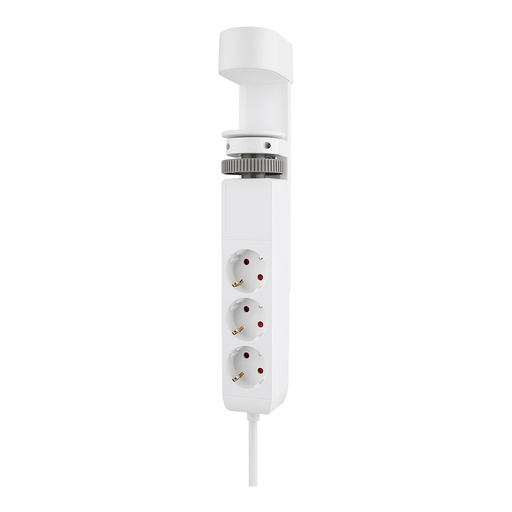
Why This Fits Their Persona: Ideal for those who want a clutter-free desk without sacrificing functionality. The clamp mount keeps the socket securely in place, while the 20W Power Delivery USB-C port quickly charges a laptop or tablet. The outlets are neatly tucked away under the desk.
This model solves the problem of messy cables and slow USB ports. The 20W USB-C PD port is powerful enough for modern devices, and its smart design keeps the desktop clear.
Simple, drill-free clamp mounting; 2x USB-C ports with 20W Power Delivery for fast charging.
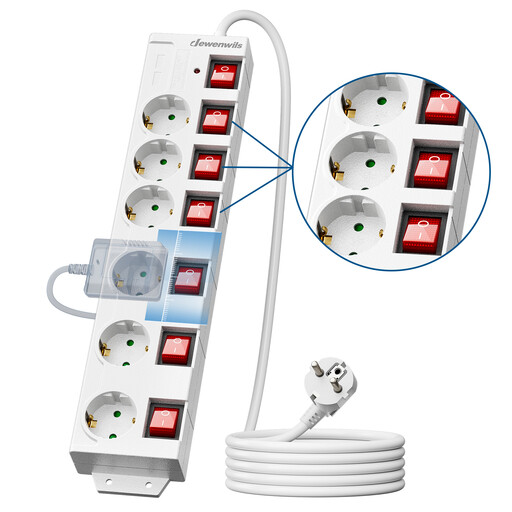
Why This Fits Their Persona: Perfect for a busy household with many devices. The six individually switched outlets make it easy to stop standby power drain from the TV, game console, or other equipment. The built-in child safety and USB ports make it a complete solution for the living room.
It tackles the pitfalls of standby power drain and unusable outlets. The individual switches provide full control, and the spacious, 90-degree rotated layout ensures all six outlets remain accessible.
6 individually switched outlets; wide spacing (60mm) between sockets; overload and child safety protection.
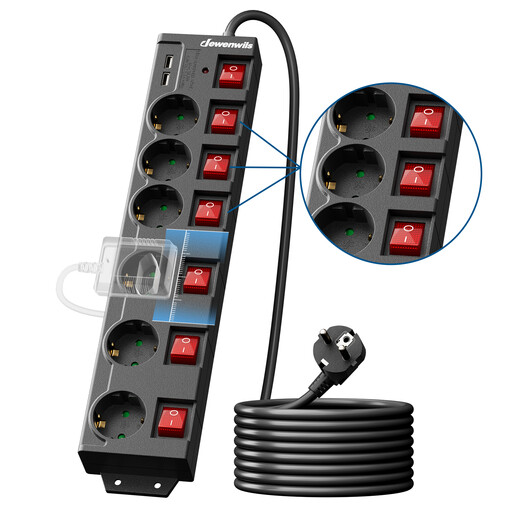
Why This Fits Their Persona: The solution for large rooms, workshops, or offices where outlets are scarce or inconveniently located. The extra-long 5-meter cord provides maximum flexibility without needing extension cords.
Prevents unsafe 'daisy-chaining' (linking multiple power strips together) by providing sufficient length from the start. The surge and lightning protection offers extra security for connected equipment.
Extra-long 5-meter cord; individual switches; surge and lightning protection.
We have compiled a complete, up-to-date list of products that fully meet these strict selection criteria and safety standards.
A power strip with surge protection shields your connected devices from sudden, high voltage spikes. These spikes can occur during thunderstorms or due to grid malfunctions. Without this protection, sensitive electronic components in your computer, TV, or audio equipment can be irreparably damaged. It's a small extra investment that can prevent costly repairs or replacements.
The exact amount depends on the connected devices. Appliances like televisions, game consoles, printers, and chargers continuously consume a small amount of power in standby mode (also known as phantom load). For an average household, this can add up to a significant cost each year. Individual switches allow you to completely cut power to devices you aren't using, reducing this standby consumption to zero.
Not every power strip is designed for wall mounting. A wall-mountable power strip has special keyhole slots or mounting holes on the back. These allow you to securely hang the power strip on screws in a wall or under a desk. This creates a tidy and safe installation, allowing cables to be neatly managed and keeping the power strip off the floor. Always check the product description or the back of the power strip for this feature.
