
Vandaag of morgen in huis

Kwaliteit gegarandeerd

Welkomstaanbiedingen ontgrendelen: GRATIS bezorging | Tot 80% korting | Gratis 30 dagen JoyPlus-proefperiode
Download de app
A shortage of outlets is a common problem in many homes and offices. A power strip seems like a simple solution, but the market is flooded with models that cause more frustration than convenience. Before making a purchase, it's crucial to know what to look for. Many power strips have design flaws or misleading specifications that make them impractical for real-world use.
We've outlined the three most common pitfalls to help you make an informed decision.
To avoid a bad purchase, there are a few technical specifications you should always check. These determine the safety, functionality, and lifespan of your power strip.
Safety comes first. Always check the maximum power rating, expressed in Watts (W) and Amperes (A). For most household applications, a power strip with a maximum load of 3680W / 16A is the standard. Never connect multiple high-power appliances (like a kettle, electric heater, or deep fryer) to a single power strip simultaneously.
A good power strip should also have child safety features. These are internal shutters that cover the contact holes and only open when pressure is applied simultaneously by two prongs, as with a plug.
For protecting sensitive electronics like computers, televisions, and game consoles, surge protection is an important feature. This function shields your devices from voltage spikes, which can be caused by events like a nearby lightning strike.
A power strip with a switch helps reduce standby power consumption. With a single press, you can completely turn off all connected devices. Even more convenient is a power strip with individual switches. This allows you to control the power supply for each device separately without having to unplug them.
If you opt for a model with USB ports, check the output. For modern fast charging, you'll need a USB-C port with Power Delivery (PD), often providing 20W or more. Standard USB-A ports should ideally have an output of 2.1A or higher to be useful.
The length of the cord determines your flexibility. A standard extension cord of 1.5 to 3 metres is often sufficient for a desk or TV stand. If you need to cover more distance, such as in a larger room or office, a 5-metre power strip is a better choice.
For use in a workshop, garage, or for jobs in and around the house, a cable reel is the most practical solution. These often offer a cable length of 25 metres or more and are designed for more intensive use. Also, pay attention to the cable thickness, indicated by codes like H05VV-F 3G1.5mm?, which signifies its robustness and load capacity.
Based on these criteria, we have selected a few products that suit different user profiles.
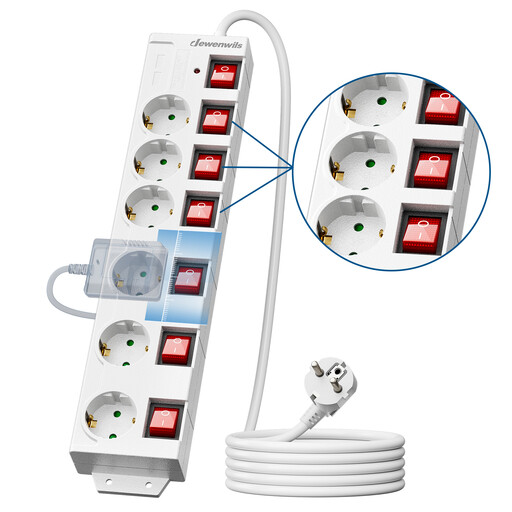
Why This Fits Their Persona: Ideal for a tidy desk. With six outlets and two USB ports, you can connect your laptop, monitor, printer, and other peripherals, while simultaneously charging your phone and tablet without extra adapters.
The generous spacing (60 mm) between the outlets prevents bulky adapters from blocking each other. The individual switches effectively tackle standby power consumption.
Six individually switchable outlets for maximum control and energy savings. Includes mounting options for a fixed position on the wall or under the desk.
Why This Fits Their Persona: Perfect for a complete home cinema setup. The extra-long 5-metre cable easily bridges the distance from the wall socket to your TV stand, even in a large living room.
The 90° rotated outlets are specifically designed for the bulky, right-angled adapters of televisions, game consoles, and soundbars, allowing you to use all six sockets.
The combination of a 5-metre power strip and the smart outlet layout offers maximum flexibility and ease of use for any entertainment corner.
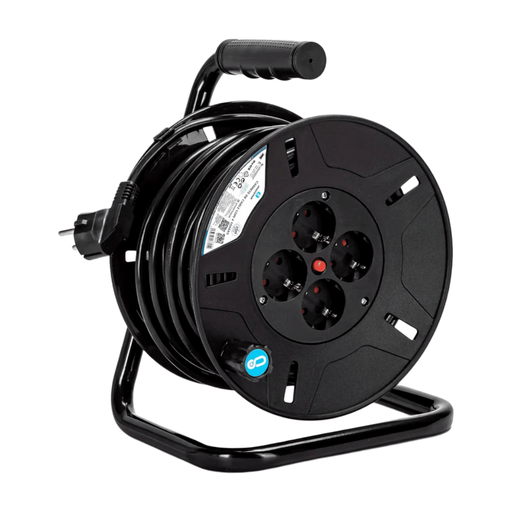
Why This Fits Their Persona: For jobs in the garage, shed, or garden where outlets are scarce. This cable reel provides a massive 25-metre range for power tools, lighting, or a lawnmower.
This isn't an ordinary power strip, but a robust cable reel designed for mobility and heavy-duty use. The built-in overload protection prevents damage from high power consumption.
A 25-metre range and a convenient reeling mechanism for easy storage. The four outlets provide enough connections for various tools.
We have compiled a complete, up-to-date list of products that meet these strict selection criteria and safety standards.
A standard power strip only distributes power to multiple outlets. A model with surge protection contains additional components that protect your connected devices from sudden voltage spikes. This is especially recommended for expensive and sensitive electronics like computers, televisions, and audio equipment. It's a small extra investment that can prevent costly damage.
It's not about the number of devices, but the total power consumption (wattage). Most power strips for home use are rated for a maximum of 3680 Watts. Check the power rating on your devices' labels. For example, it's best not to use a kettle (approx. 2200W) and a microwave (approx. 1000W) on the same power strip at the same time. Also, never plug a power strip into another power strip (this is called 'daisy-chaining'), as it can lead to overload and a fire hazard.
Replace a power strip immediately if the cable is damaged or frayed, if the housing shows cracks, or if the strip becomes abnormally hot during use. The protective components in a surge protector can wear out after a major voltage spike. Some models have an indicator light that shows whether the protection is still active. As a general guideline, it's wise to replace power strips that are used intensively every 5 to 7 years.
