Who is this for?

Home worker with a USB charging case

You want to top up your wireless microphone’s charging case between calls or recordings. First, check the charging instructions for your case. For example, RØDE lists a USB-C cable as included with the Wireless Micro charging case.

Anyone whose device stops charging too soon

You’re looking for a solution when a power bank switches off before a low-power device has finished charging. Anker Support recommends checking whether a low-current mode is available for the specific power bank model.

Creator recording for longer sessions

You want enough spare power for back-to-back sessions without carrying more bulk or weight than necessary. Which? highlights the trade-off between capacity and portability when choosing a power bank.

What should you look for when choosing?

What to consider What should you check? Who is this important for?
Output and cable Check your microphone or case’s charging instructions, the output function and whether the cable you need is suitable. I want to connect my charging case during a working day without guessing which cable or port will work. For around 36% of consumers, having a compatible charging connection is the main priority.
Charging at low current Look in the documentation for the exact model for a suitable mode, then test whether it completes a charging cycle. If my microphone or case draws very little power, I want to prevent the power bank from switching off halfway through. Around 29% of consumers prioritise uninterrupted charging.
Capacity for your sessions Compare the stated energy and output specifications; don’t assume a fixed number of charges based on mAh alone. I want enough power for back-to-back calls or recordings, but don’t want to carry more than necessary. Around 21% of consumers are mainly looking for spare power.
Size and connections Check the weight, number of ports and which cables are included; make sure they’re suitable for your charging case. I want a practical choice for my workspace, without features or cables that don’t suit my equipment. Around 14% of consumers focus mainly on size and a practical design.

Common buying mistakes

  • Assuming the mAh rating is the capacity you get directly via USB

    The internal cells’ capacity and the capacity at the USB output are measured at different voltages. Converting between them uses energy, so the label doesn’t tell you exactly how many times you can charge a device.

    Compare the energy and output specifications, and try the power bank with your charging case before relying on it for a long session.

    If you overestimate the number of usable charges, you may need to recharge partway through or bring extra power.

  • Assuming every power bank will keep charging a small device

    A power bank may switch off automatically when a device draws very little power, interrupting the charging cycle.

    Check whether the exact model has a suitable low-current mode, and test whether it fully charges your case.

  • Confusing a wireless microphone charger with wireless phone charging

    A microphone may transmit audio wirelessly, but its own charging instructions may require a cable or a specific charging case.

    Follow your microphone’s charging instructions. Don’t choose a phone-charging feature just because your microphone works wirelessly.

    A wireless phone-charging feature adds little if your microphone or charging case can’t use it.

  • Confusing a brand name with a model-specific safety warning

    On 15 July 2025, the Netherlands Food and Consumer Product Safety Authority (NVWA) warned of overheating and fire risks with specific Anker models: A1257, A1647, A1681 and A1689.

    Check the full model number. The NVWA advised against using the models named; the warning doesn’t automatically apply to every model from the same brand.

Brands to consider

Belkin

Belkin lists the BOOST↑CHARGE BPB011 as having one USB-C port and two USB-A ports. The BPB006 variant has built-in USB-C and Lightning cables. Which version is right for you depends on the connection used by your microphone or charging case.

  • Belkin lists the BPB011 as having a capacity of 10.000 mAh and up to 15 W via USB-C.
  • A built-in cable is only useful if it suits your device; the model specifications don’t prove that it’s compatible with your microphone.

Trust

Trust lists the Primo 25029 as having two USB-A ports and one USB-C port.

  • Trust lists a capacity of 10.000 mAh and says the power bank can be recharged via micro-USB or USB-C.
  • The stated maximum charging speed doesn’t, on its own, tell you how quickly a specific microphone will charge.

Xtorm

Xtorm lists the Fuel Series 5 FS5102U as having two USB-C ports and one USB-A port, making it an option if you need different cables or multiple connections.

  • Xtorm lists a capacity of 10.000 mAh and a USB-C PD output of up to 20 W.
  • The maximum output doesn’t offer an advantage for a microphone that doesn’t need that much power; claims about charging phones don’t automatically apply.

UGREEN

UGREEN says the Nexode PB727 combines a built-in USB-C cable with an extra USB-C port and a USB-A port.

  • UGREEN lists this version as having a capacity of 10.000 mAh, 36 Wh and a weight of 249 g.
  • The built-in cable and output need to suit your microphone or charging case’s charging method; advertised power for other devices doesn’t prove that your microphone will charge faster.

Anker

Anker Support describes a low-current mode for certain power banks, designed for low-power devices. Check the documentation for the exact model.

  • A suitable model-specific mode may be useful if a power bank would otherwise switch off too soon.
  • On 15 July 2025, the NVWA warned about the specific models A1257, A1647, A1681 and A1689 and advised against using them. This isn’t a judgement on all Anker models.

Power banks at Joybuy

These Joybuy picks are intended for wired charging of a microphone or charging case. Before buying, check that the connection and cable suit your model. Anker Support explains that the stated mAh capacity of internal cells isn’t the same as the capacity available via USB.

MOMAX 1-Power F.Pass+ Ultra-Slim Power Bank, 10.000 mAh

MOMAX 1-Power F.Pass+ Ultra-Slim Power Bank, 10.000 mAh

Suitable for a charging case that charges via USB-C and could benefit from extra connections.

The description lists a built-in USB-C cable, a USB-C port and a USB-A output. The built-in cable is only suitable if your device charges via USB-C.

Up to 20 W via the built-in cable, according to the product description.

View at Joybuy
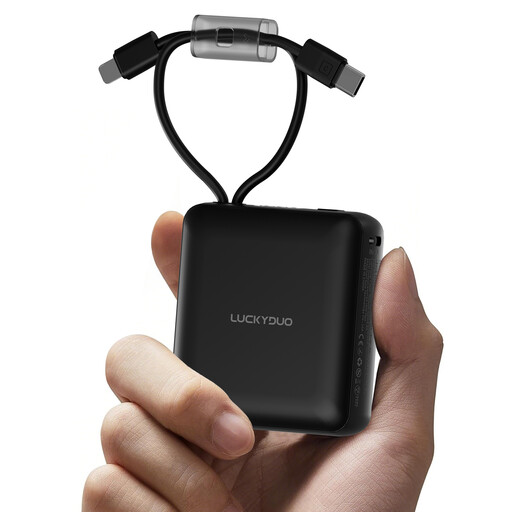
Power bank, 10.000 mAh, with two built-in cables

Power bank, 10.000 mAh, with two built-in cables

Could be suitable if one of the built-in cables connects to your microphone’s charging case and you want to avoid carrying separate cables.

The product title and description list two built-in cables, including a USB-C cable. Check which connection your charging case requires.

The description also mentions an LED display.

View at Joybuy
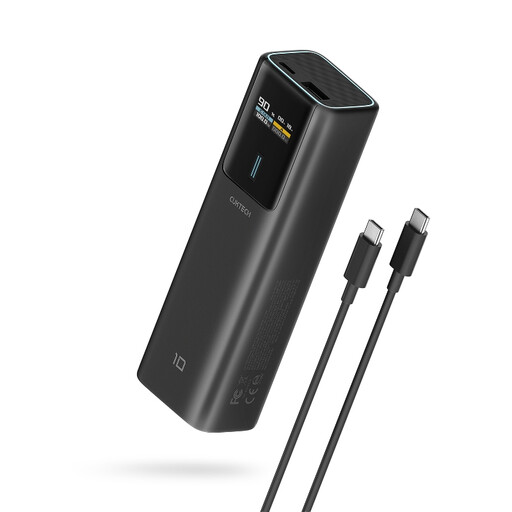
CUKTECH PB100P power bank, 10.000 mAh, with TFT display

CUKTECH PB100P, 10.000 mAh

An option if your microphone or charging case charges via USB-C and you want to keep an eye on the charge level.

The description lists a USB-C output and a TFT display showing the battery percentage and charging status.

The title states up to 100 W via USB-C; this maximum output doesn’t prove that a microphone will charge faster.

View at Joybuy
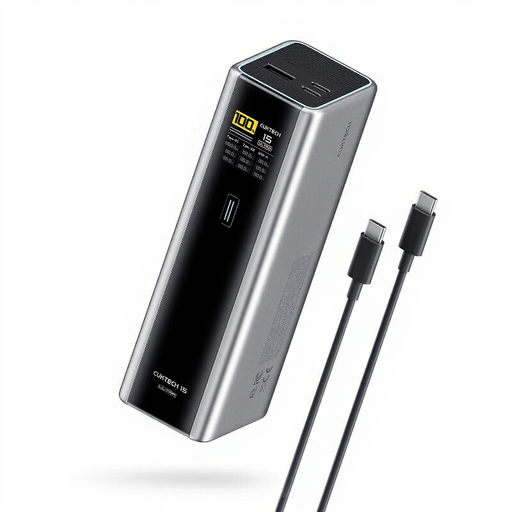
CUKTECH 15 Ultra PB200U power bank, 20.000 mAh, three ports

CUKTECH 15 Ultra PB200U, 20.000 mAh

Suitable if you want to connect other devices as well as a microphone charging case, provided the ports suit those devices.

The description lists three outputs: two USB-C and one USB-A.

The product title states 140 W and PD3.1; these specifications don’t, on their own, prove any benefit for a microphone.

View at Joybuy

Samsung power bank, 20.000 mAh, 45 W, three USB-C ports

Samsung Power Bank, 20.000 mAh, 45 W

An option if you want to connect several devices via USB-C; check that your microphone or case’s charging cable is suitable.

The product title and description list three USB-C ports and a capacity of 20.000 mAh.

The stated 45 W is a maximum product specification, not proof of your microphone’s charging speed.

View at Joybuy

Frequently asked questions

Can I charge any wireless microphone with a USB-C power bank?

No, not just because the connector fits. Check the charging instructions for your exact microphone or charging case, the power bank’s output function and the cable required. RØDE specifies USB-C power for the Wireless Micro charging case; that doesn’t automatically tell you anything about other models.

What can you do if the power bank stops before your microphone is fully charged?

First, check that the cable and output are suitable. A low-power device may trigger automatic shut-off. Anker Support recommends checking whether the exact power bank model has a suitable low-current mode.

Does 10.000 mAh mean you can deliver 10.000 mAh via USB to your microphone?

No. Anker Support explains that the mAh rating usually refers to the internal cells, and converting their power to the USB output voltage uses energy. The number of charges also depends on the microphone or charging case.

Which power bank models did the NVWA name in its Anker warning?

In its warning of 15 July 2025, the NVWA named models A1257, A1647, A1681 and A1689 and advised against using them. Check the full model number; the warning doesn’t automatically apply to all Anker power banks.

How can you charge a power bank safely at your desk?

The Fire Service advises placing the charger in a clear space so heat can escape, avoiding damaged cables and not charging the power bank under a cushion or duvet. Don’t use a damaged or swollen battery.
