Start with your lamp’s specifications: check the type of USB plug, the required input voltage and the power rating, then choose a power bank with a suitable output. To work out how long it will run, compare energy in Wh, not just capacity in mAh. For a low-power lamp, the power bank’s automatic shut-off feature also matters. On a shared desk, size and extra outputs may be useful, but no single feature guarantees compatibility if you don’t know what your lamp requires.
Who is this guide for?
People with their own USB lamp
If you want to power a lamp on a shared desk, first check that its plug and electrical requirements match the power bank’s output. IKEA Netherlands, for example, describes the HÖSTULOTA as a USB-C lamp with a specified power rating of 0.7 W. Other lamps may have different connections or requirements.
Anyone who needs light for a full working session
If the lamp needs to stay on throughout a full working session, compare the power bank’s energy with the lamp’s power rating. The Consumentenbond lists capacity as one of the features to compare when choosing a power bank; mAh alone won’t tell you how many hours your lamp will run.
People using an energy-efficient USB lamp
A low-power lamp can trigger automatic shut-off on some power banks. Anker describes a low-current mode for the 313 Power Bank A1229, but this feature applies to that specific model and doesn’t by itself confirm that it will work with your lamp.
What should you look for?
First check that you can connect the lamp to the right output. Then work out how much energy you’ll need for your session and check whether the lamp’s low power consumption could cause the power bank to switch off.
The percentages below show how consumers prioritise the main things to consider when choosing a power bank for a USB desk lamp on a shared desk.
| What to consider |
What should you check? |
Who is this important for? |
| Connection and electrical requirements |
Compare the lamp’s plug type, required voltage and power rating with a port listed as an output on the exact power bank model. |
If I want to use my own lamp on a shared desk, I need to know that its cable will fit a suitable output. Around 36% of consumers give connection and electrical compatibility top priority. |
| Run time |
Compare the lamp’s power rating in W with the power bank’s energy in Wh. This calculation gives only a theoretical upper limit before conversion losses. |
Anyone who needs a lamp for a full working session will want to match its energy requirements to the lamp’s power consumption, rather than looking at mAh alone. Around 29% of consumers prioritise a sufficient run time. |
| Low power consumption |
Check the manual for the exact model to see whether it supports low-current devices, and test it with the lamp. |
If I don’t want my energy-efficient lamp to switch off unexpectedly, I need to know how the power bank responds to a low current draw. Around 21% of consumers are most concerned about preventing shut-off at low power levels. |
| Space and an extra device |
Check the dimensions, cable layout and total output when using several ports at once. |
On a shared desk, I want to keep cables and devices tidy, and sometimes connect a second USB device too. Around 14% of consumers prioritise space-saving and the option to power two devices. |
Common buying mistakes
-
Estimating run time from the mAh figure alone
Capacity in mAh alone doesn’t guarantee a particular run time from the USB output. Run time also depends on the lamp’s power rating and the usable energy remaining after conversion losses.
Compare the lamp’s power rating in W with the power bank’s energy in Wh. Treat any calculated result as a theoretical upper limit, not a guaranteed run time.
-
Assuming every USB-C port supplies power
According to Anker, the USB-C port on the Anker 313 Power Bank A1229 is input-only. This means a lamp with a USB-C plug can’t be connected directly to that port.
Check whether the port on the exact model is labelled as an input or output, and make sure it matches your lamp’s plug.
-
Assuming an energy-efficient lamp will always stay on
A low current draw can trigger automatic shut-off on some power banks. Support for low-current devices varies by model.
Check the model’s manual and test it with your lamp, especially if you need uninterrupted light during a working session.
-
Adding together the power ratings of the ports
The power rating of each individual port doesn’t mean every device will receive that maximum power when they’re used at the same time. Belkin states that the BoostCharge BPB011btRG provides a maximum total output of 15 W when all three ports are used simultaneously.
Check the stated total output when using the lamp and a second device at the same time.
Brands to compare
Trust
The Primo range includes models with different rated capacities, so you can weigh up a compact option against having more battery reserve.
- Trust lists one USB-A output and one USB-C output for the Primo 5.000 mAh. For the Primo 10.000 mAh 24678, Trust lists two USB-A outputs and one USB-C output.
- Capacity alone won’t predict how long a particular desk lamp will stay on. Run time depends on the lamp and the usable energy at the output.
Anker
The 313 Power Bank A1229 is worth considering if you specifically need a model with a documented low-current mode.
- Anker describes a mode for low-power devices on the A1229.
- According to Anker, the USB-C port on the A1229 is input-only. This means a lamp with only a USB-C plug can’t be connected directly.
Xtorm
The Fuel Series 5 FS5103U may be worth considering if you need different types of USB plug.
- Xtorm lists a capacity of 10.000 mAh, two USB-C ports and one USB-A port for the FS5103U.
- The stated maximum charging power via USB-C PD doesn’t tell you how long your lamp will stay on or how the power bank will respond to a very low current draw. You’ll need to check your lamp’s specifications.
Belkin
The BoostCharge BPB011btRG we looked at is an option to compare if having several USB connections is important to you.
- Belkin lists two USB-A ports and one USB-C port for this version, with a capacity of 10.000 mAh.
- Belkin states that the total output is up to 15 W when all three ports are used at the same time. So the individual port specifications aren’t the same as the total power available when using them simultaneously.
Power banks at Joybuy
These power banks cater for different capacity and connection needs. Before buying, check that the output on the exact model is suitable for your lamp’s plug and electrical requirements.
 No image available
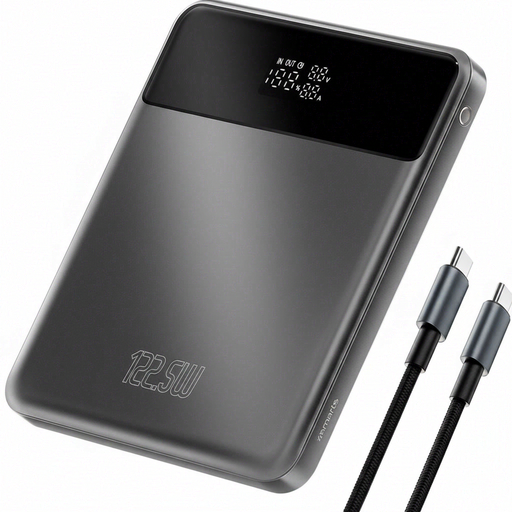
4smarts Enterprise Compact Power Bank 122.5 W 20.000 mAh Space Grey
The capacity may be useful if your lamp and desired run time call for extra energy reserve; just check which connection is an output.
20.000 mAh; 122.5 W. The product description also mentions an LCD screen, overheating protection and pass-through charging.
View at Joybuy
 No image available
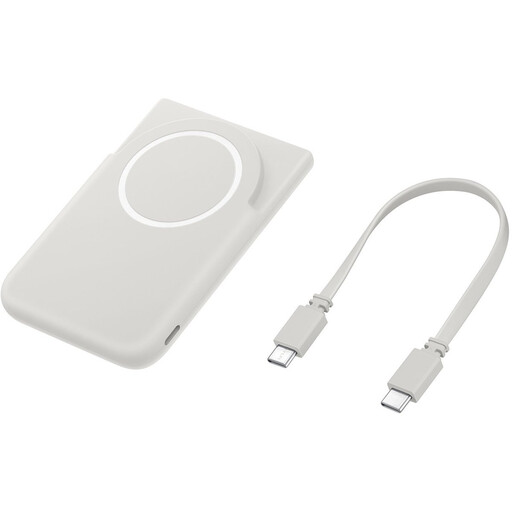
Samsung Magnet Battery Pack 5.000 mAh USB-C Gray
This compact capacity may suit a short session, provided the connection is suitable for your lamp and there’s enough energy.
5.000 mAh. The product description mentions a magnetic design and a built-in stand; check whether the USB-C connection can be used as an output for your lamp.
View at Joybuy
 No image available
Samsung Power Bank Fast Charge 45W 3x USB-C 20.000 mAh Beige
The USB-C connections may be useful if your lamp and any other devices have a suitable connection; check the lamp’s requirements separately.
20.000 mAh and three USB-C ports. According to the product description, the stated 45 W applies when one device is connected; the power may be shared when several devices are connected.
View at Joybuy
 No image available
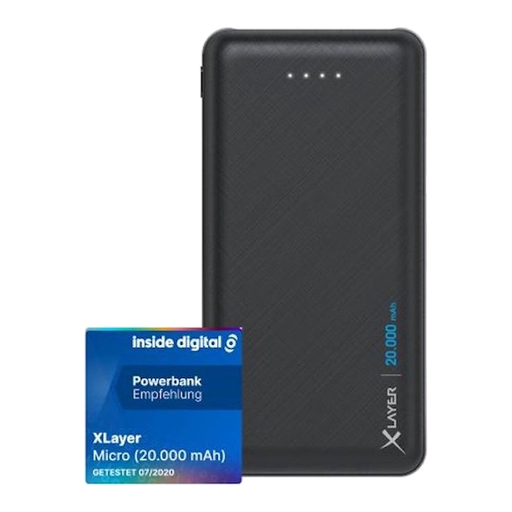
Xlayer Power Bank Micro Black Edition 20.000 mAh
This model may suit a lamp with a compatible USB-A cable, if its stated capacity meets your run-time needs.
20.000 mAh and two USB-A outputs. The USB-C port is an input, not an output; use one of the USB-A ports to supply power.
View at Joybuy
 No image available
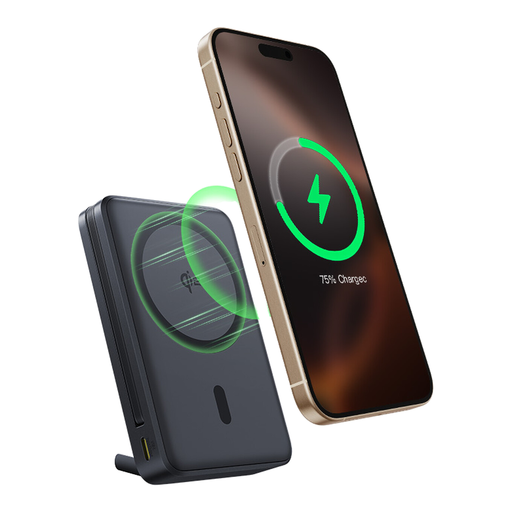
Baseus Nomos Qi2 Built-in USB-C Cable Magnetic Stand Power Bank 10.000 mAh 45W Interstellar Black
The built-in USB-C cable can help keep cables tidy on a shared desk, provided the connection is suitable for your lamp.
10.000 mAh and 45 W; the product name mentions a built-in USB-C cable and a magnetic stand. Before use, check that the cable supplies power and is compatible with your lamp.
View at Joybuy
Frequently asked questions
Will a power bank charge my desk lamp, or just power it?
It depends on the lamp. The IKEA HÖSTULOTA we looked at is connected to provide light; its product information doesn’t mention a rechargeable battery. Only describe a lamp as rechargeable if its own specifications confirm that it has a battery and charging function.
How can I estimate how long my lamp will stay on?
Note the lamp’s power rating in W and the power bank’s energy in Wh. Dividing Wh by W gives a theoretical upper limit in hours before conversion losses. Without information about the usable output energy and your lamp, it’s not possible to promise an exact run time. IKEA’s stated 0,7 W applies to that HÖSTULOTA lamp model.
What can I do if a small USB lamp switches off after a short time?
First check the connection and battery level. Then see whether the manual for your exact power bank describes a low-current mode. Anker documents this feature for the 313 Power Bank A1229, but that doesn’t confirm that the model will work with your lamp.
How can I use and charge a power bank safely on a shared desk?
Follow the instructions and place the power bank in a clear space while it’s charging, so heat can escape. Don’t use damaged cables. The Fire Service also warns about risks from a damaged or deformed battery; this doesn’t mean that normal use of any particular model is unsafe.
Where can I dispose of an old power bank?
Don’t put batteries in your general waste. The Dutch government lists collection points such as shops that sell batteries and your local recycling centre. For a complete power bank, follow the local guidance for disposing of batteries or electrical equipment.


