
Owner of a rechargeable USB recorder
Wants to top up the battery on the kitchen worktop and first checks whether their recorder can charge via USB and which connection it needs. Philips specifies USB-C charging for the VoiceTracer DVT4115.


A power bank will only charge a USB audio recorder if the manual for that exact model says it supports USB charging. USB may also supply power only while the recorder is in use, or be for file transfer. Philips specifies USB-C charging for the VoiceTracer DVT4115, while Zoom describes USB power for the H1essential, which also uses replaceable batteries. So first check what your recorder’s USB port does, then choose a suitable output and cable.
Wants to top up the battery on the kitchen worktop and first checks whether their recorder can charge via USB and which connection it needs. Philips specifies USB-C charging for the VoiceTracer DVT4115.
Wants to avoid losing power during a recording and distinguishes between USB power and charging the batteries. Zoom describes USB power for the H1essential, while Tascam describes USB bus power for the DR-05X.
Wants a place for the recorder, cable and power bank where everything can be laid out safely and kept away from moisture and heat. Brandweer Nederland advises placing chargers in an open space and not using damaged cables.
Start by checking the USB function described in your recorder’s manual, then choose a compatible output and cable. The stated capacity in mAh does not, by itself, guarantee a particular recording time; the Consumentenbond measures how much power banks actually deliver in different situations.
Choose this if: the manual for your exact model confirms that its battery charges via USB.
Keep in mind: the power bank needs a suitable output; a USB-C port is not automatically an output.
Choose this if: the manual allows external USB power while the recorder is in use.
Keep in mind: power during recording does not mean the batteries are charging at the same time; test the combination first.
Choose this if: the manual only mentions file transfer or doesn’t confirm the function; check the model information first.
Keep in mind: a power bank may not solve the power problem if the recorder doesn’t support USB charging or power.
| Concern | What to check before buying | Who is this important to? |
|---|---|---|
| Recorder’s USB function | Check the manual for the exact model to see whether USB supports charging, power while in use or file transfer only. | I want to make sure my recorder can charge via USB before buying a power bank; charging compatibility is the top purchasing priority for around 33% of consumers. |
| A safe place on the worktop | Keep the setup away from moisture and heat sources, place the power bank in an open space and use undamaged cables. | On a shared worktop, I want to keep the recorder and cable away from wet areas; safe placement comes first for around 27% of consumers. |
| Active USB output | Check whether the specific power bank model has a low-power mode for devices with low power consumption, and test that the output stays active while in use. | I want to avoid losing power during a long recording; keeping the output active is the top purchasing priority for around 20% of consumers. |
| Capacity and running time | Match the stated capacity to the recorder’s power consumption and operating mode; don’t treat mAh as a direct measure of recording hours. | When planning longer sessions, I want enough power without taking up unnecessary space on the worktop; running time matters most to around 20% of consumers. |
Manufacturers describe different functions: USB may charge a battery or supply power while the recorder is in use, without charging the batteries.
Check the manual for your exact recorder model and look for the function you need before choosing a power bank.
Anker says that the USB-C port on the 313 Power Bank (PowerCore 10K) is input-only. The shape of a port alone doesn’t tell you which way the power flows.
Check whether each port is described as an input, an output or both, and compare it with your recorder’s connection.
If the connection isn’t suitable for the function you need, you may need a different cable or power bank.
Actual running time also depends on the recorder’s power consumption and operating mode. The Consumentenbond measures the power delivered by power banks in different situations.
If available, use a measurement for the exact power bank model and test the running time you need with your recorder and setup.
The 313 Power Bank (PowerCore 10K) may be worth considering if you’re looking for a model with a low-power mode for devices with low power consumption.
The Primo range includes models with USB-A and USB-C; check the full product number and the colour of the variant.
The BoostCharge BPB011btBK is described as having two USB-A outputs, one USB-C output and an included USB-A/USB-C cable.
The Go2 Fan Edition reviewed is listed with a capacity of 10,000 mAh and USB-A and USB-C outputs.
According to the manufacturer, the Powerbank 12000 mAh reviewed has a USB-C port for input and output, plus an additional USB port.
This selection includes power banks with a USB-C connection or a built-in USB-C cable. They’re options to compare for recorders whose manuals confirm USB charging or USB power; check the function and connection of your exact model.
 No image available
The built-in USB-C cable may be suitable if your recorder can be powered or charged via USB-C.
The description lists 20 W PD via the built-in cable, a USB-C input and output, and a USB-A output. Check which connection your recorder needs.
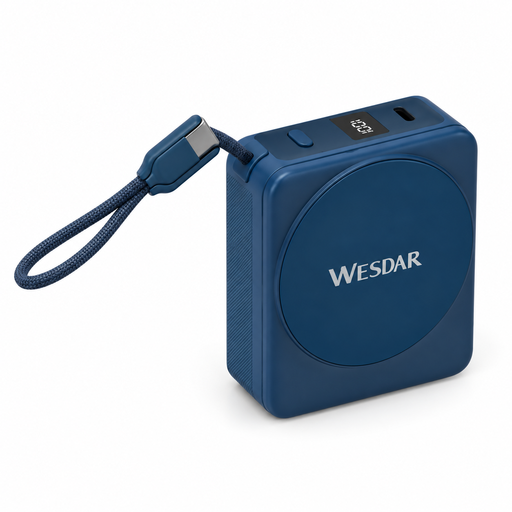 No image available
The integrated USB-C cable may suit a recorder whose manual confirms USB-C charging.
The product name lists 22.5 W wired charging via USB-C, 15 W wireless charging and a digital display. Check which charging function your recorder supports.
 No image available
The USB-C output and included USB-C cable may suit a recorder that charges via USB-C.
The product description lists up to 25 W, a capacity of 10,000 mAh and USB-C outputs. According to the product description, keep the power bank away from water and excessive heat, don’t cover it while charging and ensure it has good ventilation.
No, it depends on the recorder model. Philips says the DVT4115 has a battery that charges via USB-C; Zoom describes the H1essential as powered via USB as well as by replaceable batteries. In the manual for your exact model, look for the word ‘charging’, not just ‘USB’ or ‘USB power’.
Place the power bank in an open space so heat can escape, keep the devices and cables away from moisture and heat sources, and don’t use damaged cables. This follows the advice of Brandweer Nederland; it isn’t a set distance that applies to every worktop.
Check whether the exact power bank model has a low-power mode for devices with low power consumption, and test the combination before an important recording. Anker describes such a mode, but how it works depends on the model and the power consumption of the connected device.
According to ACM ConsuWijzer, online purchases generally come with a 14-day cooling-off period after delivery, subject to legal exceptions. You’re also entitled to a product that performs as you could reasonably expect under normal use; the statutory guarantee does not automatically have a fixed two-year term.
No. The NVWA says that individual testing isn’t mandatory for most consumer products; the rules that apply depend on the product category. A CE mark alone doesn’t show that a power bank is suitable for your specific recorder.