What should you look for when buying?
First, find out which charging connection your tablet supports. Then compare the capacity you need, the power available from each port and how easy the power bank is to carry.
| What to consider |
What should you check? |
Who is this important for? |
| Enough energy for the working day |
Compare the capacity in mAh with independent measurements of the energy actually delivered. Also consider the size and weight. |
If I work for long periods without a power socket, I want enough usable energy without having to carry more than I need. Around 31% of consumers say enough energy for the working day is their top buying priority. |
| A compatible charging connection |
Check the charging standard and the power output of the port you’ll use with your tablet. Also find out how much power remains available from each port when charging several devices at once. |
If I only have a short time to charge at a shared desk, I want my tablet, cable and port to work together. Around 31% of consumers prioritise suitable, sufficiently fast tablet charging. |
| Fewer loose cables |
Check whether the cable is built in or removable, and make sure the connection and cable length are suitable. Belkin says the built-in cable on the BPB024hq is 5.7 cm long. |
If I often move between workspaces, I don’t want to have to carry my charging cable separately each time. Around 23% of consumers say cable convenience is their top buying priority. |
| Portability |
Compare the weight and dimensions of the specific model. You may also want to check how it displays the remaining charge. |
If I regularly move my power bank between desks, I want a spare that’s easy to carry. Around 15% of consumers say portability is their top priority. |
Power banks at Joybuy
This selection includes power banks for charging tablets, from compact models to options with more capacity or a built-in cable.
 No image available
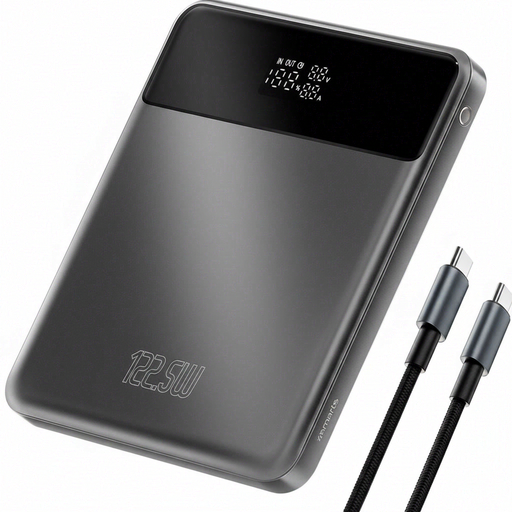
4smarts Enterprise Compact Power Bank 122.5 W 20,000 mAh Space Grey
The product information mentions tablet charging, making this a possible option for a longer working day without access to a power socket.
20,000 mAh; 122.5 W; three USB-C ports; two built-in USB-C cables, one of which extends to 70 cm; the product description says it can charge up to four devices at once.
View at Joybuy
 No image available
Samsung Power Bank Fast Charge 45W 3x USB-C 20,000mAh Beige
The USB-C connections and stated capacity may suit you if your tablet charges via USB-C and you work for longer periods without access to a power socket.
20,000 mAh; up to 45 W; three USB-C connections; supplied 20 cm cable; Power Delivery 3.0. Samsung says 45 W is only available when one device is connected, and that compatibility varies by device.
View at Joybuy
 No image available
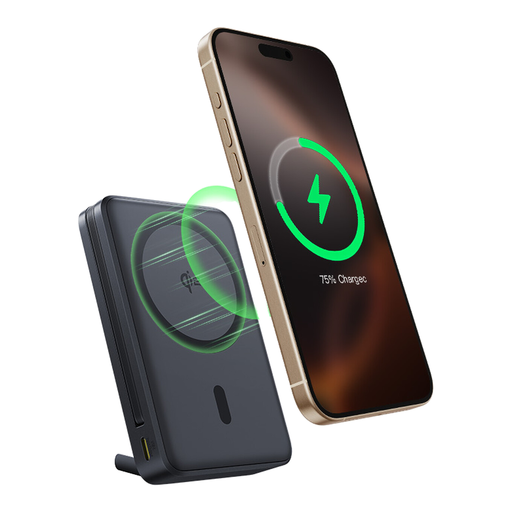
Baseus Nomos Qi2 Built-in USB-C Cable Magnetic Stand Power Bank 10,000mAh 45W Interstellar Black
The built-in USB-C cable may suit a desk set-up where you want to carry fewer loose cables. The product information lists tablets as compatible devices.
10,000 mAh; up to 45 W via USB-C; 15 W wireless charging; built-in stand.
View at Joybuy
 No image available
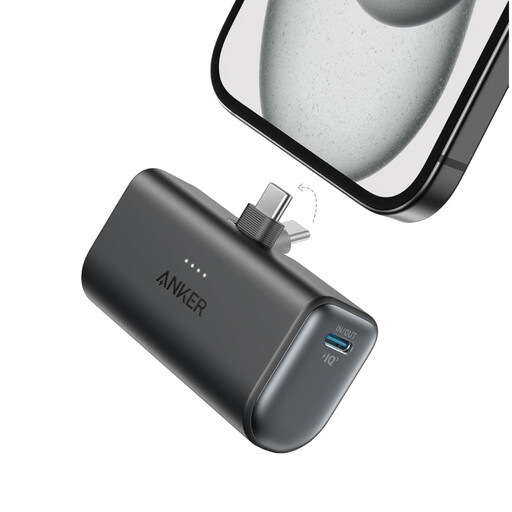
Anker Nano 5000mAh Black
The compact, portable design may suit you if you mainly want a small power reserve to carry between workspaces.
5,000 mAh; one USB-C port; maximum output of 22.5 W; weight 100 g.
View at Joybuy
 No image available
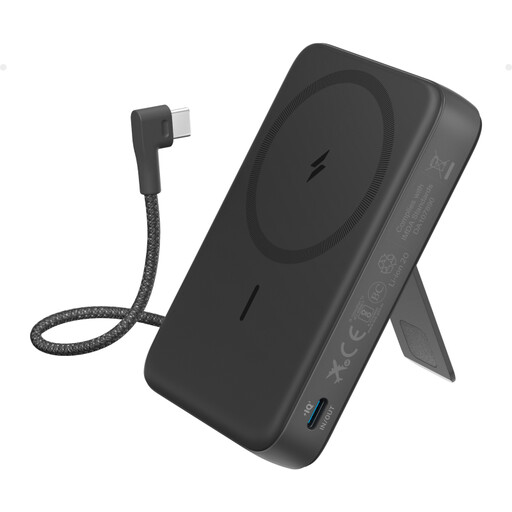
Anker 10K Magnetic Power Bank with Built-In USB-C Cable, Black
The built-in USB-C cable can be handy if you want to use fewer loose cables at a shared desk.
10,000 mAh; up to 30 W wired charging via USB-C; 7.5 W wireless charging; adjustable stand.
View at Joybuy
Frequently asked questions
Will a power bank with a higher wattage always charge my tablet faster?
No, not necessarily. Check the charging capabilities of your exact tablet, the cable you’re using and the output of the port in question. The power available may be lower when several devices are connected.
Can I charge my tablet and power bank at the same time?
Only if the specific model supports this feature. Belkin lists passthrough charging for the BPB024hq and BPB027hq. For other models, check the manual and the conditions for charging devices at the same time.
How can I charge safely at a shared desk?
Keep chargers and batteries uncovered so heat can escape, and don’t use damaged cables. This is the fire service’s safety advice. Also check for warnings relating to the exact model and, where specified, the batch number.
What should I do if my power bank turns out to be faulty?
If a product is faulty, contact the seller first. According to the Dutch Government, the seller must put the problem right; you shouldn’t have to pay extra for the repair or replacement of a faulty product.
Can I put a power bank I no longer need in general waste?
No. The Dutch Government says that used batteries must not go in the bin. You can take them to shops that sell batteries or to your local council’s recycling centre, among other places.


