Who should consider this?

Working from home with an existing fan

You want to know whether your fan’s cable and charging specifications are compatible with the power bank. For example, Tristar specifies USB charging at 5 V for the VE-5776P; this specification doesn’t automatically apply to other fan models.

Working from home without a mains socket near your desk

You want to top up your fan during longer working sessions. Compare capacity figures at the same voltage and take your own fan’s charging specifications into account.

Working from home with several USB devices

You want to connect another device as well as your fan. Look for suitable ports and check how much power is available when charging several devices at once.

What should you look for?

What to consider What to look for Who is this important for?
Connector and charging compatibility Check your fan’s charging connector, cable and required power supply in its manual, then compare them with the power bank’s output. If you want to connect an existing fan, first check that the plug and power supply match. Around 36% of consumers prioritise compatibility.
Capacity for your working session Compare capacity at the same output voltage, or check the energy rating in Wh; don’t assume the mAh figure guarantees a certain number of charges. If you work for longer without a mains socket, you’ll want to know how much reserve capacity suits your fan. Around 29% of consumers prioritise their preferred run time.
Charging several devices Check the number of suitable outputs and the power available when they’re used at the same time; see whether pass-through charging is specified for the exact model. If you want to connect your fan and another USB device at the same time, suitable ports and enough shared power are important. Around 21% of consumers prioritise charging several devices.
Safe charging and aftercare Keep the model details and proof of purchase; check recall information for the exact model and follow the manufacturer’s charging instructions. If safe ownership and good aftercare matter to you, you’ll want to check the exact model and know which instructions apply. Around 14% of consumers consider this their main purchasing concern.

Common buying mistakes

  • Assuming the highest mAh figure is the available USB capacity

    Capacity can be quoted at different voltages. For example, VARTA lists 10,000 mAh at 3.7 V for the Energy Powerbank 10.000, and a rated capacity of 5.920 mAh at 5 V.

    Don’t assume a fixed number of fan charges without checking the specifications of both the power bank and your fan. Compare figures at the same voltage or check the Wh rating.

  • Choosing a cable or port without checking your fan’s connector

    A power bank with USB-C won’t necessarily fit every fan. For example, Belkin lists USB-C ports for the BoostCharge BPB027hqWH; check whether your fan can connect to them.

    Read your fan’s manual and check which cable is included. If the connectors don’t match, you may need a suitable separate cable or a different model.

    You may need an extra cable if the one supplied isn’t compatible with your fan.

  • Applying a product-line recall to every model

    Recalls may apply only to certain models and date codes. IKEA’s 2024 VARMFRONT recall affected specific model numbers and date codes; on 15 July 2025, the NVWA named specific Anker models.

    Compare the exact model and, where applicable, the date code with the recall information. Don’t continue using a product that is covered by a warning.

Brands to consider

VARTA

The Energy Powerbank 10.000, type 57976, is one example to consider if you’re looking for USB-A and USB-C connections.

  • VARTA lists two USB-C outputs, one USB-A output, pass-through charging and a rated capacity of 5.920 mAh at 5 V.
  • The stated capacity won’t tell you how long your fan will run; check your fan’s charging specifications.

Belkin

The BoostCharge BPB027hqWH is a USB-C option to consider if you want to connect several devices and check the remaining charge.

  • Belkin lists a display, pass-through charging and two USB-C ports.
  • Belkin specifies up to 20 W when using one port and 15 W in total when using both. A fan with a different connector will need a suitable cable.

UGREEN

The Nexode Power Bank 20.000 mAh/100 W, product code 25188, is a higher-capacity option to consider if you also want to charge other devices.

  • UGREEN lists a capacity of 20.000 mAh and three outputs.
  • The stated maximum of 100 W doesn’t mean a fan needs that much power. Compatibility and actual run time depend on the fan and its connector.

Power banks for a rechargeable fan

These product options are suitable for charging a fan via USB, with choices that include a built-in cable, extra capacity or support for several devices. Before buying, always check that the output and cable are compatible with your fan’s manual.

MOMAX 1-Power F.Pass+ Ultra-Slim Power Bank, 10.000 mAh

MOMAX 1-Power F.Pass+ Ultra-Slim, 10.000 mAh

An option to consider if the built-in USB-C cable matches your fan’s connector.

The product information lists USB-C and USB-A connections, and charging for three devices at once.

View at Joybuy
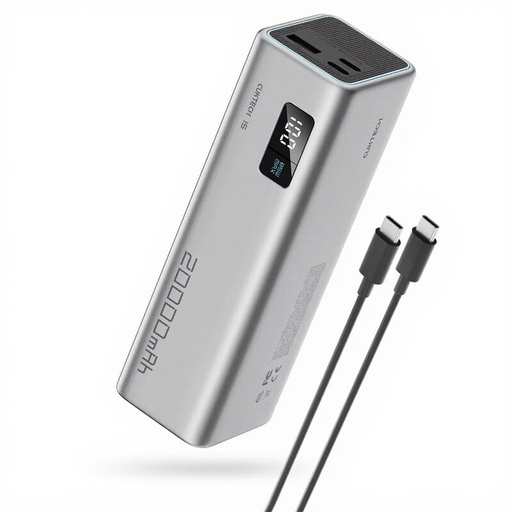
CUKTECH 15 SE Power Bank, 20.000 mAh, 65 W

CUKTECH 15 SE Power Bank, 20.000 mAh, 65 W, PB200

An option to compare if you want more capacity and also connect other USB devices.

The product information lists 20.000 mAh, two USB-C outputs and one USB-A output. Check which output and power level are right for your fan.

View at Joybuy

Samsung Power Bank Fast Charge 45 W, 20.000 mAh, 3 USB-C ports

Samsung Power Bank Fast Charge 45 W, 20.000 mAh

An option to compare if you want to charge other USB-C devices as well as your fan.

The product information lists three USB-C ports and an included USB-C cable. A fan with a different connector will need a suitable cable.

View at Joybuy
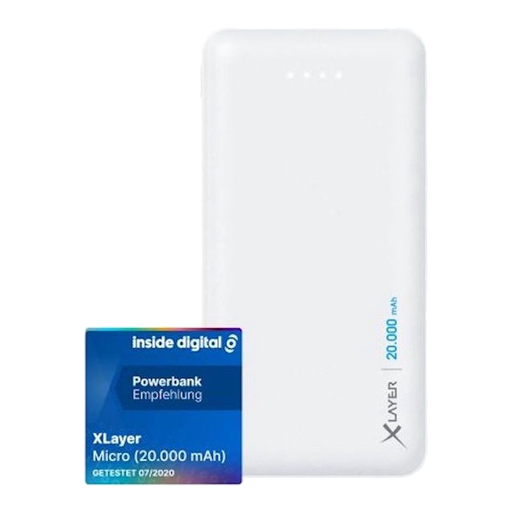
Xlayer Power Bank Micro White, 20.000 mAh, two USB outputs

Xlayer Power Bank Micro White, 20.000 mAh

An option to compare if your fan charges via USB-A at 5 V.

The product information lists two USB-A outputs at 5 V and a USB-C input. USB-C is listed here as an input, not an output.

View at Joybuy

Samsung Fast Charge Duo Power Bank, 25 W, 10.000 mAh

Samsung Fast Charge Duo Power Bank, 25 W, 10.000 mAh

An option to compare if you’re looking for a power bank that, according to the product information, can charge two devices at once.

The product information lists USB Power Delivery 3.0 and a weight of 210 g.

View at Joybuy

Frequently asked questions

Can any rechargeable fan be charged with a power bank?

No. The fact that a fan is rechargeable doesn’t necessarily mean it can be charged with a power bank. Check the charging connector, cable and required power supply in your model’s manual. Tristar specifies USB charging at 5 V for the VE-5776P; this doesn’t tell you anything about other fans.

Can your fan keep running while it’s charging?

That depends on the fan and can’t be determined from the power bank’s pass-through feature. Pass-through charging means the power bank can power a connected device while it recharges. Check your fan’s manual separately to see whether it can run while charging.

How can you charge a power bank safely at your desk?

Follow the instructions in the manual and don’t use damaged cables. The fire service advises placing chargers in a clear space so heat can dissipate; don’t charge equipment under a cushion or duvet.

What can you do if the power bank develops a fault too soon?

If a product is faulty, contact the seller. According to the Dutch Government, there’s no fixed statutory warranty period in the Netherlands; what you can reasonably expect from a product depends partly on the product itself.

Where can you take an unwanted power bank?

Don’t put a power bank in your household rubbish. The Dutch Government lists places that sell batteries and your local council’s recycling centre among the drop-off points for used batteries.
