First, check whether your controller charges an internal battery or compatible battery pack via USB. Microsoft states that rechargeable AA batteries in a standard Xbox Wireless Controller cannot be charged through the controller. Then choose between an integrated cable, which means fewer separate items, and separate ports, which give you more flexibility over your cable and where you place the power bank. Compare the capacity with the runtime you need, and check the exact model for safety notices.
Who is this relevant to?
Controller owners checking whether their device can be charged
You want to know whether your controller’s battery charges via USB before choosing a power bank. For example, Microsoft states that rechargeable AA batteries in a standard Xbox Wireless Controller cannot be charged in the controller.
Players at a shared desk
You want a cable that reaches your controller from a convenient spot, without adding unnecessary clutter. An integrated cable has a fixed length; with a separate cable, you can choose the distance yourself.
Users who want to share power
You may want to connect another device as well as your controller. Check the available outputs and whether the product information covers charging multiple devices at once. A claim about charging phones says nothing by itself about a controller’s charging speed.
What should you look for when buying?
If you’re looking for a power bank for a USB gaming controller at a shared desk, start by checking whether the controller can be charged and how the cable will be set up. Then consider runtime and any extra connections you might need.
| What to consider |
What to look for |
Who is this important for? |
| Does the controller charge via USB? |
Check the exact controller model, battery type and the manufacturer’s charging instructions. A USB port does not automatically mean that inserted AA batteries can be charged. |
If I first want to check whether my controller’s battery can be charged via USB, I check the manual and battery configuration. Around 36% of consumers say chargeability is their top priority. |
| Cable and desk set-up |
Measure the distance between the power bank and controller. Check the length of an integrated cable, or choose an output that works with a separate cable. |
If I don’t want to place the power bank right next to the controller, I check the cable length and positioning. Around 29% of consumers prioritise a practical cable set-up. |
| Power reserve |
Compare the stated capacity with performance assessed under similar conditions. An mAh figure does not directly tell you how many times a controller can be charged. |
If I want to use my devices for longer without recharging the power bank, I look at its usable power reserve and ease of handling. Around 21% of consumers say their desired runtime is their main reason for buying. |
| Connecting multiple devices |
Count the usable outputs and check whether the product information explains if you can charge multiple devices at once. |
If I also want to connect another device at the same desk, I check how many suitable outputs are available. Around 14% of consumers say having extra connections is their top priority. |
Common purchasing mistakes
-
Assuming USB charges the inserted AA batteries
Microsoft states that rechargeable AA batteries cannot be charged in a standard Xbox Wireless Controller. So a USB cable will not necessarily solve the battery problem.
Check the controller model and battery configuration before buying. Consider a compatible battery pack as a different solution from separate AA batteries.
-
Choosing an integrated cable without checking its length
According to their manufacturers, the integrated cables on the Belkin BoostCharge and UGREEN Nexode models mentioned here are different lengths. If the cable is too short, it may determine where you can put the power bank on a shared desk.
Measure the distance from where you plan to place the power bank, and check whether there is also a separate output for a cable of your choice.
If the integrated cable doesn’t reach far enough, you may need a longer separate cable or to move the power bank.
-
Assuming claims about phone charging apply to controller charging times
A manufacturer’s claim about fast-charging a phone doesn’t prove that a gaming controller will charge faster. The stated power output or capacity also won’t necessarily tell you how many times a controller can be charged.
Use these figures as product specifications, and compare performance only when the test conditions and devices are similar.
-
Judging a safety notice by brand name alone
In a 2025 safety notice, the Netherlands Food and Consumer Product Safety Authority named specific Anker Zolo models: A1681 and A1689. You shouldn’t assume that these model numbers apply to other Zolo versions.
Check the full model number and, if specified in the notice, compare the batch or item number with the relevant NVWA notice.
Brands to compare
Belkin
The BoostCharge BPB021hqPK may suit you if fewer separate cables matter more than being able to choose the cable length.
- Belkin lists 10.000 mAh, an integrated USB-C cable, an extra USB-C port and support for two devices charging at once.
- Belkin states that the integrated cable is 5,7 cm long. Check whether that works for your desk set-up; these specifications are not the result of an independent controller test.
Xtorm
The Fuel Series 5 FS5103U is worth considering if you want to choose your own cable and need different types of port.
- Xtorm lists 10.000 mAh, two USB-C ports and one USB-A port.
- You’ll need a separate cable that’s suitable for your controller. A claim about fast-charging phones doesn’t confirm faster controller charging.
UGREEN
The Nexode PB727 may be a good fit if you want a longer integrated USB-C cable and extra outputs.
- UGREEN specifies 10.000 mAh, an integrated 22 cm cable and extra USB-C and USB-A outputs.
- According to UGREEN, the advertised 55 W applies to compatible Xiaomi phones; it is not a claim about charging performance for a gaming controller.
Anker
The Zolo A1688 is an alternative with an integrated USB-C cable if convenience is your priority.
- For the A1688, Anker lists 10.000 mAh and up to 30 W via the integrated cable or USB-C port.
- Check the full model number. The 2025 NVWA notice names the other Zolo models, A1681 and A1689; it does not automatically apply to every Zolo version.
Fresh 'n Rebel
The range includes wired power banks and a magnetic phone model; for a controller, check the wired connection.
- The Fresh 'n Rebel product list includes a 12.000mAh model with an integrated USB-C cable and a magnetic 10.000mAh model with a USB-C output.
- The stated magnetic compatibility is for phones and does not confirm wireless charging for a gaming controller.
Power banks at Joybuy
This Joybuy selection includes power banks with integrated USB-C cables and models with separate outputs. Before buying, check whether your controller can charge through the wired connection you’ve chosen and whether the cable set-up will work at your desk.
 No image available
Samsung Power Bank Fast Charge 45W, 3 USB-C, 20.000 mAh, beige
Worth considering if your controller has a compatible USB-C charging port and you also want to connect other devices.
The product information lists 20.000 mAh, three USB-C ports and a USB-C cable included. It describes charging up to three devices at once. The stated power output is no guarantee of a controller’s charging speed.
Joybuy
 No image available
Baseus Nomos Qi2, integrated USB-C cable, 10.000 mAh, 45 W, Interstellar Black
The integrated USB-C cable gives you a wired connection if your controller can charge this way. Check beforehand that the fixed cable reaches your controller where you want to use it.
The product name lists 10.000 mAh and 45 W. The product description mentions Qi2 wireless charging for compatible devices; this does not confirm wireless charging for gaming controllers.
Joybuy
 No image available
Samsung Fast Charge Duo Power Bank, 25 W, USB-C, 10.000 mAh, beige
A wired option to consider if your controller charges via USB-C and you also want to connect a second device.
The product information lists two USB-C ports, a USB-C cable included, support for charging two devices at once and a weight of 210 g. The stated 25 W does not, by itself, predict a controller’s charging speed.
Joybuy
 No image available
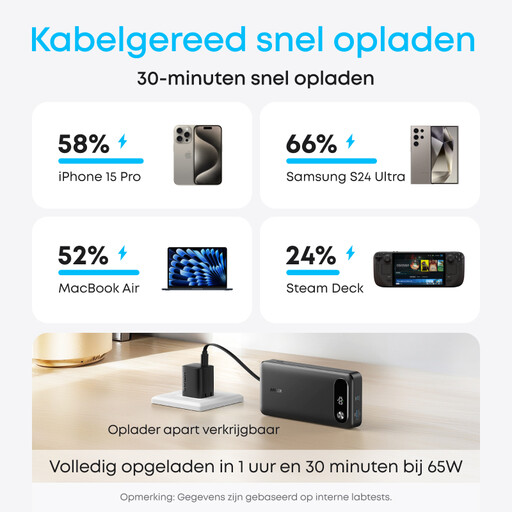
Anker Power Bank (20K, 87W, Built-In USB-C Cable), Black
The integrated USB-C cable gives you a wired charging option if it’s compatible with your controller and the fixed cable length works at your desk.
The product name lists 20.000 mAh, while the product information specifies up to 87 W total output and charging for three devices at once. This total output is not a measure of controller charging performance.
Joybuy
 No image available
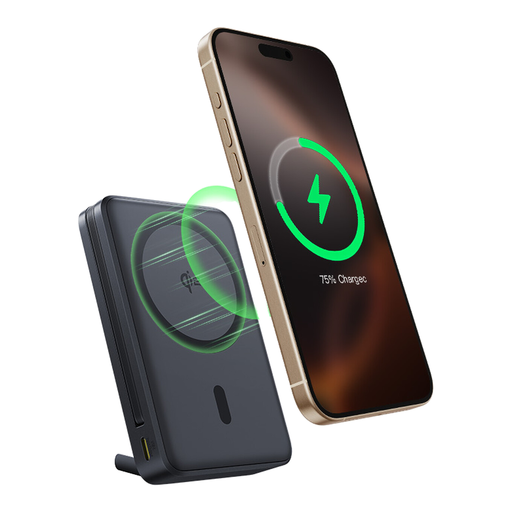
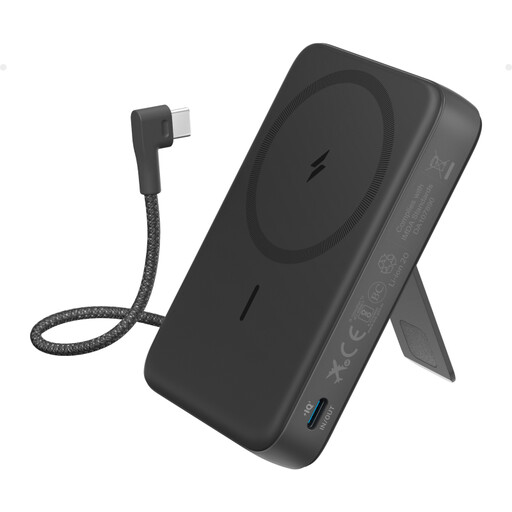
Anker 10K Magnetic Power Bank with Built-In USB-C Cable, Black
The integrated USB-C cable may offer a wired option for a controller with a compatible connection; check that the cable reaches where you want to use it at your desk.
The product information lists 10.000 mAh, a stand and up to 30 W. Wireless charging for compatible phones does not confirm wireless charging for gaming controllers.
Joybuy
Frequently asked questions
Does a standard Xbox Wireless Controller charge rechargeable AA batteries via USB?
No. Microsoft states that rechargeable AA batteries cannot be charged in a standard Xbox Wireless Controller. Charge those batteries separately according to their instructions; a compatible battery pack is a different battery configuration.
Can I charge a Nintendo Switch Pro Controller with any power bank?
Not every power bank is automatically suitable. Nintendo describes charging with the supplied USB cable via the dock’s USB port or with a compatible power supply. Check the requirements for your controller and the power bank’s output.
How can I charge a controller safely at a shared desk?
Place the power bank in an open area so heat can escape, and don’t use a damaged cable. The Fire Service advises keeping chargers clear of obstructions; also check whether the exact model is covered by an NVWA safety notice. This is not a general safety assessment of all other models.
What can I do if a power bank breaks too soon during normal use?
For a consumer purchase in the Netherlands, statutory consumer rights may apply alongside any manufacturer’s warranty. ACM ConsuWijzer states that the seller is responsible for providing an appropriate free solution if the product does not meet what you could reasonably expect; the circumstances matter.
Does a CE mark on a power bank guarantee its safety?
No. The Netherlands Food and Consumer Product Safety Authority describes CE marking as a declaration by the manufacturer for products covered by the relevant rules, not as a general independent product test. The rules that apply depend in part on the product version; check for specific safety notices too.


