What should you look for in a power bank for your controller?
A simple power bank with a cable
Choose this when: your controller has a battery that recharges via USB and you mainly want to charge that one device.
Consider: the stated mAh rating alone doesn’t tell you how much power the controller will actually receive.
A power bank with extra ports or a built-in cable
Choose this when: you also want to connect a second USB device or keep the number of loose cables on the worktop to a minimum.
Consider: a built-in USB-C cable won’t fit every controller, and the power available may be lower when charging multiple devices at once.
A suitable external battery charger
Choose this when: your controller uses rechargeable AA batteries that the manufacturer says can’t be recharged inside the controller.
Consider: a USB cable can power the controller, but it doesn’t replace the recommended method for charging removable batteries.
First check the battery type and charging instructions. Then look at the cable, ports and capacity.
| What to consider |
What should you look for? |
Who is this important for? |
| Charging via USB |
Check the exact controller model, battery type and the manufacturer’s charging instructions. |
I want to know first whether my controller’s battery charges via USB; around 31% of consumers prioritise finding out whether their device can be charged this way. |
| A dry place to charge |
Check the model’s warnings, use an undamaged cable and choose a dry, clear space. |
I want to charge on the kitchen worktop without exposing the power bank or cable to splashes or heat; around 31% of consumers focus most on safe placement. |
| Cable and ports |
Check that the plug fits and find out how much power is available when you connect several devices at once. |
I want a suitable cable and might connect a second device too; around 23% of consumers focus mainly on cable and port convenience. |
| Capacity |
Compare the capacity with the number of devices you actually want to charge. Don’t treat the mAh rating as a guarantee of a set number of controller charges. |
I also want to use the power bank for other devices; around 15% of consumers prioritise having extra charge in reserve. |
Power banks at Joybuy
This selection includes power banks with a USB-C cable or connection. Check that your controller charges via USB and that the connection is compatible.
 No image available
MOMAX 1-Power F.Pass+ Ultra-Slim power bank, 10.000 mAh
Suitable for a controller with a compatible USB-C connection, especially if you also want to connect other devices.
Capacity: 10.000 mAh. Comes with a built-in USB-C cable, an extra USB-C port and a USB-A output.
The built-in cable is USB-C, so only use it if it fits your controller’s connection.
Joybuy
 No image available
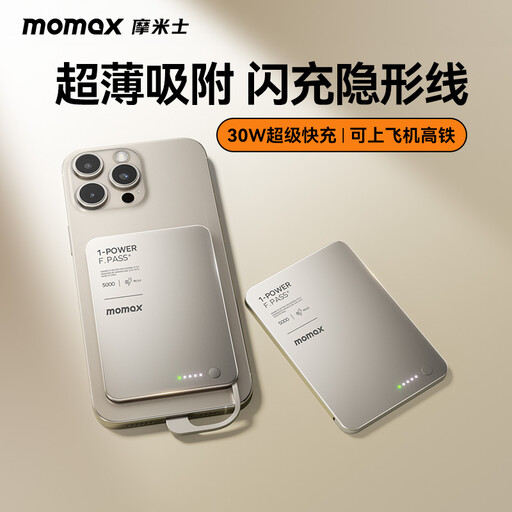
MOMAX 1-Power F.Pass+ Ultra-Slim power bank, 5.000 mAh
An option if your controller has a compatible USB-C connection and you want to use a built-in cable.
Capacity: 5.000 mAh. Features a concealed, built-in USB-C cable.
The cable is only compatible with devices that have a suitable USB-C connection.
Joybuy
 No image available
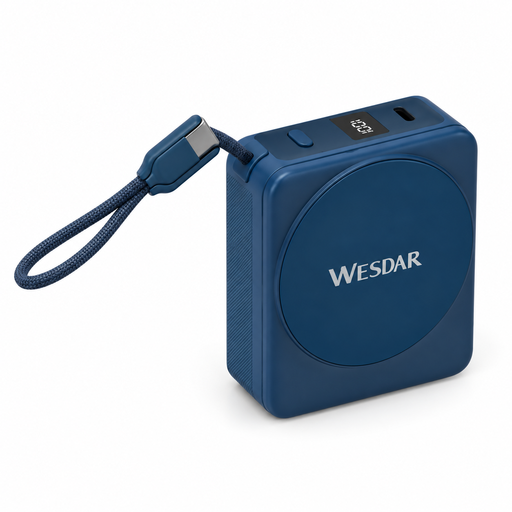
Power bank, 10.000 mAh, with integrated USB-C cable
Worth considering if your controller has a compatible USB-C connection and you want an integrated cable.
Capacity: 10.000 mAh. The product title lists 22,5 W wired charging and 15 W wireless charging.
The integrated cable is USB-C; check that it’s compatible with your controller.
Joybuy
 No image available
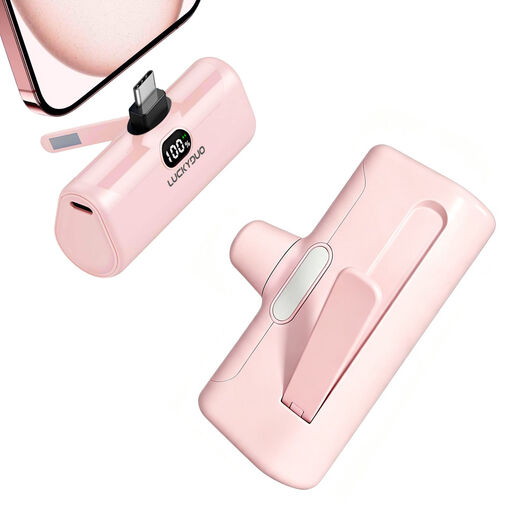
USB-C power bank, 5.000 mAh, 15 W PD, pink
Suitable for a controller and cable that connect to the USB-C output.
Capacity: 5.000 mAh. The product title lists 15 W PD and a USB-C output.
The USB-C output can only be used with a controller and cable that connect to it.
Joybuy
 No image available
Samsung Fast Charge Duo Power Bank, 25 W, 10.000 mAh, beige
An option if your controller charges via USB-C and you want to use a second USB-C connection.
Capacity: 10.000 mAh. It has two USB-C connections; the product information lists up to 25 W and includes a USB-C cable.
Check that the connections and cable are compatible with your controller’s charging port.
Joybuy
Frequently asked questions
Will an Xbox controller with rechargeable AA batteries charge via its USB cable?
No. According to Xbox Support, rechargeable AA batteries aren’t recharged inside the controller. Check which battery type your exact controller uses; a compatible rechargeable battery pack or a controller with an internal battery is a different case.
Can I charge the power bank next to the sink?
It’s best to choose a dry spot away from splashes, keep charging equipment in an open space and avoid using a damaged cable. Brandweer Nederland offers this as safety advice; it doesn’t mean that every spot on a kitchen worktop is unsafe.
Does a power bank always come with an adapter for charging it?
No, it depends on the model. For example, IKEA states that an adapter isn’t included with the VARMFRONT. Check the packaging and the chosen model’s input requirements before buying any extra accessories.
What about the warranty and disposal rules in the Netherlands?
According to the Dutch government, there’s no fixed legal warranty period; what you can reasonably expect from a product depends on the circumstances. For discarded electrical appliances, the Dutch government also refers to the take-back scheme, under which an old appliance can be handed in when buying a similar new one.
Does a CE logo by itself prove that a power bank has been independently approved?
No. The European Union’s Your Europe website explains that there’s no central EU body that issues a licence or certificate for using the CE marking. So the logo doesn’t mean that such a central certificate has been issued.


