Who is this for?

Cyclists with an older USB connection

You want to avoid buying a new power bank that won’t work with your cycling computer’s charging cable. For example, Wahoo Fitness Support describes a specific charging limitation affecting early BOLT 2 units. Check the exact model and the required combination of cable and power source.

Cyclists who want to travel light

You want to top up your cycling computer on the train without carrying more than you need. First, check whether one compatible USB port will do; Xtorm lists both USB-A and USB-C for the Go2 5,000 mAh.

Travellers with multiple devices

You may also want to charge your phone while you’re out and about, so consider the available ports, capacity and cables you’ll need. Trust and Belkin list multiple ports or built-in cables for the models discussed here.

What should you look for?

Compact USB power bank

Ideal if: you mainly want to top up one cycling computer using a compatible USB-A or USB-C cable.

Bear in mind: the Xtorm Go2 is listed as 5,000 mAh, which is less capacity than the 10,000 mAh models discussed here.

USB power bank with extra capacity or ports

Ideal if: you want to connect another device or carry more battery capacity.

Bear in mind: a built-in USB-C cable won’t replace a cable for a different connection, such as micro-USB.

Garmin Charge Power Pack

Ideal if: you have a Garmin Edge that Garmin confirms is compatible with this battery pack.

Bear in mind: check compatibility with your specific device; Garmin describes this connection for compatible Edge models.

What to consider What to check Who should pay attention?
Connection and charging setup Check the exact cycling computer model, the recommended cable and the power bank’s output. For early Wahoo BOLT 2 units, follow Wahoo Fitness Support’s specific cable and power source requirements. If you mainly want to avoid travelling with an unsuitable cable or power source, check compatibility first. Around 33% of consumers give this check their highest priority.
Size and convenience Compare the stated capacity and ports with what you actually want to carry; capacity alone won’t tell you how many full charges your cycling computer will get. If you want to carry as little extra luggage as possible on a train journey, check whether a compact power bank with one compatible port will do. Around 27% of consumers prioritise travelling light.
Extra capacity for multiple devices Check which ports your devices need and which connections can be used as outputs at the same time. If you also want to connect your phone, for example, look for extra ports and spare capacity. Around 20% of consumers give charging multiple devices their highest priority.
Safe, reliable charging Check the exact model and any warnings. Don’t use a damaged cable, and keep the charging port and cable dry; the fire service recommends placing chargers in an open space so heat can escape. If you mainly want a recognisable product and a reliable charging connection, check the model number and the condition of the cable. Around 20% of consumers prioritise safe, reliable use.

Common mistakes

  • Assuming a USB-C port means every USB-C power source will work

    Wahoo Fitness Support describes an exception for early BOLT 2 units: they need a specific USB-A-to-USB-C cable with a suitable USB-A power source, or a smart charging source specified by Wahoo.

    Check the exact model and follow Wahoo’s charging requirements before choosing a power bank.

  • Choosing a built-in cable without checking your cycling computer’s connection

    The fixed USB-C and Lightning cables on the Belkin power bank discussed here won’t necessarily suit a cycling computer that uses a different connection. Wahoo lists micro-USB for older ELEMNT, BOLT 1 and ROAM 1 models.

    Compare the built-in cables and any separate output with the cable your device uses.

  • Ignoring or overgeneralising a safety warning for a specific model

    In a warning issued on 15 July 2025, the Netherlands Food and Consumer Product Safety Authority named Anker models A1257, A1647, A1681 and A1689 due to the risk of overheating and fire. The warning doesn’t automatically apply to every product from the same brand.

    Check the full model number and don’t use a product covered by the warning.

  • Assuming the stated capacity guarantees a certain number of charges

    A capacity stated in mAh alone doesn’t tell you how many full charges a particular cycling computer will get from the power bank.

    Use the capacity to compare the stated reserve, and also check that the cable and charging connection are suitable for your device.

Brands to consider

Xtorm

The Go2 and Fuel Series 5 models discussed here offer different stated capacities and port combinations. Xtorm lists the Go2 at 5,000 mAh and the Fuel Series 5 at 10,000 mAh.

  • USB-A and USB-C ports give you options for different cables.
  • These specifications aren’t independent charging test results with a cycling computer; check the cable and the amount of spare capacity you need.

Trust

The Trust Primo Ultra-thin, model 24678, is listed with a capacity of 10,000 mAh, two USB-A ports and one USB-C port.

  • The three ports give you a choice of connections if you use different cables.
  • Trust states that charging speed varies by device; the stated charging power doesn’t confirm compatibility with your cycling computer.

Belkin

The BoostCharge Plus BPB006btBLK discussed here combines fixed USB-C and Lightning cables with an additional USB-C port.

  • A built-in cable can save you carrying a separate one if it suits your device’s connection.
  • The fixed cables won’t replace a cable for a cycling computer that uses micro-USB, for example.

Garmin

Garmin describes the Charge Power Pack as a battery pack for compatible Edge cycling computers.

  • A direct connection may suit an Edge model that Garmin confirms is compatible.
  • Check compatibility for each device; it doesn’t automatically apply to every cycling computer.

Power banks at Joybuy

This selection includes standard power banks for anyone looking for extra capacity, multiple ports or a built-in USB-C cable. Before buying, check that the connection and power source are suitable for your cycling computer.

Samsung Power Bank Fast Charge 45W, 20,000 mAh, 3x USB-C, beige

Samsung Power Bank Fast Charge 45W, 20,000 mAh, 3x USB-C, beige

May suit you if you want to connect other devices as well as your cycling computer and carry extra capacity; check whether USB-C is suitable for your cycling computer.

The product name lists 20,000 mAh, 3 USB-C ports and 45 W.

View at Joybuy
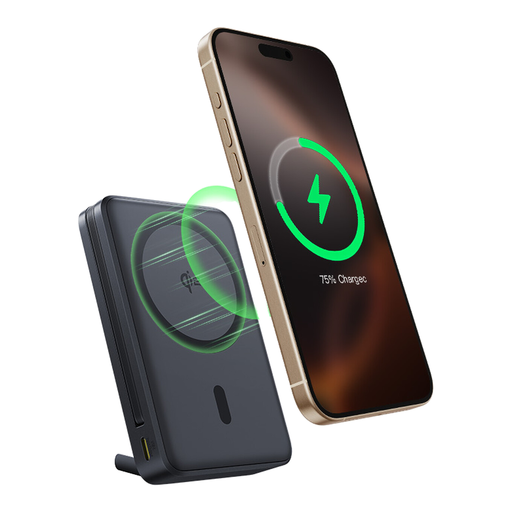
Baseus Nomos Qi2 power bank, 10,000 mAh, built-in USB-C cable and magnetic stand

Baseus Nomos Qi2, 10,000 mAh, built-in USB-C cable, magnetic stand, Interstellar Black

May suit you if a built-in USB-C cable would be handy for your journey; check that it matches your cycling computer’s charging cable.

The product name lists 10,000 mAh, Qi2, a built-in USB-C cable, a magnetic stand and 45 W.

View at Joybuy

Samsung Fast Charge Duo Power Bank, 25 W, USB-C, 10,000 mAh, beige

Samsung Fast Charge Duo Power Bank, 25 W, USB-C, 10,000 mAh, beige

May suit you if you want to charge another device as well as your cycling computer; check which cable and output your cycling computer needs.

The product name lists 10,000 mAh, USB-C and 25 W.

View at Joybuy
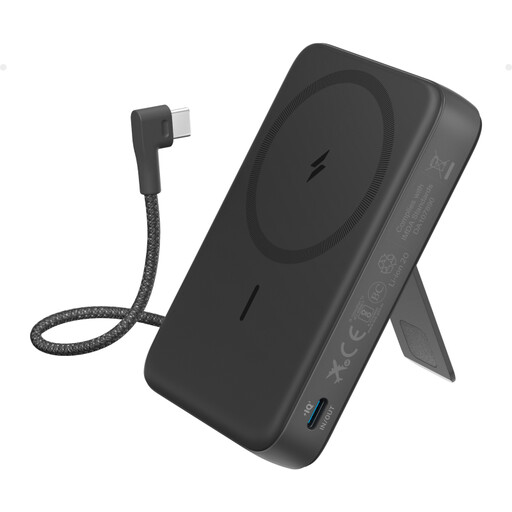
Anker 10K Magnetic Power Bank with built-in USB-C cable, black

Anker 10K Magnetic Power Bank with built-in USB-C cable, black

May suit you if a built-in USB-C cable saves you carrying a separate one; check that your cycling computer can charge with this cable.

The product name lists 10K, a built-in USB-C cable and a magnetic power bank.

View at Joybuy

Frequently asked questions

Will any USB-C power bank work with my Wahoo cycling computer?

No, not with every model and power source. Wahoo Fitness Support says early BOLT 2 units need a USB-A-to-USB-C cable with a suitable USB-A charger or a smart power source, such as a laptop. According to Wahoo, later BOLT 2 units and the ROAM 2 don’t have this limitation; check which version of the device you have.

Can I assume there’ll be a usable power socket on my train?

No. In July 2026, NS advised passengers to be prepared for situations where charging on the train isn’t possible and suggested a power bank as an alternative. Charge your power bank beforehand if you want to rely on being able to top up your device during your journey.

What should I watch out for while charging?

Check the cable and battery for damage, and keep the connection dry. Wahoo warns against moisture or dirt in the charging port; the fire service advises against using damaged cables and recommends placing chargers in an open space so heat can escape.

What are my rights if a power bank I bought online doesn’t work properly?

For an online purchase, ACM ConsuWijzer says you have a cancellation period that ends 14 days after delivery. You also have legal rights against the seller if a product doesn’t meet the expectations you were entitled to have. The statutory guarantee period isn’t automatically a fixed two years for every power bank.

Can I take my bike on an NS train if I charge my cycling computer during the journey?

If you’re taking your bike too, NS’s separate rules for bicycles apply; these are unrelated to using a power bank. For a standard bicycle, NS requires a Bicycle Off-Peak Day Ticket in addition to your travel ticket, and time restrictions apply on weekdays. Different times apply at weekends, on public holidays other than King’s Day, and in July and August; there must also be space available. Different conditions apply to international trains.
