What should you look for?
First check how your exact battery can be charged, then compare the connection and power supply. After that, weigh up charging time, power reserves and portability.
| Consideration |
What should you check? |
Who is this important for? |
| Compatibility |
Check the full camera and battery model numbers, the permitted charging method and the connection required by the camera or battery charger. |
I want to avoid choosing a power bank that doesn’t suit the way my battery charges. Around 36% of consumers put compatibility first. |
| Charging during a short stop |
Compare the charging protocol and power required by your model with the output available when using the number of ports you need. |
When I have a short wait, I want to know whether the combination of camera or charger, cable and power bank can deliver the required power. Around 29% of consumers prioritise suitable charging power during a short stop. |
| Usable power reserve |
Where available, compare Wh or output capacity on a like-for-like basis; nominal cell capacity isn’t the same as capacity at the USB output. |
I want to take enough usable power for the rest of my trip without overestimating how many times I can charge based on the mAh figure alone. Around 21% of consumers put power reserves at the top of their list. |
| Portability |
Compare the dimensions and weight with the power reserve you need; also check whether any included cable suits your charging method. |
If I want to keep my kit compact, I weigh the extra capacity against what I’m prepared to carry. Around 14% of consumers make portability their top priority. |
Power banks at Joybuy
This selection includes power banks for use with a suitable USB charging method for your camera battery. Check the connection and power requirements for your camera or battery charger.
 No image available
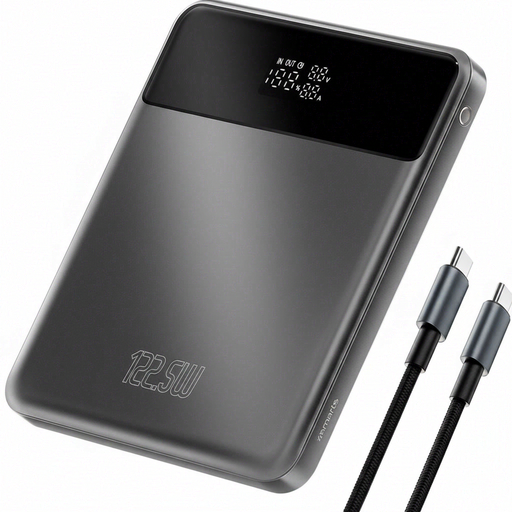
4smarts Enterprise Compact Power Bank, 122.5 W, 20000 mAh, Space Grey
Could suit a compatible USB charging method if you need extra power reserves; check that the output is suitable for your camera or battery charger.
The product information lists 20.000 mAh, Power Delivery and Qualcomm Quick Charge. The title lists 122.5 W.
The description also mentions an LCD display and overheating protection.
View at Joybuy
 No image available
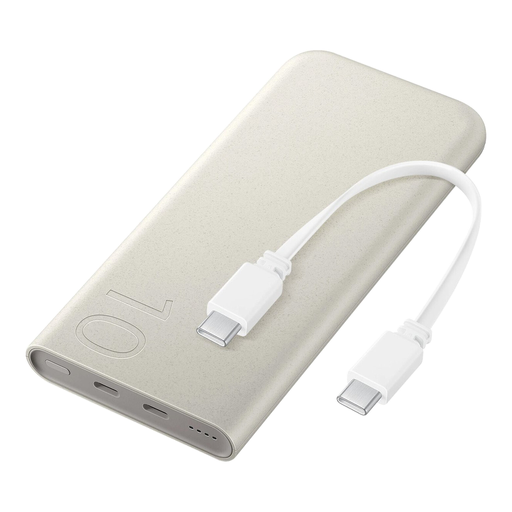
Samsung 25W Inductive Power Bank, 10,000 mAh, Beige
May be worth considering if your camera or battery charger uses a compatible USB-C charging method; check the connection and power requirements for your model.
The product information lists an integrated USB-C cable, up to 25 W wired charging and up to 7,5 W wireless charging.
Wireless charging is only relevant for other devices that support it.
View at Joybuy
 No image available
Samsung Power Bank Fast Charge 45W, 3x USB-C, 20000mAh, Beige
Could suit a camera or battery charger that uses a compatible USB-C and Power Delivery charging method; check the requirements for your exact model.
The title lists 20.000 mAh and three USB-C ports. The description mentions Power Delivery 3.0 and up to 45 W when one device is connected.
According to the product description, the output may vary when several devices are charging at once.
View at Joybuy
 No image available
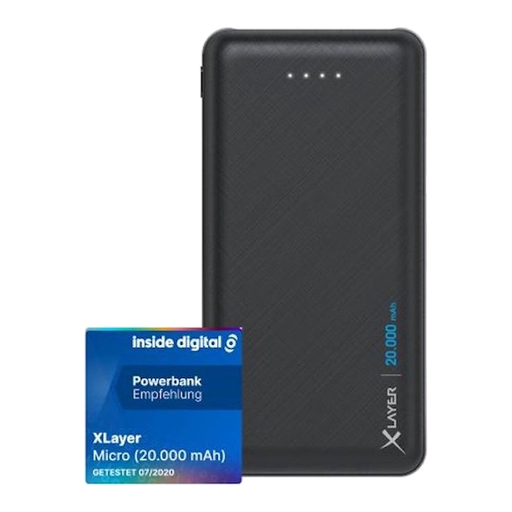
Xlayer Power Bank Micro Black Edition, 20000mAh, 2 × USB-A, Black
Could suit a charging method that uses a USB-A output and a compatible cable; this model’s USB-C connection is described as an input.
The title lists 20.000 mAh. The description specifies two USB-A outputs: 5 V/2,1 A and 5 V/1,0 A.
The product information lists a weight of 420 g and four LED indicators.
View at Joybuy
 No image available
Samsung Fast Charge Duo Power Bank, 25W, USB-C, 10,000 mAh, Beige
Can connect to a compatible USB-C charging method; check that the power supply is suitable for your camera or battery charger.
The description lists two USB-C ports, Power Delivery 3.0 and the ability to charge two devices at once. The title lists 25 W; the description gives a maximum of 9 V.
The product information lists a weight of 210 g and a charging-level indicator.
View at Joybuy
Frequently asked questions
Can I charge my camera battery while taking photos?
Don’t assume this is possible with every model. The Nikon Z8 manual says that the battery charges via the described connection while the camera is switched off; Sony explains that, in a different situation, the camera cannot be powered and charged at the same time by a mobile battery. Check your model’s manual.
How can I use a power bank safely in a terminal that may be damp?
Keep the battery, connections and cable dry, don’t use damaged cables, and leave charging equipment uncovered so heat can escape. The Netherlands Fire Service warns of risks from moisture, damage and short circuits; also follow the instructions provided by the terminal or transport operator.
What returns and warranty rights apply to an online purchase in the Netherlands?
For online consumer purchases, you generally have a statutory cooling-off period of up to 14 days after delivery, subject to exceptions. ACM ConsuWijzer explains that statutory guarantees also apply if a product doesn’t meet what you could reasonably expect from it during normal use; these are separate from any manufacturer’s warranty.
Does the USB-C rule mean that every USB-C power bank is suitable for a camera?
No. The Dutch government describes the USB-C rule for new devices covered by the regulation and sold on the Dutch market from 28 December 2024, including cameras. This doesn’t automatically make an existing camera or separate battery USB-C rechargeable, or guarantee a compatible charging protocol or power supply; check the manual for the exact model.
Where can I dispose of an old camera battery?
Take the battery to a designated collection point and don’t put it in household waste. The Dutch government lists batteries for photo and video cameras as batteries that can be disposed of this way.


