
Top up before you set off
You want to top up your camera at the ferry terminal and check in advance that the power bank’s output and cable suit your camera model.


First, check the charging instructions for your camera model and choose a power bank with a suitable output and cable. A compact model may be enough for a short wait; if you also want to charge other devices, weigh the extra capacity and ports against the size. Keep your camera and charging connection dry: for the Osmo Action 5 Pro, DJI specifies that the USB-C cover must be closed for the stated water protection.
You want to top up your camera at the ferry terminal and check in advance that the power bank’s output and cable suit your camera model.
You want to charge several devices during a longer journey, so you’re comparing capacity, the number of ports and the power available when charging multiple devices at once.
You want to know how to keep the charging connection dry and whether your camera supports external power while recording.
Start with your camera’s charging instructions, then work out how much power and how many connections you’ll need on the go. If you’re using it on the quay, take moisture into account.
| What to consider | What should you check? | Who is this important to? |
|---|---|---|
| Connection and charging compatibility | Compare your camera’s specified voltage and current with the power bank’s output and cable. | I want to know before setting off whether the connection suits my camera model. Around 36% of consumers put compatibility first. |
| Power for the rest of your journey | Compare the stated capacity with the devices you want to charge; the mAh figure doesn’t tell you directly how many times you can charge your camera. | If I also want to charge my camera or phone later in the trip, I look for extra capacity. Around 29% of consumers are mainly looking to carry more power. |
| Safe charging around moisture | Follow the instructions for the USB connection on your exact camera model and charge somewhere dry, using undamaged cables. | While waiting on the quay, I want to keep the charging connection dry and undamaged. Around 21% of consumers prioritise safe charging around moisture. |
| Easy to carry and connect | Compare the size, cable type and number of outputs. If you’re charging several devices, also check the power available in each usage mode. | If I want to travel light and avoid forgetting a separate cable, I look at the size and connection. Around 14% of consumers value simplicity and portability. |
Charging recommendations vary from camera to camera. The power available may also change when you connect several devices at once.
Compare the output modes with your camera’s manual. If you’re charging multiple devices at once, check how much power the power bank supplies in that situation.
The stated capacity isn’t the same as a measurement of how much energy reaches your camera under your charging conditions.
Use the capacity to compare models, but don’t expect a set number of charges without suitable measurements for the exact model.
For the Osmo Action 5 Pro, DJI describes closed covers as part of its stated water protection. An open connection may affect that protection.
Charge somewhere dry and follow the instructions for your camera model. Don’t use a damaged cable or power bank.
The BoostCharge BPB027hqBK has two USB-C ports, while the BPB021hqPK has an integrated USB-C cable. This lets you weigh up whether you’d prefer multiple connections or a built-in cable.
The Redoh 24879 has a stated capacity of 10,000 mAh, while the Avala 25883 is a 20,000 mAh option with multiple outputs.
According to Xtorm, the Fuel Series 5 FS5103U combines a capacity of 10,000 mAh with two USB-C ports and one USB-A port.
The Galaxy Battery Pack EB-U2510XUEGEU combines wired connections with wireless charging for compatible devices.
This selection of Joybuy products includes 10,000 mAh models for lighter travel and 20,000 mAh models if you’re looking for extra capacity. Check that the output and cable suit your camera for each model.
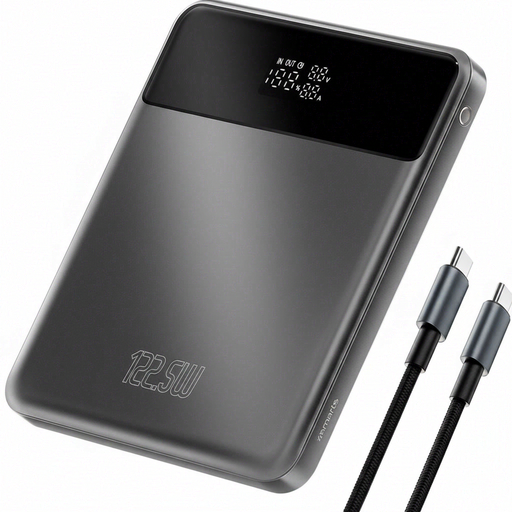 No image available
For anyone looking for extra capacity on the go. Check your camera’s charging requirements before choosing this power bank.
Stated capacity: 20,000 mAh. The product name specifies 122.5 W.
 No image available
An option if you want extra capacity and several USB-C connections. Check how much power is available when charging multiple devices at once.
The product information specifies 20,000 mAh, three USB-C ports, 45 W and an included USB-C cable.
 No image available
For anyone who wants to carry a lower-capacity option with an included USB-C cable. Check your camera’s connection.
The product information specifies 10,000 mAh and a weight of 210 g. Keep the power bank away from water, heat and direct sunlight.
No. Check the exact camera model and its charging instructions. GoPro Support lists 5 V/2 A for several recent models; DJI recommends a 5 V/2 A USB-C charger for its Osmo Action series when a charger isn’t included. That doesn’t mean other models have the same requirements.
It depends on the camera model. According to a GoPro employee’s reply in the GoPro Support Community, the HERO13 Black battery doesn’t charge while recording, even when the camera is connected. Check your camera’s manual before relying on this setup.
Find a dry spot and keep the charging connection out of the rain. For the Osmo Action 5 Pro, DJI specifies that the USB-C cover must be closed for the stated water protection. Brandweer Nederland advises against using damaged cables or counterfeit chargers.
In the Netherlands, the seller is your point of contact for your statutory guarantee. According to ACM ConsuWijzer, depending on the circumstances, a faulty product may be repaired or replaced free of charge, or you may be entitled to a refund. A manufacturer’s guarantee doesn’t replace these statutory rights.
No. The European Commission explains that the manufacturer is responsible for identifying the applicable EU requirements and affixing the required CE mark. There’s no central EU body that issues general approval or a certificate for this; the requirements depend on the product.