Start by considering the furthest viewing position and the space available: a compact screen only works if everyone can follow the actions in the film. Next, check how you’ll play your own film, and assess the light, viewing angle and speech clarity separately. A 4K label won’t determine any of these. The Consumentenbond recommends using viewing distance as a starting point, but the right size also depends on the room and the film.
Who is this buying guide for?
Workshop leader with viewers at the back
This workshop leader wants people in the furthest seats to be able to follow the film, while making sure the screen fits the available space. The Consumentenbond discusses viewing distance as a starting point for choosing a screen size.
Workshop leader with their own film file
This workshop leader wants to start the film without relying on a streaming app. So check the connection to your player or the file formats supported by the exact TV model.
Organiser of a bright group space
This organiser takes ambient light, viewers sitting off-centre and spoken explanations into account. The Consumentenbond lists picture and sound quality as separate considerations.
What should you consider when choosing?
First, measure the distance to the furthest viewing position and the space where you’ll put the TV. Then decide how you’ll play the film, and check that the picture and sound will work well in the workshop space.
| Consideration |
What to look for |
Who is this important for? |
| Visibility from the furthest seat |
Measure the viewing distance and available width, including the stand. Use the Consumentenbond’s viewing-distance table as a starting point, not a fixed size for every workshop. |
If I’m sitting at the back, I want to follow the actions in the film without the screen taking up too much space. Around 29% of consumers prioritise readability from the furthest viewing position. |
| Playing your own film |
Decide in advance whether you’ll use a laptop or another player, USB storage or an app. Check the connections and supported file formats for the exact model, and test the file with sound. |
If I’m using my own film file, I want to know before the workshop that my chosen playback method works. Around 23% of consumers prioritise being able to start the film reliably. |
| Light and viewing angle |
Assess the specific model from seats to the side and in similar lighting conditions. Compare brightness and reflections separately; screen technology alone won’t determine them. |
When viewers are spread out or light falls on the screen, I want to check that the details remain visible. Around 18% of consumers prioritise visibility in a group space. |
| Hearing spoken explanations |
Play a clip with dialogue from the furthest seat. If you’re using an external speaker, check which audio output the exact model has. |
If the film contains spoken instructions, I want people to be able to follow them from their seats. Around 18% of consumers prioritise speech clarity. |
| Placement and energy use |
Compare the dimensions, including the stand, with the space available. Check the model specifications or the European energy label for energy use; usage time and your electricity rate will also affect your costs. |
If the TV needs to go on a small piece of furniture, I also want to know how much room the stand needs and what regular use will mean. Around 12% of consumers prioritise placement and running costs. |
Common buying mistakes
-
Measuring only the screen diagonal
The diagonal doesn’t tell you how much space the TV takes up, including its stand, or whether people will be able to follow the film from the furthest seat.
Measure both the viewing distance and the available space in centimetres before choosing a model.
-
Expecting 4K to make every film look sharper
The picture you see also depends on the source film. LG states that the picture quality of upscaled content varies according to the source resolution.
Assess a clip from your own material rather than relying on the resolution label alone.
-
Assuming USB or a smart TV will play every file
A connection or streaming feature doesn’t confirm that a particular film file is supported. An external player connected via HDMI is an alternative, but you’ll also need a device and cable.
Decide in advance how you’ll play the film, and test the file with both picture and sound.
-
Confusing the manufacturer’s guarantee with your statutory rights
The Dutch government explains that statutory warranty in the Netherlands doesn’t have a fixed term; what you can reasonably expect from the product is what matters. Consumer protection rules apply to purchases made by consumers.
If you’re buying in a business name, check which purchase and warranty terms apply to your situation.
Brands to compare
Philips
According to Philips product information, the Philips 43PUS8001/12 is a 43-inch 4K LED TV with Titan OS and Ambilight. This combination is worth considering if the size and features suit your space.
- The product information lists a 43-inch screen, 4K, Titan OS and Ambilight.
- These features don’t replace checking the film source, viewing angle and speech clarity.
LG
The Dutch LG 43UA75006LA.AEU is a 43-inch UHD model with webOS. It’s worth comparing with a set-up that uses a separate player.
- LG lists 4K upscaling for this model.
- LG says the results of upscaled content depend on the source resolution. Also check the connections and stand dimensions of the exact version.
TCL
According to TCL, the P7K range includes a 43-inch QLED version, which is worth including in a comparison for a room with ambient light.
- TCL’s product information describes a 43-inch QLED version.
- TCL makes the colour and brightness claims, and notes that laboratory results may differ under other test conditions. This doesn’t guarantee visibility in a workshop.
Samsung
According to Samsung’s brand overview, its 43-inch models include ranges such as Crystal UHD and QLED. Compare the version you’re considering for size and connections.
- The brand overview includes several 43-inch model ranges to compare based on specific features.
- Features of one model don’t automatically apply to the whole range; the brand overview doesn’t test whether a TV is suitable for this workshop film.
TVs for a compact workshop set-up
This selection features compact TVs that could serve as screens for a workshop film, with HDMI as a possible connection for an external player. Compare the exact model with the space available and test your own film file.
 No image available
Philips 43PUS8001/12 43-inch F 4K TV
The 43-inch version gives you a specific size to compare with the distance to the furthest viewing position and the space available on your furniture.
4K; the product information lists three HDMI ports and two USB ports.
Joybuy
 No image available
43PUS7061/12 43-inch 4K LED TV
The 43-inch size gives you a starting point for assessing screen size and viewing distance together.
4K LED TV; the product information lists HDMI connections.
Joybuy
 No image available
Philips 43 PQS7801 4K QLED Smart TV
The 43-inch size and QLED label give you specific points to assess alongside viewing distance and ambient light.
4K QLED; the product information lists HDMI connections.
Joybuy
 No image available
CHiQ L32QM10E 32-inch QLED Smart TV with Google TV
The 32-inch version is a smaller option to weigh up against visibility from the furthest seat.
QLED; the product information lists HDMI.
Joybuy
 No image available
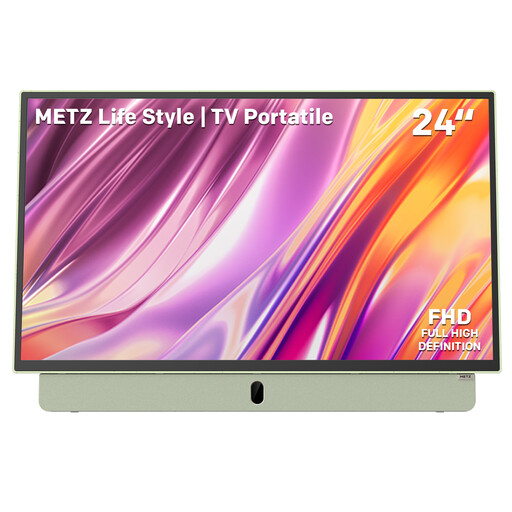
Metz MPE7200Z portable 24-inch TV
The portable version with a built-in battery is an option to compare if you need to move the TV around.
24 inches; the product information lists a matt anti-reflective screen, HDMI and USB.
Joybuy
Frequently asked questions
How can you tell whether 43 inches is big enough for the group?
Measure from the furthest viewing position and take the available space into account. For a viewing distance of 3 metres, the Consumentenbond gives a range of 43–55 inches. This distance is a starting point, not a guarantee that everyone will be able to see fine details in your film.
Can you play the workshop film directly from a USB stick?
A USB connection alone doesn’t guarantee that you can. Check the file formats supported by the exact model and test your own file with sound; a compatible external player connected via HDMI is an alternative.
What should you check before placing or wall-mounting the TV?
If you’re putting the TV on furniture, measure it with the stand attached. Before wall-mounting, check the mounting details and safety instructions for the exact TV and bracket; the screen diagonal doesn’t tell you how much width you’ll need on a piece of furniture.
Am I always entitled to exactly two years of statutory warranty in the Netherlands?
No. According to the Dutch government, statutory warranty in the Netherlands doesn’t have a fixed term; what you can reasonably expect from the product is what matters. Consumer protection rules apply to purchases made by consumers. If you’re buying the TV for a workshop in a business capacity, check the terms that apply to that purchase.


