What should you look for when choosing?
First, work out whether the projector itself needs to sit off-centre or whether only the seating is off-centre. Then measure the distance and desired image width, and assess the picture under your usual task lighting.
| What to consider |
What to look for when buying |
Who is this important for? |
| Positioning the image away from the screen’s centre line |
Measure the sideways offset and compare it with the horizontal lens-shift range of the exact model. Don’t treat keystone correction as the same type of adjustment. |
If I can’t put the projector in front of the screen, I want to know whether its optical shift will work for my setup. Around 36% of consumers cite off-centre positioning as their top consideration. |
| Seeing details with the task lighting on |
Test the film at your desired screen size with the task lighting on. Only compare brightness figures if their measurement basis is clear. |
When participants are working with clay at the same time, I want them to be able to follow the techniques on screen. Around 29% of consumers prioritise visibility in task lighting. |
| Image size for the room |
Measure the distance from the lens to the screen and decide how wide you want the image to be. Then check the model’s throw ratio, zoom and shift limits. |
In a shallow room or with a fixed table position, I want to know in advance whether the desired image size is achievable. Around 21% of consumers prioritise the available projection distance. |
| Setup and sound |
Check that your playback device can connect, and test the sound from the seating area. |
When the equipment is set up for different workshops, I want to be able to start the film and sound without any surprises. Around 14% of consumers prioritise quick setup and clear sound. |
Projector options at Joybuy
These models are suited to film playback and adjusting the image setup. If the projector itself needs to sit away from the screen’s centre line, check separately whether the exact model offers a suitable horizontal lens-shift range.
 No image available
XGIMI Vibe One, Full HD 1080p, Google TV, JBL audio, built-in battery, screen with stand, Match Night EU Edition
The product information lists autofocus and automatic keystone correction for adjusting the image setup.
Full HD 1080p; 250 ISO lumens; built-in JBL audio; built-in battery; screen with stand included.
View at Joybuy
 No image available
Yaber L2, native 1080p, Google TV, dual 5W speakers
The product information lists autofocus and automatic keystone correction for adjusting the image setup.
520 ISO lumens; short-throw ratio 1,17:1; native 1080p; dual 5W speakers; compatible with a flexible stand.
View at Joybuy
 No image available
XGODY N7 Cine Smart Projector, native 1080p
The product information lists autofocus, automatic keystone correction and automatic screen fitting to align the image.
1.000 ANSI lumens; native 1080p; throw ratio 1,1:1; built-in speakers; gimbal with 90° rotation.
View at Joybuy
 No image available
Blackview Smart Projector PV1000 Max Grey, native 1080p
The product information lists a rotating design and autofocus for different projection setups.
1.000 ANSI lumens; native 1080p; 360° rotation; WiFi 5; Bluetooth.
View at Joybuy
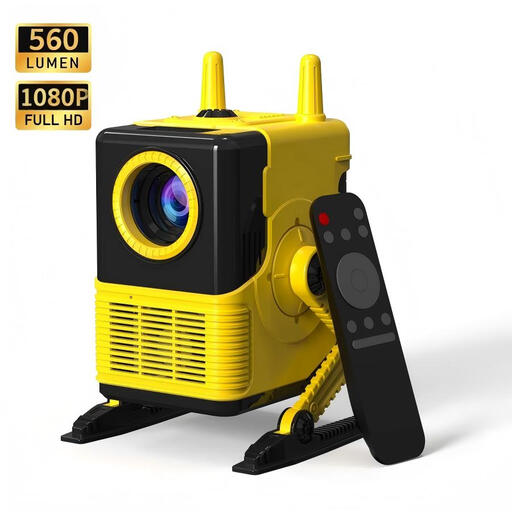 No image available
XBJ H8 Portable LCD Home Projector, 1080p support
The product information lists 4-point keystone correction for adjusting the image shape.
560 lumens; 1080p support; HDMI connection; dual-band Wi-Fi; Bluetooth 5.0.
View at Joybuy
Frequently asked questions
Do I need horizontal lens shift if the participants are sitting off-centre?
Not just because of the seating. Horizontal lens shift moves the projected image when the projector itself can’t sit on the desired screen centre line; separately check whether participants sitting to the side will be able to see the screen clearly.
Can I angle the projector and use automatic keystone correction?
You can, within the limits of the model, but test the picture with the film and screen size you plan to use. BenQ describes keystone as digital correction and warns that stronger correction can affect the edges and sharpness, among other things.
How do I check the projector setup before the workshop?
Measure the distance from the lens to the screen and the sideways offset, then compare them with the exact model’s throw ratio and lens-shift range. Next, play the film with your usual task lighting and sound; lens-shift ranges vary by model.
Can I screen any film during a workshop?
No. Owning a film or private copy doesn’t automatically give you permission to screen copyrighted material. The Government of the Netherlands states that you need the creator’s permission to use films made by others; check the rights for the specific film and screening.
What can I do if the projector develops a fault soon after purchase?
For a consumer purchase in the Netherlands, the seller must, according to ACM ConsuWijzer, remedy a product free of charge if it breaks sooner than expected under normal use and doesn’t meet what you were entitled to expect. For online consumer purchases, you’re also entitled to a 14-day cooling-off period in many cases; the precise terms depend on the purchase.


