
Vandaag of morgen in huis

Kwaliteit gegarandeerd

Welkomstaanbiedingen ontgrendelen: GRATIS bezorging | Tot 80% korting | Gratis 30 dagen JoyPlus-proefperiode
Download de app
An older car does not necessarily need a new stereo or built-in infotainment system. With a portable CarPlay screen for your car, you can add features such as navigation, hands-free calling and music streaming. However, many models look similar at first glance. The main differences often come down to connectivity, audio output, camera features and how the screen is mounted.
As a Joybuy Product Recommendation Officer, I filter the most important specifications and potential pitfalls so you can compare products more effectively.
A wireless Apple CarPlay screen typically connects to your iPhone via Bluetooth and Wi-Fi. Android Auto works in a similar way. The initial pairing usually has to be completed manually. Automatic connection may be available afterwards, but this depends on the phone, software version and specific model.
Before purchasing, check the following:
A 10.26- or 11.4-inch screen is easy to read, but it also takes up space on the dashboard. A poorly positioned mount can restrict visibility or come loose when temperatures change. Position the screen so that your view of the road, mirrors and instruments remains unobstructed.
Pay attention to:
A universal CarPlay display is generally designed for vehicles with a 12V or 24V connection. Still, check the product information, especially if you drive a motorhome, van or truck.
A model advertised with a “4K dashcam” may sound appealing, but also check whether a memory card is included, how loop recording works and whether the reversing camera is actually part of the package. With some models, the camera must be purchased separately.
A car reversing camera can assist with manoeuvring, but it does not replace mirrors or attentive driving. Also check:
For everyday use, screens measuring around 10.26 inches are popular. A resolution of 1600 × 600 pixels is sufficient for maps, menus and camera footage, while some larger models offer 1920 × 720 pixels.
A larger screen is not automatically more practical. Focus on the combination of:
A touchscreen car display with automatic screen protection or dimming can be more comfortable during evening drives.
Not every older car supports Bluetooth audio. That is why portable infotainment systems often offer several options:
AUX generally provides a direct wired connection, while Bluetooth keeps the dashboard free of cables. With an FM transmitter, local radio stations or interference can affect playback. Also check whether navigation instructions interrupt the music or mix with it. Some manufacturers list audio mixing as a feature; treat this as a product specification, not as a guaranteed experience in every car.
Most models draw power through the 12V socket. Some support a range of 12–24V. A built-in battery can help with quick start-up, but check how long the screen operates without the power cable.
With a dashcam, you should also consider:
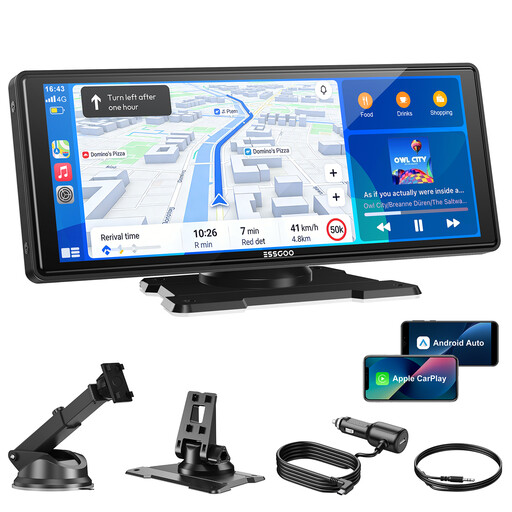
Why it is a good fit: A practical choice for drivers who want to add navigation, music and hands-free functionality to an older vehicle without replacing the factory stereo.
The product information lists a 10.26-inch screen, 12V–24V power supply, wireless CarPlay and Android Auto. According to the description, a reversing camera is available separately, allowing you to factor this into your budget in advance.
1600 × 600 pixels, Bluetooth 5.3, dual-band Wi-Fi, AUX, FM transmitter and OTA updates, according to the product description.
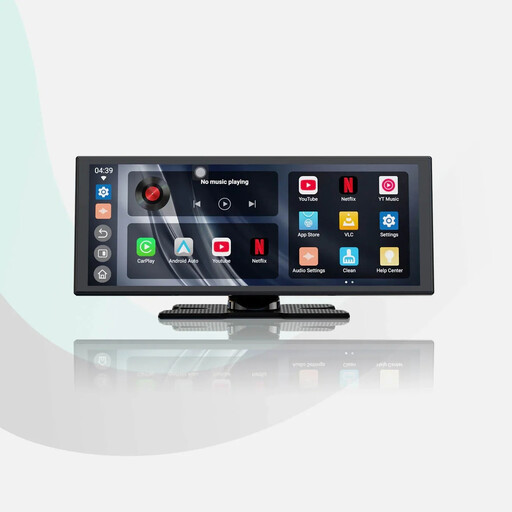
Why it is a good fit: Ideal for anyone who wants to view maps, menus and camera footage on a spacious portable CarPlay screen.
The product listing specifies a resolution of 1920 × 720 pixels and includes a 1080p rear camera. However, check in advance whether the 11.4-inch housing can be mounted securely in your car.
Wireless CarPlay and Android Auto, built-in apps, dual Wi-Fi and dual Bluetooth, according to the product description.
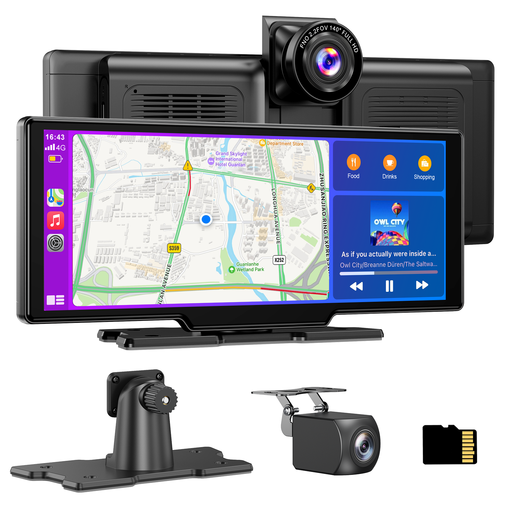
Why it is a good fit: For drivers who want to combine a wireless CarPlay screen with journey recording and a rear-facing camera.
The product description lists an included 64GB TF card, loop recording and a 1080p waterproof rear camera. Check local rules regarding dashcam use and privacy before sharing recordings.
4K front camera, 1080p rear camera, 140° viewing angle, wireless CarPlay and Android Auto, plus Bluetooth, AUX and FM audio.
Browse our current range of car screens and compare screen size, connections, cameras and compatibility.
A plug-and-play CarPlay screen is usually mounted on the dashboard or windscreen and connected to the cigarette lighter socket. You then pair your phone via Bluetooth and Wi-Fi. For audio, you can choose Bluetooth, AUX, FM or the built-in speaker.
A reversing camera requires additional work. Route the cable neatly to the rear of the car and secure the camera firmly. Test the image before driving. While driving, use hands-free functions only and do not operate the screen if doing so distracts you from the road.
Many models are designed for cars with a 12V connection and are described as universal. You should also check smartphone compatibility, available audio ports and the amount of dashboard space. “Universal” does not mean that every mounting or audio solution will work in the same way in every car.
When using Apple CarPlay or Android Auto, navigation is generally displayed through a smartphone app. The screen shows the route, while the phone usually provides the map data and internet connection. Some models also have their own GPS module; check this for each product.
In addition to the purchase price, you may incur extra costs for a memory card, separate reversing camera, AUX adapter or replacement power cable. Streaming services and mobile data are separate from the screen itself. So do not consider only the screen size; take into account the complete installation and all the accessories you need.
