
Vandaag of morgen in huis

Kwaliteit gegarandeerd

Welkomstaanbiedingen ontgrendelen: GRATIS bezorging | Tot 80% korting | Gratis 30 dagen JoyPlus-proefperiode
Download de app
A portable CarPlay screen can add navigation, hands-free calling and music to an older car without replacing the original stereo. However, not every screen is equally easy to use in practice. A large display, wireless connection or built-in camera may sound appealing, but the details determine whether the device is right for your vehicle.
A large screen is easy to read, but it also takes up more space on the dashboard. Check its dimensions, mounting method and adjustability. A windscreen mount must not unnecessarily obstruct your view. With a 10.26- or 11.3-inch screen, a sturdy dashboard mount or suction-cup mount is particularly important.
With wireless Apple CarPlay and an Android Auto screen, your phone and the car screen usually connect via Bluetooth and Wi-Fi. The initial pairing may still involve a few steps. Check that your smartphone’s software version is supported, too. For example, the product descriptions for the ESSGOO models mentioned here specify support for iOS and Android from particular versions. Check the product page before you buy.
The audio connection is also worth considering. A screen may play sound through its built-in speaker, Bluetooth, an FM transmitter or AUX. Not every car handles these options in the same way. AUX or Bluetooth may provide a clearer connection than an FM signal in many situations, but the available connection varies from vehicle to vehicle.
Look out for the difference between:
According to the product description, the ESSGOO 10.26-inch version comes with a front camera, a 1080p rear camera and a 64GB TF card. With another ESSGOO model, the reversing camera must be bought separately. This directly affects the total cost and installation time.
A universal car screen won’t automatically work with every phone or audio system. Check at least the following:
A plug-and-play car screen is especially handy if you don’t want to alter any wiring. If a rear camera is included, you’ll still need to route the cable to the back of the car.
An HD car touchscreen should be not only large, but bright enough to use in daylight. Check the resolution and whether you can adjust the brightness manually. For example, the ESSGOO screens in this selection have a resolution of 1600 × 600 pixels, while the 11.3-inch model lists a resolution of 1920 × 720 pixels.
Night mode or automatic brightness control can be useful in the dark. These features won’t automatically prevent distraction, though: position the screen so you can glance at the navigation without taking your attention away from the road for too long.
The following features are worth checking for a dash cam:
The casing is particularly important if you’re using the device on a motorcycle. According to the product description, the ESSGOO 5-inch motorcycle screen has an IP67 rating. This rating indicates protection against dust and water under certain test conditions; it doesn’t mean that the device can be used without restrictions in prolonged, heavy rain. Check the operating temperature range, mounting and cable protection as well.
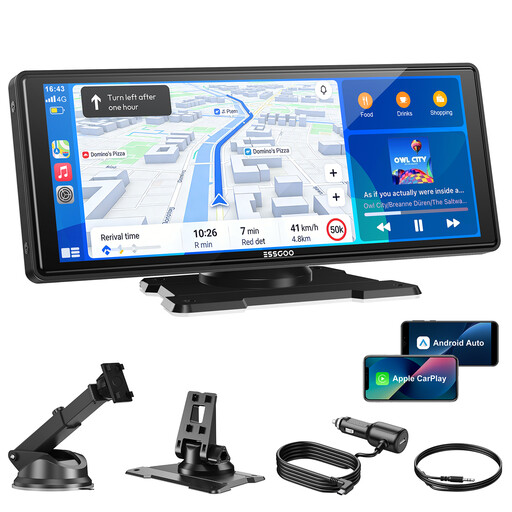
Why it suits this type of user: This model is designed to provide a quick upgrade with wireless CarPlay, Android Auto, navigation and several audio options. It installs using the supplied mount and power cable.
The specifications list four audio outputs and a 1600 × 600 screen. Check in advance which option works with your car.
10.26-inch touchscreen, Bluetooth 5.3, dual-band Wi-Fi, AUX and FM transmitter; suitable for vehicles with a 12–24V connection.
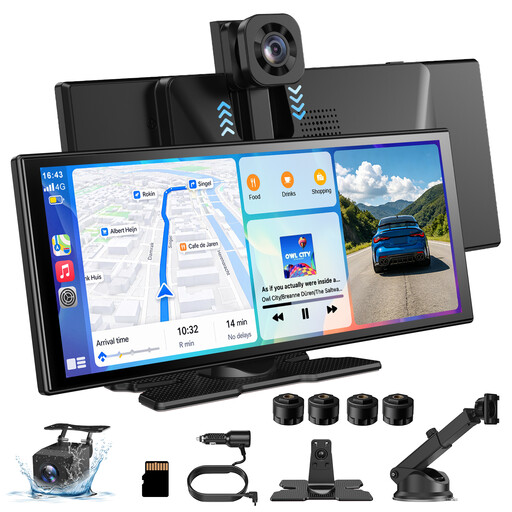
Why it suits this type of user: The combination of a larger display, a 4K front camera and a 1080p rear camera is ideal for drivers who want navigation and recording features in one system.
The product description mentions loop recording and a button for locking footage. Check the storage and camera connections before use.
11.3-inch screen with 1920 × 720 pixels, 360° rotatable front camera, wireless CarPlay and Android Auto.
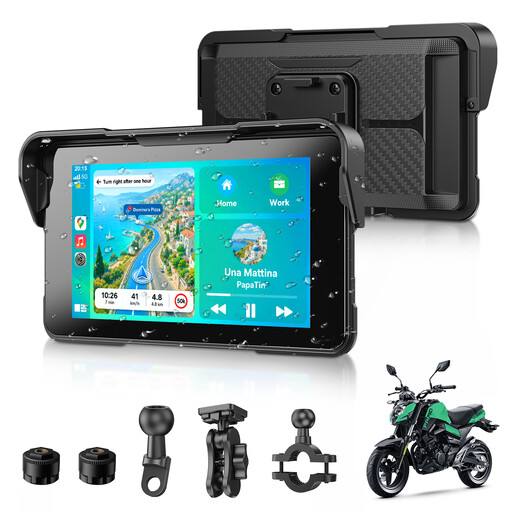
Why it suits this type of user: This compact CarPlay screen for motorcycles is designed for riders who want to use navigation, music and phone calls from the handlebars without fitting a large car screen.
The stated IP67 rating and removable mount make it suitable for outdoor use. Check that the mount and cable routing work for your motorcycle.
5-inch HD display, wireless CarPlay and Android Auto, Bluetooth 5.3, GPS navigation and TPMS support.
We’ve put together a complete, up-to-date list of products that meet these strict selection criteria and the applicable European safety regulations.
A portable screen usually works as follows:
Don’t use video apps while driving. Features such as YouTube or streaming are intended for when the vehicle is stationary or for passengers, according to the product descriptions.
Not necessarily. Check the power supply, available audio connection and compatibility with your iPhone or Android phone. A model with 12–24V support will suit many vehicles, but the mounting and sound output can vary from car to car.
Usually not for everyday use, provided the screen supports wireless CarPlay. It will still need a power cable. When pairing it for the first time, switch on Bluetooth and Wi-Fi and follow the screen’s instructions.
Its lifespan depends on how it’s mounted, heat, moisture, strain on the cables and how often it’s used. Don’t leave the screen in direct sunlight for long periods, keep the ventilation clear and regularly check that the mount and connections are secure. Check the warranty terms for the specific product, too.
