Choose a portable monitor if you regularly move your screen between rooms and mainly want to view drawings or references alongside your laptop. A larger, fixed display is a better fit if assessing detail or colour at one workstation is your priority. Check your laptop’s video connection, the space available and, for colour-critical work, the supported colour gamut and calibration options. The specifications quoted are provided by manufacturers and are not an independent performance comparison.
Who are these displays for?
Designer who works between rooms
You review drawings in different locations and want to set up an extra screen quickly. Portability and a reliable connection to your laptop matter more to you than a large screen size; Lenovo lists these features for the ThinkVision M14d.
Reviewer of renders and materials
You usually view visual details or colours at one workstation and want to be able to consider a suitable colour mode or hardware calibration. The colour and calibration information quoted comes from BenQ, ASUS and EIZO.
Designer with a changing desk setup
You usually work at a desk but regularly change the screen position or reconnect your laptop. An adjustable setup or hub may be useful; check that it suits your laptop and workspace. LG and Dell describe these options for the models mentioned.
What should you look for when choosing?
Portable monitor
A good fit if: you regularly carry the screen around and want a second display for drawings or references. Lenovo lists the ThinkVision M14d as weighing 600 g, with a 14-inch screen and 2240 × 1400 pixels.
Keep in mind: the smaller screen offers less physical workspace for large drawings and multiple windows.
Fixed design monitor
A good fit if: you mainly assess details in drawings, material images or renders in one place. BenQ and ASUS describe the models mentioned as 27-inch 4K monitors with colour settings for design work.
Keep in mind: a fixed display is less convenient to move between rooms. Colour coverage alone doesn’t tell you how colours will appear across your whole setup.
| What to consider |
What to look for |
Who should give this extra thought? |
| Moving between rooms |
Compare dimensions and weight; check that your laptop outputs video through the USB-C port you plan to use. |
If I want to view drawings in different places, I need to be able to carry the extra screen easily. Around 36% of consumers say portability is their top priority. |
| Assessing colours |
Check the colour space of your files, the available colour modes and whether your workflow requires calibration. |
For renders and material images, I want to assess colours within the colour space of my files. Around 29% of consumers put colour assessment first. |
| Detail and workspace |
Compare the screen size and resolution with the available space, and check that text and dimensions are readable after adjusting the display scaling. |
If I want to view details in drawings or several design windows, the available screen space matters a lot. Around 21% of consumers say drawing space is their top priority. |
| Connecting and positioning |
Check USB-C video compatibility, the required charging power, cables and the space available on your desk for a clamp, if needed. |
If I often reconnect my laptop or adjust the screen at a fixed workstation, I want the setup to suit that. Around 14% of consumers say quick connection or positioning is their top priority. |
Common buying mistakes
-
Assuming wide colour coverage proves colour accuracy
Listed colour spaces and calibration options apply to the specific model. On their own, they don’t tell you how a file will appear on your screen setup.
First choose the colour space your work requires, then check for a suitable colour mode and any calibration options.
Setting up and calibrating a workflow may take extra time or resources.
-
Assuming USB-C will automatically work with a single cable
The laptop port you use must support the required video signal. The monitor’s charging power must also meet your laptop’s needs.
Check the laptop port, video mode, cable and required charging power as one complete setup.
Depending on the combination, you may need a different cable, an adapter or a separate power supply.
-
Confusing an adjustable fixed monitor with a portable display
The adjustable setup of the LG 27UK580-B doesn’t make it suitable for frequent carrying. LG lists this model as weighing 9,0 kg with the stand; Lenovo lists the portable ThinkVision M14d at 600 g.
Decide whether you’ll actually carry the screen between rooms or simply adjust its position within one workspace.
Brands to consider
Lenovo
Lenovo describes the ThinkVision M14d as a portable 14-inch monitor for use as an extra screen.
- Lenovo lists a weight of 600 g, a resolution of 2240 × 1400 pixels and two USB-C ports with DisplayPort Alt Mode.
- A 14-inch screen offers less physical workspace than a 27-inch display; check that your laptop port outputs video.
BenQ
BenQ positions the PD2705U as a fixed 27-inch 4K monitor with colour modes for design work.
- BenQ lists 99% coverage of sRGB and Rec.709, as well as 65 W USB-C power delivery.
- The stated colour coverage is manufacturer information and doesn’t, on its own, prove how colours will appear in your workflow.
ASUS
ASUS describes the ProArt PA279CRV as a fixed 27-inch 4K monitor for users who also need Adobe RGB or DCI-P3 colour reproduction.
- For this model, ASUS lists 99% Adobe RGB, 99% DCI-P3 and 96 W USB-C power delivery.
- These figures apply to this model. They aren’t an independent comparison or proof that every ProArt monitor has the same features.
Dell
Dell describes the Pro Plus P2725QE as a fixed 27-inch 4K monitor with USB-C hub features.
- Dell lists 90 W USB-C power delivery and an Ethernet port.
- Check compatibility with your laptop and cable; hub features alone don’t show that a monitor is suitable for colour-critical work.
LG
LG describes the 27UK580-B as a fixed 27-inch 4K monitor with an adjustable Ergo setup.
- According to LG, the screen position can be adjusted in several ways.
- According to LG, this model doesn’t have USB-C; the specifications also don’t list hardware calibration.
EIZO
EIZO describes the ColorEdge CS2740 as a fixed 27-inch 4K monitor for colour-focused workflows.
- EIZO lists a wide colour gamut and hardware calibration with ColorNavigator.
- These features are most relevant when your workflow suits the calibration method; the specifications are provided by the manufacturer.
Joybuy product picks
This selection includes portable monitors to carry between rooms and fixed displays offering more workspace for use in one place. Check the product information and relevant documentation for the specific model; the Dutch government outlines obligations relating to applicable European safety rules, CE marking and an EU declaration of conformity.
 Image unavailable
TECLAST V16H 16-inch portable monitor
A good choice if you want to move an extra screen between rooms and set it up temporarily.
The title lists an FHD IPS screen with a 16:10 aspect ratio and 144 Hz, two USB-C ports, Mini HDMI and a built-in stand. The 16-inch screen offers less workspace than a large fixed display for extensive drawings.
View at Joybuy
 Image unavailable
UPERFECT 15,6-inch touchscreen monitor
A good fit if you’re looking for a portable second screen with touchscreen controls.
The product title lists 1080p, USB-C, Mini HDMI and VESA mounting. The product description mentions a protective cover that doubles as an adjustable stand. Check that the connection and setup suit your laptop.
View at Joybuy
 Image unavailable
Philips 27E1N1800AE/00 27-inch 4K UHD IPS monitor
A good choice if you want more screen space for drawing details at a fixed workstation.
The product information lists 3840 × 2160 pixels, 60 Hz, 4 ms, HDMI and DisplayPort. The stand is height-adjustable; the stated weight is 4 kg, which may make frequent moving less practical.
View at Joybuy
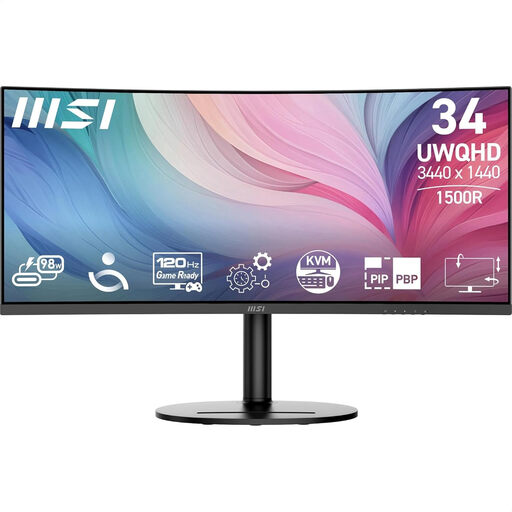 Image unavailable
MSI Modern MD342CQP 34-inch ultrawide monitor
A good fit if you want a wide workspace for design and productivity in one place.
The product information lists 3440 × 1440 pixels, USB-C and a height-adjustable, swivelling and tilting setup. The stated weight is 8,05 kg, so this screen is less practical to carry between rooms frequently.
View at Joybuy
 Image unavailable
Acer PM161QB1 portable 15,6-inch monitor
A good choice if you’re looking for a portable screen you can set up in different locations.
The product information lists an IPS panel with 1920 × 1080 pixels, HDMI and USB-C, a weight of 0,75 kg and a stand. The product description says that a charger isn’t included as standard; the 15,6-inch screen offers less workspace than a large fixed display.
View at Joybuy
Frequently asked questions
Can you connect a portable monitor or hub monitor with a single USB-C cable?
Only if the laptop port supports the required video signal and the cable is suitable. Lenovo lists DisplayPort Alt Mode for the ThinkVision M14d; check your laptop and cable specifications before relying on a single cable.
How should you set up your screen again after moving to another room?
The Dutch Arboportaal advises placing the screen directly in front of you, with the top just below eye level. Readjust your chair, work surface and screen position if the new space is laid out differently.
What if a monitor bought online isn’t suitable or breaks too soon?
For online purchases, ACM ConsuWijzer says you generally have a statutory cooling-off period of up to 14 days after delivery; check the applicable exceptions and returns policy. If a product doesn’t meet what you could reasonably expect under normal use, ACM ConsuWijzer says the seller is responsible under the statutory guarantee. This isn’t the same as a fixed manufacturer’s warranty period.
Which Dutch rules apply to an electrical monitor?
The Dutch government outlines obligations relating to applicable European safety rules, CE marking and an EU declaration of conformity. According to this information, the manufacturer must apply the CE marking and draw up an EU declaration of conformity after assessing the product against the applicable requirements. For employees who work at a screen for more than two hours a day, the Arboportaal also lists specific requirements for the workstation; these employment-related requirements don’t automatically apply to every private buyer.


